
本文目录 29 个章节
Build - Unreal Build System
# Build - Unreal Build System
创建时间:2021/12/17 1:08
- Build Engine from Source
- Build Project 的步骤与原理
- Build Project 工具与自动化
- UnrealBuildTool (UBT)
- UnrealHeaderTool (UHT)
- AutomationTool
- 功能
- How AT Works
- 使用方法
- GenerateProjectFiles
- BuildGraph
- Unreal CI 实践
- Windows Build Android
- GenerateProjFiles
- Compile Codes
- BuildCook
- RunUAT
- Mac Build iOS
- GenerateProjFiles
- Xcode Build Engine, Build Project
- 证书与签名问题
- RunUAT
- Windows Remote Mac Build iOS
- 错误排坑
- Android SDK问题
- 引用丢失问题
- Adding Adaptive Icons to a UE4 project for Android
- 丢失dSYM
- Windows Build Android
- Ref
Build Engine from Source
Build Project 的步骤与原理
整体的打包流程如下:Build->Cook->Stage->Pakage->Archive
Build: This stage compiles the executeables for the selected platform.
Cook: This stage cooks content by executing the Editor in a special mode.
Stage: This stage copies the executables and content to a staging area; a standalone directory outside of the development directory. build cook
(run )
package
platform
task
Build Project 工具与自动化
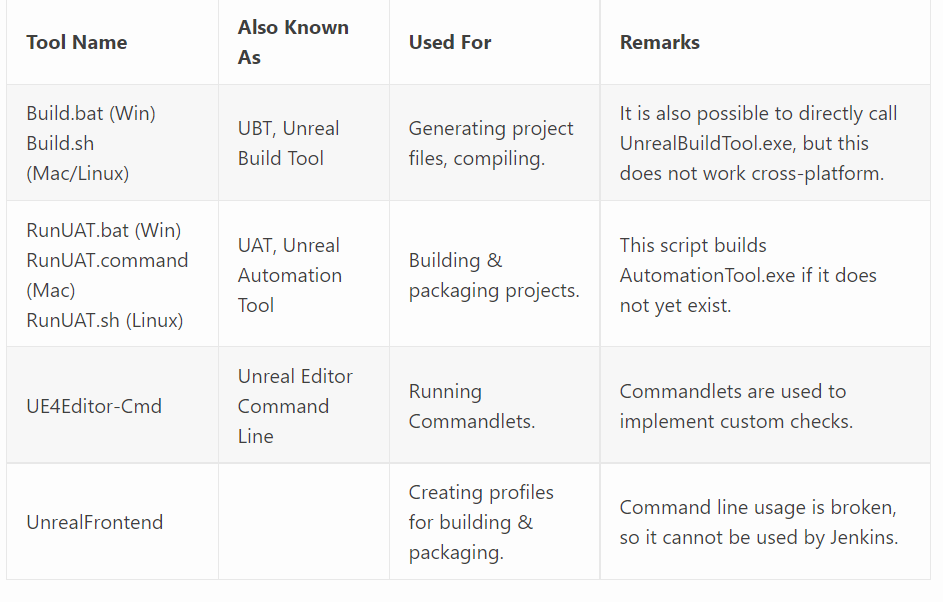
via. https://www.maygames.net/2020/07/03/cross-platform-build-automation-for-ue4-projects-with-jenkins/
UnrealBuildTool (UBT)
a custom tool that manages the process of building Unreal Engine 4 (UE4) source code across a variety of build configurations.
Unreal Build Tool is a console application that does a lot of magic like generating project files, invoking unreal header tool, invoking the compiler and linker for different platforms and flavours of build.
UnrealHeaderTool (UHT)
a custom parsing and code-generation tool that supports the UObject system
AutomationTool
功能
building cooking running games running automation tests scripting other operations to be executed on our build farm
How AT Works
finds all automation projects (saved as Visual Studio C# projects with an .Automation.csproj extension), compiles them, and then uses reflection to find the appropriate command to be executed.
使用方法
RunUAT.bat/.sh: Unreal提供了bat/shell脚本,来调用UnreaAutomationTool.exe。
- 根据情况判断是否要编译UnreaAutomationTool.exe本身
- 启动UnreaAutomationTool.exe
位置 Windows: Engine/Build/BatchFiles/RunUAT.bat Mac: Engine/Build/BatchFiles/RunUAT.sh
public class AGenericClass<T> where T : IComparable<T> { }
参数解释:https://zhuanlan.zhihu.com/p/41931214
GenerateProjectFiles
当使用Unreal Source时,there are no Visual Studio (VS) or Xcode project files included for compiling and running the engine or example games.
generates your Visual Studio solution and projects for Windows
the first step is building the build tool. This happens invoking MSBuild on Source\Programs\UnrealBuildTool\UnrealBuiltTool.csproj.
如果安装预编译好的Unreal引擎,那么是没有GenerateProjectFiles.bat脚本的。可以右键uproject文件,点击Generate Visual Studio Project Files来生成Project文件,也可以直接使用Unreal Build Tool来实现
public class AGenericClass<T> where T : IComparable<T> { }
BuildGraph
BuildGraph integrates with UnrealBuildTool, AutomationTool, and the editor, and can be extended and customized for your projects.
More: https://docs.unrealengine.com/4.27/en-US/ProductionPipelines/BuildTools/AutomationTool/BuildGraph/
Unreal CI 实践
注意:Unreal的配置保存在Config目录下的 XXX.ini 文件当中,这个文件配置好之后,需要进版本管理的,否则在更新工程后会出现配置失效的问题。尤其是iOS打包时配置的证书问题。
UE4游戏开发基础命令【部署环境、编译引擎、构建代码】:https://www.cnblogs.com/kekec/p/8684068.html
Windows Build Android
GenerateProjFiles
UnrealBuildTool.exe -projectfiles -project="%UPROJECT_PATH%" -game -rocket -progress
Compile Codes
可以用MSBuild进行编译: "%MSBUILD_EXE%" "%PROJ_VS_SLN%" /t:build /p:Platform=%PLATFORM%;verbosity=diagnostic
BuildCook
public class AGenericClass<T> where T : IComparable<T> { }
RunUAT
RunUAT可以把编译到出包的工作全部自动化地执行,一键出包,只需要配置参数,来决定开启哪些功能、执行哪些步骤就可以了。
https://blog.csdn.net/zhangxiaofan666/article/details/79567017
public class AGenericClass<T> where T : IComparable<T> { }
如果不执行某个阶段,把某个参数去掉就可以了。
Mac Build iOS
GenerateProjFiles
public class AGenericClass<T> where T : IComparable<T> { }
Xcode Build Engine, Build Project
public class AGenericClass<T> where T : IComparable<T> { }
证书与签名问题
注意:配置要进版本管理。
理论上,只要在Config当中,配置好BundlID、证书的名称等信息,使用UAT就可以直接打包了,工具会自动查找、使用证书来进行签名。只需要 unlock keychain就可以了
public class AGenericClass<T> where T : IComparable<T> { }
签名失败:
- Code Signing Error: https://medium.com/@ceyhunkeklik/how-to-fix-ios-application-code-signing-error-4818bd331327
- https://developer.apple.com/forums/thread/669328
- https://stackoverflow.com/questions/24023639/xcode-command-usr-bin-codesign-failed-with-exit-code-1-errsecinternalcomponen
自动导入证书:https://zhuanlan.zhihu.com/p/400261513 说明:证书是自动导入到Keychain里面,UE在使用UAT打包的时候,会自动在里面找Keychain,所以UE配置证书,只是配一个证书的名字。上文中,导入证书是向Keychain当中导入。
RunUAT
public class AGenericClass<T> where T : IComparable<T> { }
Windows Remote Mac Build iOS
手动打包教程: https://www.jianshu.com/p/04188aa411b4 https://blog.csdn.net/u011047958/article/details/78300086
使用IPhonePackager.exe,自动导入证书:https://ue5wiki.com/wiki/32489/
错误排坑
Android SDK问题
Installed Build Tools revision 31.0.0 is corrupted. Remove and install again using the SDK Manager.
The main problem is the two files missing in SDK build tool 31 that are: dx.bat dx.jar
The solution is that these files are named d8 in the file location so changing their name to dx will solve the error.
引用丢失问题
问题:删除插件,打包失败 。 原因:场景还在引用这个插件。右键场景->Reference Viewer,可见场景对插件中组件的引用关系。
Unreal比较奇怪的一点是,如果场景对Actor有引用,但是Actor资源被删除了,World Outliner里面是看不到的。
解决方法:找到引用这个资源的场景,啥都不做,save一下,None引用就没有了。
Adding Adaptive Icons to a UE4 project for Android
https://www.unrealengine.com/en-US/tech-blog/adding-adaptive-icons-to-a-ue4-project-for-android
丢失dSYM
-SkipBuildEditor: 不编译编辑器
Ref
https://ericlemes.com/2018/11/23/understanding-unreal-build-tool/