
本文目录 34 个章节
Unity Native Programming【C#与C++互相调用】
创建时间:2020/12/5 23:24
Unity Native Programming【C与C++互相调用】
- Unity Native Programming【C#与C++互相调用】
- 原理
- 相关知识
- 库、动态库和静态库(.dll,.so,.lib,.a)
- 链接种类
- 不同平台的命名
- ABI(Application binary interface)
- ABIs包含的一些细节
- Android ABIs
- Generate code for a specific ABI
- 存储类型说明符(Storage Class Specifiers)
- EXTERN
- REGISTER
- __declspec
- dllexport, dllimport
- 特殊用法——提供者和使用者共用同一个头文件
- 更详细的资料
- 库、动态库和静态库(.dll,.so,.lib,.a)
- Unity中C#调用C++:PInvoke
- Unity Plugins
- Managed plug-ins
- Native plug-ins
- Unity Assets/Plugins文件夹
- PInvoke简单实践:Windows平台下调用Native代码
- 编写C++代码并导出
- 在C#中编写接口
- Native (C++) plug-ins for Android
- how the Android platform manages native code in APKs(ABI management)
- Native code in app packages
- Android platform ABI support
- Automatic extraction of native code at install time
- NDK
- CMake
- 更多Android Native代码开发教程
- how the Android platform manages native code in APKs(ABI management)
- Unity Plugins
- Ref
原理
主要是C/C++这种操作系统级别的语言作为桥接,几乎所有高级编程语言都支持C/C++扩展,交互。
c/c++可以编译成.so动态库(android平台下),.dll动态库(window平台和编辑器下),.a静态库(iOS平台下),.bundle包(Mac平台下和编辑器下)
目前.Net平台中托管环境调用非托管环境有三种方法: P/Invoke , C++ Interop, COM Interop。C++ Interop是针对托管C++使用的方法(说实话C++/CLI感觉没啥前途),COM Interop则是针对Window软件开发而采用的方式。所以我们只剩下一种解决方案:也就是PInvoke来进行托管环境与非托管环境的互操作。
相关知识
库、动态库和静态库(.dll,.so,.lib,.a)
库 - 库 是写好的现有的,成熟的,可以复用的代码。一般是软件作者为了发布方便、替换方便或二次开发目的,而发布的一组可以单独与应用程序进行compile time或runtime 链接 的 二进制 可重定位 目标码文件 。
本质上来说库是一种 可执行代码的二进制形式 , 可以被操作系统载入内存执行 。可以在编译时由编译器直接链接到可执行程序中,也可以在运行时由操作系统的runtime enviroment根据需要动态加载到内存中。
链接种类
链接 + 把外部函数的代码(通常是后缀名为.lib和.a的文件),添加到可执行文件中。这就叫做连接(linking)。
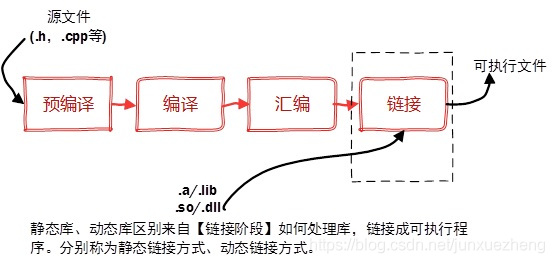
静态链接库 - 静态编译时由编译器到指定目录寻找并且进行链接,一旦链接完成,最终的可执行程序中就包含了该库文件中的所有有用信息,包括代码段、数据段等。
使用静态库的时候,会将静态库的信息直接编译到可执行文件中
优点:当静态库被删除,对可执行文件没有影响
优点:直接被链接进可执行程序中之后,该可执行程序就不再依赖于运行环境的设置了(当然仍然会依赖于 CPU指令集和操作系统支持的可执行文件格式等硬性限制)
缺点:浪费内存空间。如果静态库被修改,可执行程序要重新编译
动态链接库 - 在应用程序运行时,由操作系统根据应用程序的请求,动态到指定目录下寻找并装载入内存中,同时需要进行地址重定向。
加载器在加载动态库时,操作系统会先检查动态库是否因为其它程序已经将这个动态库信息加载到了内存中。如果没有加载到内存中,操作系统会将动态库载入内存,并将它的引用计数设置为1;如果已经加载到内存,仅将动态库的引用计数加1。
优点:用户甚至可以在程序运行时随时替换该动态库,这就构成了动态插件系统的基础。
动态链接库的效率可能比静态链接库要差 - 程序总无法直接调用动态库中的函数符号,而只能通过调用操作系统的runtime enviroment接口来动态载入某个函数符号,同时获得该函数符号在内存中的地址,将其保存为函数指针进行调用,这就在函数调用时增加了一次间接寻址的过程。
不同平台的命名
Android / Linux下: 静态库( static library ) : lib库名.a 动态库( shared library ) : lib库名.so(shared object)
window:下 静态库:lib库名.lib 动态库:lib库名.dll(dynamic link library)
Dynamic-link library (DLL) is Microsoft’s implementation of the shared library concept in the Microsoft Windows and OS/2 operating systems. These libraries usually have the file extension DLL , OCX (for libraries containing ActiveX controls), or DRV (for legacy system drivers).
The file formats for DLLs are the same as for Windows EXE files – that is, Portable Executable (PE) for 32-bit and 64-bit Windows, and New Executable (NE) for 16-bit Windows. As with EXEs, DLLs can contain code , data , and resources , in any combination.
相关链接:Difference between shared objects (.so), static libraries (.a), and DLL’s (.so)?
如何知道一个可执行程序依赖哪些库? ldd命令可以查看一个可执行程序依赖的共享库
class Program
{
    static void Main(string[] args)
    {
        dynamic dyn = 1;
        object obj = 1;
        dyn = dyn + 3;
        //obj = obj + 3; 报错

        // Rest the mouse pointer over dyn and obj to see their
        // types at compile time.
        System.Console.WriteLine(dyn.GetType());
        System.Console.WriteLine(obj.GetType());
    }
}
ABI(Application binary interface)
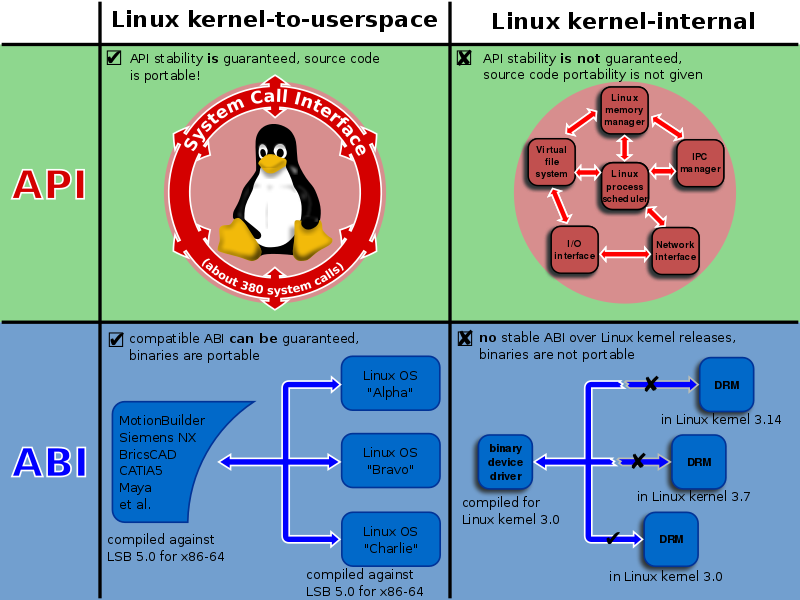
In computer software, an application binary interface (ABI) is an interface between two binary program modules.
a library or operating system facility
program that is being run by a user
来源:WIKIPEDIA
An ABI defines how data structures or computational routines are accessed in machine code , which is a low-level , hardware-dependent format. In contrast, an API defines this access in source code , which is a relatively high-level , hardware-independent, often human-readable format. A common aspect of an ABI is the calling convention , which determines how data is provided as input to, or read as output from, computational routines.
ABIs包含的一些细节
a processor instruction set (with details like register file structure, stack organization, memory access types, …)
the sizes, layouts, and alignments of basic data types that the processor can directly access
the calling convention , which controls how the arguments of functions are passed, and return values retrieved.
in the case of a complete operating system ABI, the binary format of object files , program libraries , and so on.
Android ABIs
Different Android devices use different CPUs , which in turn support different instruction sets. Each combination of CPU and instruction set has its own Application Binary Interface (ABI).
查看安卓手机ABI: adb shell cat /proc/cpuinfo adb shell getprop ro.product.cpu.abi
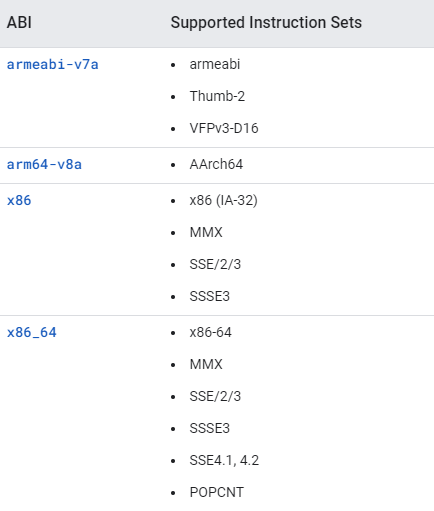
The default behavior of the build system is to include the binaries for each ABI in a single APK, also known as a fat APK.
At installation time, the package manager unpacks only the most appropriate machine code for the target device. ( Automatic extraction of native code at install time )
a fat APK may contain:
class Program
{
    static void Main(string[] args)
    {
        dynamic dyn = 1;
        object obj = 1;
        dyn = dyn + 3;
        //obj = obj + 3; 报错

        // Rest the mouse pointer over dyn and obj to see their
        // types at compile time.
        System.Console.WriteLine(dyn.GetType());
        System.Console.WriteLine(obj.GetType());
    }
}
Generate code for a specific ABI
Gradle (whether used via Android Studio or from the command line) builds for all non-deprecated ABIs by default.
For example, to build for only 64-bit ABIs, set the following configuration in your build.gradle
class Program
{
    static void Main(string[] args)
    {
        dynamic dyn = 1;
        object obj = 1;
        dyn = dyn + 3;
        //obj = obj + 3; 报错

        // Rest the mouse pointer over dyn and obj to see their
        // types at compile time.
        System.Console.WriteLine(dyn.GetType());
        System.Console.WriteLine(obj.GetType());
    }
}
存储类型说明符(Storage Class Specifiers)
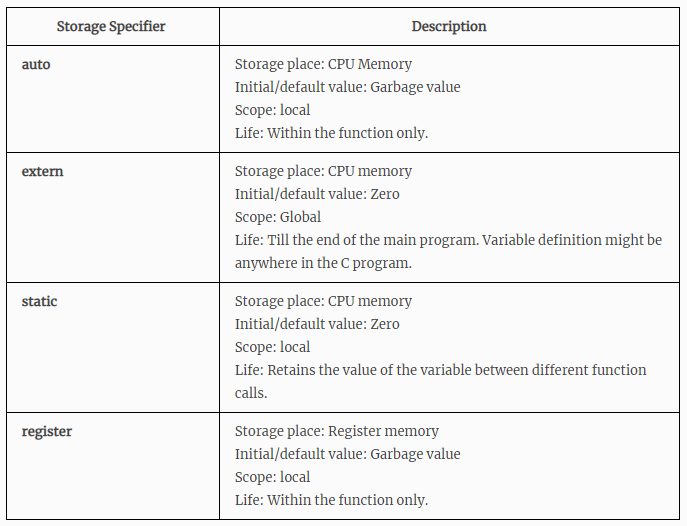
Storage class specifiers in C language tells the compiler where to store a variable, how to store the variable, what is the initial value of the variable and life time of the variable.
A storage class defines the scope (visibility) and life-time of variables and/or functions within a C++ Program.
Declaration specifiers(声明说明符) (decl-specifier-seq) is a sequence of the following whitespace-separated specifiers, in any order. (via. https://en.cppreference.com/w/cpp/language/declarations)
C provides the following storage-class specifiers:
auto
register
static
extern
typedef
__declspec ( extended-decl-modifier-seq ) /* Microsoft-specific */
EXTERN
The scope of this extern variable is throughout the main program. It is equivalent to global variable. Definition for extern variable might be anywhere in the C program.
class Program
{
    static void Main(string[] args)
    {
        dynamic dyn = 1;
        object obj = 1;
        dyn = dyn + 3;
        //obj = obj + 3; 报错

        // Rest the mouse pointer over dyn and obj to see their
        // types at compile time.
        System.Console.WriteLine(dyn.GetType());
        System.Console.WriteLine(obj.GetType());
    }
}
REGISTER
Register variables are also local variables, but stored in register memory. Whereas, auto variables are stored in main CPU memory.
Register variables will be accessed very faster than the normal variables since they are stored in register memory rather than main memory.
But, only limited variables can be used as register since register size is very low. (16 bits, 32 bits or 64 bits)
__declspec
__declspec是Microsoft特定的属性,允许您指定存储类信息。但是,许多其他编译器供应商(例如GCC)现在支持此 语言扩展 ,以与针对Microsoft编译器编写的已安装代码库兼容。
The extended attribute syntax for specifying storage-class information uses the __declspec keyword, which specifies that an instance of a given type is to be stored with a Microsoft-specific storage-class attribute listed below.
thread
naked
dllimport
dllexport
(Others)
| 语言概念 | 具体概念 | 代码 |
|---|---|---|
| Keyword | __declspec | |
| decl-specifier(声明修饰符) | __declspec ( extended-decl-modifier-seq ) | |
| extended-decl-modifier(声明修饰符的拓展) | Storage-Class Attributes(Specifier) | dllexport, dllimport等 |
Microsoft将该__declspec符号发明为C ++语言的扩展。我相信GCC现在支持它,但这主要是出于与Microsoft编译器兼容的原因。而且我不了解“特定于MS”与“特定于编译器”有何不同。微软编写了一个C ++编译器,许多人使用它。它随Visual Studio一起提供。 via. QAStack
可以指定的那些存储类属性中的两个是dllimport和dllexport。这些向编译器指示分别从DLL导入或导出函数或对象。
dllexport, dllimport
You can use them to export and import functions, data, and objects to or from a DLL.
dllexport是把DLL中的相关代码(类,函数,数据)暴露出来为其他应用程 序使用。
These attributes explicitly define the DLL’s interface to its client, which can be the executable file or another DLL. Declaring functions as dllexport eliminates the need for a module-definition (.def) file, at least with respect to the specification of exported functions.
若要导出类中的所有公共数据成员和成员函数,关键字必须出现在类名的左边,如下所示:
class Program
{
    static void Main(string[] args)
    {
        dynamic dyn = 1;
        object obj = 1;
        dyn = dyn + 3;
        //obj = obj + 3; 报错

        // Rest the mouse pointer over dyn and obj to see their
        // types at compile time.
        System.Console.WriteLine(dyn.GetType());
        System.Console.WriteLine(obj.GetType());
    }
}
dllexport of a function exposes the function with its decorated name. For C++ functions, this includes name mangling. For C functions or functions that are declared as extern “C”, this includes platform-specific decoration that’s based on the calling convention. For information on name decoration in C/C++ code, see Decorated Names. No name decoration is applied to exported C functions or C++ extern “C” functions using the __cdecl calling convention.
特殊用法——提供者和使用者共用同一个头文件
class Program
{
    static void Main(string[] args)
    {
        dynamic dyn = 1;
        object obj = 1;
        dyn = dyn + 3;
        //obj = obj + 3; 报错

        // Rest the mouse pointer over dyn and obj to see their
        // types at compile time.
        System.Console.WriteLine(dyn.GetType());
        System.Console.WriteLine(obj.GetType());
    }
}
更详细的资料
参见: https://www.cnblogs.com/yyxt/p/4241802.html
Unity中C#调用C++:PInvoke
Unity Plugins
In Unity, you normally use scripts to create functionality, but you can also include code created outside Unity in the form of a plug-in. There are two kinds of plug-ins you can use in Unity: Managed plug-ins and Native plug-ins.
Managed plug-ins
Managed plug-ins are managed .NET assemblies created with tools like Visual Studio. They contain only .NET code which means that they can’t access any features that are not supported by the .NET libraries. However, managed code is accessible to the standard .NET tools that Unity uses to compile scripts. There is thus little difference in usage between managed plug-in code and Unity script code, except for the fact that the plug-ins are compiled outside Unity and so the source may not be available.
Native plug-ins
Native plug-ins are are libraries of native code written in C, C++, Objective-C, etc. They are platform-specific.
They can access features like OS calls and third-party code libraries that would otherwise not be available to Unity.
Unity Assets/Plugins文件夹
Plugins文件夹用来放native插件。它们会被自动包含进build中去。(注意这个文件夹只能是Assets文件夹的直接子目录。)
Plugins/x86 如果为32bit或64bit平台创建游戏,那么这个文件夹下的native plugin文件会被自动的包含在游戏build中。如果这个文件夹不存在,则Unity会查找Plugins文件夹下的native pluglins。
Plugins/x86_64 如果为32bit或64bit平台创建游戏,那么这个文件夹下的native plugin文件会被自动的包含在游戏build中。如果这个文件夹不存在,则Unity会查找Plugins文件夹下的native pluglins。 如果要创建universal build,建议你同时使用这两个文件夹。然后将32bit和64bit的native plugins放进相应的文件夹中。
Plugins/Android 在这个文件夹里放入Java.jar文件。用于java语言的plugins。.so文件也会被包含进来。 See http://docs.unity3d.com/Documentation/Manual/PluginsForAndroid.html
Android平台根据cpu架构不同放在对应文件夹下面,比如Anroid/libs/armeabi-v7a。
- Plugins/iOS A limited, simple way to automatically add (as symbolic links) any .a, .m, .mm, .c, or .cpp files into the generated Xcode project. See [http://docs.unity3d.com/Documentation/Manual/PluginsForIOS.html If you need more control how to automatically add files to the Xcode project, you should make use of the PostprocessBuildPlayer feature. Doing so does not require you to place such files in the Plugins/iOS folder. See[http://docs.unity3d.com/Documentation/Manual/BuildPlayerPipeline.html
PInvoke简单实践:Windows平台下调用Native代码
编写C++代码并导出
Write functions in a C-based language to access whatever features you need and compile them into a library.
建立Win32工程
写代码
TestLibAdd.h
class Program
{
    static void Main(string[] args)
    {
        dynamic dyn = 1;
        object obj = 1;
        dyn = dyn + 3;
        //obj = obj + 3; 报错

        // Rest the mouse pointer over dyn and obj to see their
        // types at compile time.
        System.Console.WriteLine(dyn.GetType());
        System.Console.WriteLine(obj.GetType());
    }
}
TestLibAdd.cpp
class Program
{
    static void Main(string[] args)
    {
        dynamic dyn = 1;
        object obj = 1;
        dyn = dyn + 3;
        //obj = obj + 3; 报错

        // Rest the mouse pointer over dyn and obj to see their
        // types at compile time.
        System.Console.WriteLine(dyn.GetType());
        System.Console.WriteLine(obj.GetType());
    }
}
__declspec(dllexport)代表需要导出的函数,需要放在函数定义的前面。 extern “C”表示以C语言方式进行导出 stdcall表示以标准方式调用。由于定义了extern “C”与 stdcall,编译器会对函数名进行整理,在库中会独立对应一个标识符,C#也会根据相同的规则去寻找符合条件的函数以进行调用。 在非托管dll导出的时候往往会用到不同的调用方式,所以相同的在C#中也可以通过调整DllImport中的CallingConvention进行指定以保证找到相应的函数。
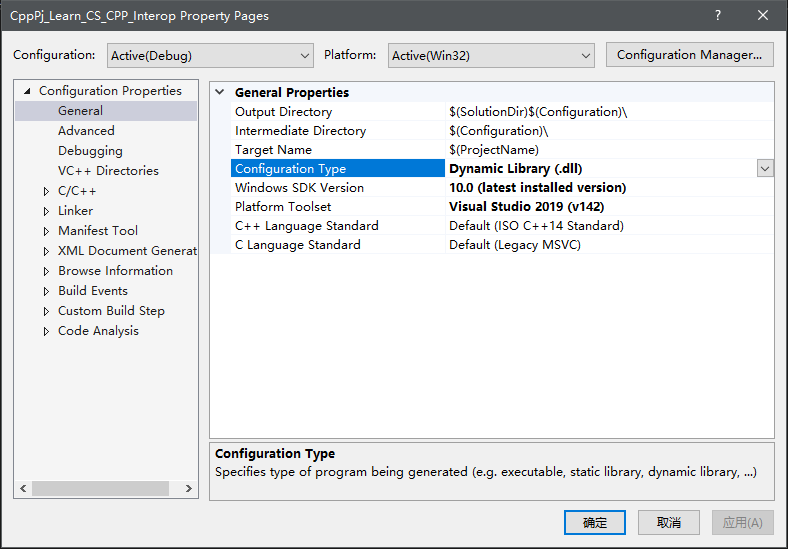
右键点击工程,选择属性,选择生成动态库dll
选择平台类型
- 我们右键工程进行生成,分别生成x86与x64的版本。
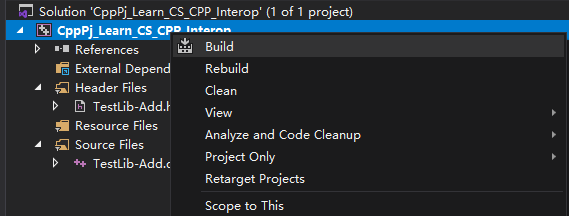
- 分别将生成的.dll与.pdb放入到对应的文件夹中。x86放入x86文件夹,x64放入x86_64文件夹下。
在C#中编写接口
Create a C# script which calls functions in the native library.
定义函数
static - 非托管函数无需实例化就可直接调用
extern - 告诉编译器该函数在外部定义,不需要函数体
DllImport(“DLL名称”) - Unity会首先搜索Plugin,如果在Windows平台会去搜索系统目录,如果仍未找到就会抛出DllNotFound异常。
DllImport定义在命名空间
System.Runtime.InteropServices中
基本格式:
class Program
{
    static void Main(string[] args)
    {
        dynamic dyn = 1;
        object obj = 1;
        dyn = dyn + 3;
        //obj = obj + 3; 报错

        // Rest the mouse pointer over dyn and obj to see their
        // types at compile time.
        System.Console.WriteLine(dyn.GetType());
        System.Console.WriteLine(obj.GetType());
    }
}
笔者的案例:
class Program
{
    static void Main(string[] args)
    {
        dynamic dyn = 1;
        object obj = 1;
        dyn = dyn + 3;
        //obj = obj + 3; 报错

        // Rest the mouse pointer over dyn and obj to see their
        // types at compile time.
        System.Console.WriteLine(dyn.GetType());
        System.Console.WriteLine(obj.GetType());
    }
}
可能遇到的其他问题: 指定字符集、指定调用方式、指定调用入口。遇到时查阅相关资料即可
在C#中调用就像普通调用C#函数一样。
class Program
{
    static void Main(string[] args)
    {
        dynamic dyn = 1;
        object obj = 1;
        dyn = dyn + 3;
        //obj = obj + 3; 报错

        // Rest the mouse pointer over dyn and obj to see their
        // types at compile time.
        System.Console.WriteLine(dyn.GetType());
        System.Console.WriteLine(obj.GetType());
    }
}
Native (C++) plug-ins for Android
Unity supports native plug-ins for Android written in C/C++ and packaged in a shared library (.so) or a static library (.a).
To build a C++ plug-in for Android, use the Android NDK and get yourself familiar with the steps required to build a shared library.
When using the IL2CPP scripting backend, you can use C/C++ source files as plug-ins and Unity compiles them along with IL2CPP generated files. This includes all C/C++ source files with extensions .c, .cc, .cpp and .h.
how the Android platform manages native code in APKs(ABI management)
Native code in app packages
Both the Play Store and Package Manager expect to find NDK-generated libraries on filepaths inside the APK matching the following pattern:
class Program
{
    static void Main(string[] args)
    {
        dynamic dyn = 1;
        object obj = 1;
        dyn = dyn + 3;
        //obj = obj + 3; 报错

        // Rest the mouse pointer over dyn and obj to see their
        // types at compile time.
        System.Console.WriteLine(dyn.GetType());
        System.Console.WriteLine(obj.GetType());
    }
}
a fat APK may contain:a fat APK may contain:
class Program
{
    static void Main(string[] args)
    {
        dynamic dyn = 1;
        object obj = 1;
        dyn = dyn + 3;
        //obj = obj + 3; 报错

        // Rest the mouse pointer over dyn and obj to see their
        // types at compile time.
        System.Console.WriteLine(dyn.GetType());
        System.Console.WriteLine(obj.GetType());
    }
}
Android platform ABI support
You can force install an apk for a specific ABI. This is useful for testing. Use the following command:
class Program
{
    static void Main(string[] args)
    {
        dynamic dyn = 1;
        object obj = 1;
        dyn = dyn + 3;
        //obj = obj + 3; 报错

        // Rest the mouse pointer over dyn and obj to see their
        // types at compile time.
        System.Console.WriteLine(dyn.GetType());
        System.Console.WriteLine(obj.GetType());
    }
}
Automatic extraction of native code at install time
When it finds the libraries that it’s looking for, the package manager copies them to /lib/lib<name>.so, under the application’s native library directory (<nativeLibraryDir>/). The following snippets retrieve the nativeLibraryDir:
class Program
{
    static void Main(string[] args)
    {
        dynamic dyn = 1;
        object obj = 1;
        dyn = dyn + 3;
        //obj = obj + 3; 报错

        // Rest the mouse pointer over dyn and obj to see their
        // types at compile time.
        System.Console.WriteLine(dyn.GetType());
        System.Console.WriteLine(obj.GetType());
    }
}
NDK
配置安卓开发环境 https://developer.android.com/
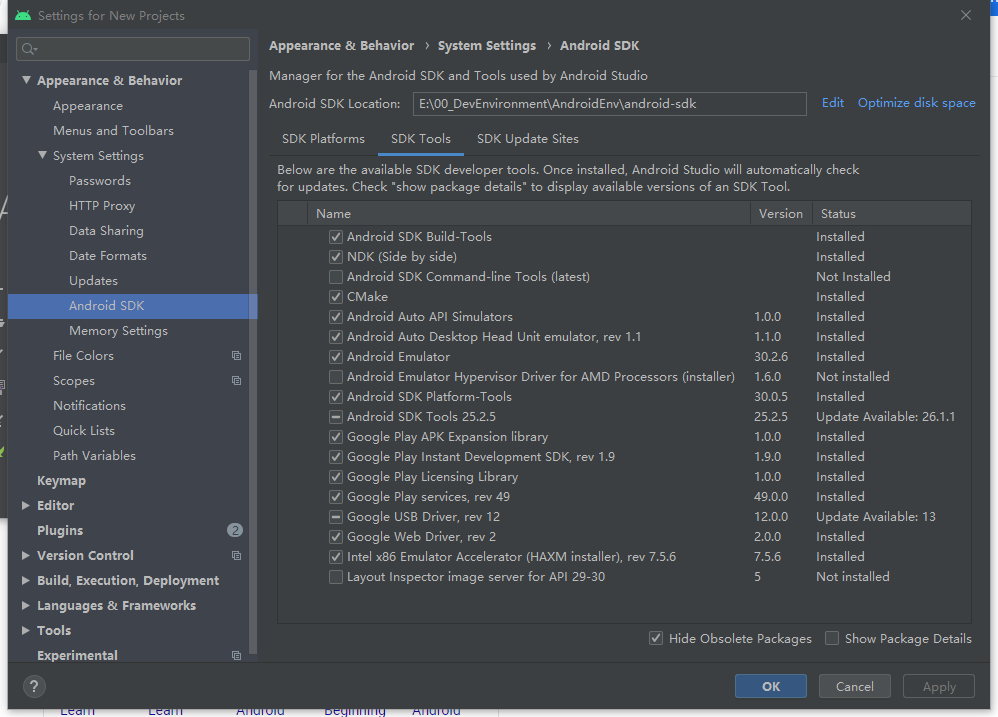
Android Studio -> Settings -> Apperance & Behaviour -> System Settings ->Android SDK -> SDK Tools。安装CMake、NDK
CMake
how to use CMake with the NDK
the Android Gradle Plugin’s
ExternalNativeBuildinvoking CMake directly
更多Android Native代码开发教程
Ref
https://zhuanlan.zhihu.com/p/30746354 https://www.cnblogs.com/yyxt/p/4241802.html https://fresh2refresh.com/c-programming/c-storage-class-specifiers/ https://docs.microsoft.com/en-us/cpp/cpp/declspec?view=msvc-160 https://blog.csdn.net/junxuezheng/article/details/100557176 https://www.cnblogs.com/andyliu1988/p/3222892.html https://docs.unity3d.com/Manual/Plugins.html https://docs.unity3d.com/Manual/AndroidNativePlugins.html https://en.wikipedia.org/wiki/Application_binary_interface https://developer.android.com/ndk/guides/abis