
本文目录 19 个章节
Draw Call与Batching
创建时间:2020/9/10 18:33
Draw Call与Batching
- Draw Call与Batching
- Draw Call
- 定义
- 耗时原因
- 方法与建议
- Note:游戏性能并非Draw Call越小越好。
- Batch, Draw Call, Setpass Call
- 主要看哪个指标
- Draw call batching
- Dynamic batching
- Meshes
- Particle Systems, Line Renderers, Trail Renderers
- Static batching
- 实践技巧
- Dynamic Batching的开启
- 使用图集合并Material
- 无法合批的常见原因及案例
- Dynamic batching
- SRP Batching
- Ref
- Draw Call
Draw Call
定义
To draw a GameObject on the screen, the engine has to issue a draw call to the graphics API (such as OpenGL or Direct3D). 每次引擎准备数据并通知GPU的过程称为一次Draw Call 。 The command that tells the GPU to render a certain set of vertices as triangles with a certain state (shaders, blend state and so on)
耗时原因
在没有进行拼合的情况下,引擎准备数据并通知GPU的过程是逐个物体进行的,对于每个物体,不只GPU的渲染,CPU重新 设置材质/Shader 也是一项非常耗时的操作。
Draw Call耗时主要是CPU端的耗时—— Unity3d官方 - Draw calls are often resource-intensive(资源密集型的,大量占用资源的), with the graphics API doing significant work for every draw call, causing performance overhead(开销)on the CPU side. This is mostly caused by the state changes done between the draw calls (such as switching to a different Material), which causes resource-intensive validation and translation steps in the graphics driver.
There are some real costs with making draw calls, it requires setting up a bunch of state ( which set of vertices to use, what shader to use and so on ), and state changes have a cost both on the hardware side (updating a bunch of registers) and on the driver side (validating and translating your calls that set state).
为何要减少DrawCall? The main reason to make fewer draw calls is that graphics hardware can transform and render triangles much faster than you can submit them. If you submit few triangles with each call, you will be completely bound by the CPU and the GPU will be mostly idle. The CPU won’t be able to feed the GPU fast enough.
The main cost of draw calls only apply if each call submits too little data , since this will cause you to be CPU-bound, and stop you from utilizing the hardware fully.
Making a single draw call with two triangles is cheap, but if you submit too little data with each call, you won’t have enough CPU time to submit as much geometry to the GPU as you could have.
(我还不太懂的)draw calls can also cause the command buffer to be flushed, but in my experience that usually happens when you call SwapBuffers, not when submitting geometry. Video drivers generally try to buffer as much as they can get away with (several frames sometimes!) to squeeze out as much parallelism from the GPU as possible.
方法与建议
目前,我们建议DrawCall的主体范围(5%~95%) 控制在[0,150]范围内。
方法:减少所渲染物体的材质种类,并通过Draw Call Batching 来减少其数量。
Note:游戏性能并非Draw Call越小越好。
决定渲染模块性能的除了Draw Call之外,还有用于传输渲染数据的 总线带宽 。当我们使用Draw Call Batching将同种材质的网格模型拼合在一起时,可能会造成同一时间需要传输的数据(Texture、VB/IB等)大大增加,以至于造成带宽“堵塞”,在资源无法及时传输过去的情况下,GPU只能等待,从而反倒降低了游戏的运行帧率。
Batch, Draw Call, Setpass Call
DrawCall
DrawCall:CPU每次调用图像编程接口 glDrawElements(OpenGl中的图元渲染函数)或者 DrawIndexedPrimitive(DirectX中的顶点绘制方法)命令GPU渲染的操作称为一次Draw Call。Draw Call就是一次渲染命令的调用,它指向一个需要被渲染的图元(primitive)列表,不包含任何材质信息,glDrawElements 或者 DrawIndexedPrimitive 函数的作用是将CPU准备好的顶点数据渲染出来。
Batch
一个Batch:提交vbo,提交ibo,提交shader,设置好硬件渲染状态,设置好光源属性,CPU调用GPU渲染。
这其实就是渲染流程的运用阶段,最终输出一个渲染图元(点、线、面等),再传递给GPU进行几何阶段和光栅化阶段的渲染显示。一个Batch必然会触发一次或多次DrawCall,且包含了该对象的所有的网格和顶点数据以及材质信息。把数据加载到显存是指把渲染所需的数据从硬盘加载到内存(RAM),再将网格和纹理等加载到显卡(VRAM),这一步比较耗时。设置渲染状态就是设置场景中的网格的顶点(Vertex)/片元(Fragment)着色器,光源属性,材质等。Unity提供的动态合批(Dynamic Batching )合并的就是这一过程,将渲染状态相同的对象合并成一个Batch,减少DrawCall。
如果一个batch和另一个batch使用的不是同种材质或者同一个材质的不同pass,那么就要触发一次set pass call来重新设定渲染状态。例如,Unity要渲染20个物体,这20个物体使用同种材质(但不一定mesh等价),假设两次dynamic batch各自合批了10个物体,则对于这次渲染,set pass call为1(只需要渲染一个材质),batch为2(向GPU提交了两次VBO,IBO等数据)。
SetPassCall
Shader脚本中一个Pass语义块就是一个完整的渲染流程,一个着色器可以包含多个Pass语义块,每当GPU运行一个Pass之前,就会产生一个SetPassCall,所以可以理解为一次完整的渲染流程次数。
由此可见,一个Batch包含一个或多个DrawCall,都是产生是在CPU阶段,而目前普遍渲染的瓶颈恰恰就是CPU,GPU的处理速度比CPU快多了,Draw Call太高,CPU会把大量时间花费在处理Draw Call调用上。如果Batch太大,CPU需要频繁的从硬盘加载数据,切换渲染状态,这个消耗要比DrawCall大,所以后面Unity才逐渐弱化了DrawCall的显示。
主要看哪个指标
SetPass Call与 Draw Call相比,SetPass Call的指标与性能相关性更大(比如Static Batching的开启不影响Draw Call数,而SetPass Call通常会明显下降)。但 SetPass Call在某些情况下也同样存在问题,比如往一个场景中添加任意个相邻且材质相同的大网格物体(使Dynamic Batching失效)时,SetPass Call并不会变化。因此在UWA中,我们所使用的是类似Profiler 中 Total Batches 这一项指标,通常该数值与 Frame Debugger 中的数值基本一致,因此可以通过该工具来查看每个Batch的内容,从而更有针对性地进行优化。
Draw call batching
You can enable or disable Dynamic and Static batching through Unity’s Player settings under Other Settings.
Built-in Batching的优劣: Built-in batching has several benefits compared to manually merging GameObjects together; most notably, GameObjects can still be culled individually. However, it also has some downsides ; static batching incurs memory and storage overhead , and dynamic batching incurs some CPU overhead.
Dynamic batching
Meshes
条件:
share the same Material(共享相同的材质 实例 )
fulfill other criteria
* 顶点数量:Batching dynamic GameObjects has certain overhead per vertex, so batching is applied only to Meshes containing no more than 900 vertex attributes, and no more than 300 vertices. 如果你的着色器使用顶点位置,法线和一个UV,那么你可以动态批处理多达300个顶点;而如果你的着色器使用顶点位置,法线,UV0,UV1和切线,那么只有180个顶点。

* 镜像信息:GameObjects are not batched if they contain mirroring on the transform. 例如A物体的大小是(1f, 1f, 1f),而B物体的大小则是(-1f, -1f, -1f),则无法做批处理。

* Using different **Material instances** causes GameObjects not to batch together, even if they are essentially the same. The exception is shadow caster rendering.

* GameObjects with lightmaps have additional renderer parameters: lightmap index and offset/scale into the lightmap. Generally, dynamic lightmapped GameObjects should point to exactly the same lightmap location to be batched.

* Multi-pass Shaders break batching. 几乎所有的Unity着色器都支持多个灯光的正向渲染模式(Forward Rendering),这要求额外的渲染次数,所以绘制 “额外的每像素灯”时不会被批处理;Legacy Deferred(Light Pre-Pass)渲染路径不能被动态批处理,因为它必须绘制物体两次。
If you need to access shared Material properties from the scripts, then it is important to note that modifying Renderer.material creates a copy of the Material. Instead, use Renderer.sharedMaterial to keep Materials shared.
Shadow casters can often be batched together while rendering, even if their Materials are different. Shadow casters in Unity can use dynamic batching even with different Materials, as long as the values in the Materials needed by the shadow pass are the same. For example, many crates could use Materials with different Textures on them, but for the shadow caster rendering the textures are not relevant, so in this case they can be batched together.
如果Draw Call的开销比合批要低, 那么合批就没有意义了. Dynamic batching works by transforming all GameObject vertices into world space on the CPU, so it is only an advantage if that work is smaller than doing a draw call. The resource requirements of a draw call depends on many factors, primarily the graphics API used. For example, on consoles or modern APIs like Apple Metal, the draw call overhead is generally much lower, and often dynamic batching cannot be an advantage at all.
Particle Systems, Line Renderers, Trail Renderers
ParticleSystem等属于 Components with geometry that Unity generates dynamically(带有动态生成的几何图形的组件)
具体处理方式:
For each compatible renderer type, Unity builds all batchable content into 1 large Vertex Buffer.
The renderer sets up the Material state for the batch.
Unity binds the Vertex Buffer to the Graphics Device.
For each Renderer in the batch, Unity updates the offset into the Vertex Buffer, and then submits a new draw call.
When measuring the cost of the Graphics Device calls, the slowest part of rendering a Component is the set-up of the Material state. Submitting draw calls at different offsets into a shared Vertex Buffer is very fast by comparison.
Static batching
本质上是用空间换时间,要在渲染耗时与内存占用之间做权衡.
Static batching allows the engine to reduce draw calls for geometry of any size provided it shares the same material , and does not move.
优点:more efficient than dynamic batching (it does not transform vertices on the CPU)
缺点:uses more memory.
Using static batching requires additional memory for storing the combined geometry. If several GameObjects shared the same geometry before static batching, then a copy of geometry is created for each GameObject, either in the Editor or at runtime. This might not always be a good idea; sometimes you have to sacrifice rendering performance by avoiding static batching for some GameObjects to keep a smaller memory footprint. For example, marking trees as static in a dense forest level can have serious memory impact.
内部实现: Internally, static batching works by transforming the static GameObjects into world space and building one shared vertex and index buffer for them.
实践技巧
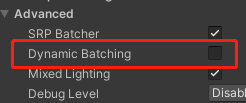
Dynamic Batching的开启
Built-in管线,在Project Settings -> Player当中:

SRP,在RenderPipelineAsset的Inspector面板的Advanced下:
使用图集合并Material
If you have two identical Materials which differ only in Texture, you can combine those Textures into a single big Texture. This process is often called Texture atlasing (see the Wikipedia page on Texture atlases for more information). Once Textures are in the same atlas, you can use a single Material instead.
atlas (also called a sprite sheet or an image sprite) is an image containing multiple smaller images, usually packed together to reduce overall dimensions. Benefits In an application where many small textures are used frequently, it is often more efficient to store the textures in a texture atlas which is treated as a single unit by the graphics hardware. This reduces the overhead of a context switch by increasing memory locality.
无法合批的常见原因及案例
详情见: https://github.com/Unity-Technologies/BatchBreakingCause
SRP Batching
Ref
https://blog.uwa4d.com/archives/Simple_PA_Rendering.html https://blog.uwa4d.com/archives/optimzation_cpu.html https://stackoverflow.com/questions/4853856/why-are-draw-calls-expensive https://docs.unity3d.com/Manual/DrawCallBatching.html https://en.wikipedia.org/wiki/Texture_atlas https://www.zhihu.com/question/60614886 https://zhuanlan.zhihu.com/p/76562300 https://zhuanlan.zhihu.com/p/366779113 https://answer.uwa4d.com/question/58d29b8b5a5050b366a6b6ae