
本文目录 48 个章节
【优化】Unity开发中的C#——内存与GC优化
创建时间:2020/6/19 16:03
【优化】Unity开发中的C——内存与GC优化
- 【优化】Unity开发中的C#——内存与GC优化
- 基本概念
- managed heap
- Mono内存
- Manual Memory Management
- Automatic Memory Management
- Value and Reference Types
- Garbage Collection
- managed heap
- 堆内存优化的原因
- memory management in Unity
- 基本的堆栈内存管理方法
- What happens during stack allocation and deallocation?
- What happens during a heap allocation?
- GC
- What happens during GC
- When does GC happen
- Problems with GC
- GC优化原则与策略
- 思路1:Reducing the amount of garbage created(避免不必要的对象创建)
- 缓存(Caching)
- Don’t allocate in functions that are called frequently
- 在需要的逻辑分支中创建对象
- 使用常量避免创建对象
- Clearing collections instead of new
- Object pooling
- 避免拆箱装箱
- 思路2:降低单次GC的耗时
- 不要使用空析构函数
- Structuring our code to minimize the impact of garbage collection
- 思路3:Timing garbage collection
- 思路1:Reducing the amount of garbage created(避免不必要的对象创建)
- 其他内存优化策略
- 实现 IDisposable 接口
- Common causes of unnecessary heap allocations
- Strings
- Boxing
- Coroutines
- Foreach loops
- LINQ and Regular Expressions
- Unity function calls
- FindObjectsOfType
- GetPixels
- GetComponentsInChildren/GetComponentsInParents
- Others
- 其他优化知识点
- string
- 使用 StringBuilder 做字符串连接
- 避免不必要的调用 ToUpper 或 ToLower 方法
- string
- Ref
- 基本概念
基本概念
managed heap
Unity游戏在运行时的内存组成可以用下图表示:
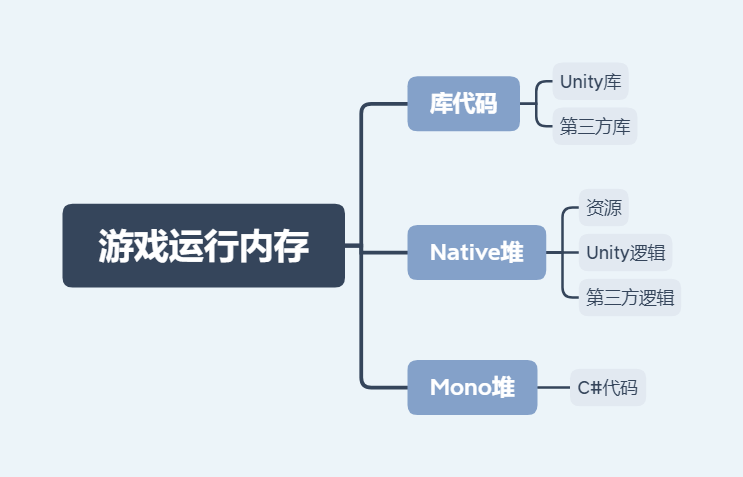
The “managed heap” is a section of memory that is automatically managed by the memory manager of a Project’s scripting runtime (Mono or IL2CPP).
“托管” 的本意是 Mono可以自动地改变堆的大小来适应你所需要的内存,并且适时地调用垃圾回收(Garbage Collection)操作来释放已经不需要的内存,从而降低开发人员在代码内存管理方面的门槛 。
non-null reference-typed objects
boxed value-typed objects
must be allocated on the managed heap
Mono内存
对于目前绝大多数基于Unity引擎开发的项目而言,其 托管堆内存 是由Mono分配和管理的。 目前绝大部分Unity游戏逻辑代码所使用的语言为C#, C#代码所分配的堆内存 又称为 mono堆内存 ,这是因为Unity是通过mono来跨平台解析并运行C#代码的,在Android系统上,游戏的lib目录下存在的 libmono.so 文件,就是 mono在Android系统上的实现 。C#代码通过mono解析执行,所需要的内存自然也是由mono来进行分配管理.
GC本身是比较耗时的操作,而且由于GC会暂停那些需要mono内存分配的线程(C#代码创建的线程和主线程),因此无论是否在主线程中调用,GC都会导致游戏一定程度的卡顿,需要谨慎处理。另外,GC释放的内存只会留给mono使用,并不会交还给操作系统,因此 mono堆内存是只增不减 的。
Manual Memory Management
In computer science, manual memory management refers to the usage of manual instructions by the programmer to identify and deallocate unused objects, or garbage. The way Unity manages memory when running its own core Unity Engine code is called manual memory management. This means that the core engine code must explicitly state how memory is used.
Automatic Memory Management
Nowadays, runtime systems like Unity’s Mono engine manage memory for you automatically.
Advantages : Automatic memory management requires less coding effort than explicit allocation/release and greatly reduces the potential for memory leakage (the situation where memory is allocated but never subsequently released).
Value and Reference Types
value types - Types that are stored directly and copied during parameter passing are called value types. value-typed local variables are allocated on the stack. These include integers, floats, booleans and Unity’s struct types (eg, Color and Vector3).
reference types - Types that are allocated on the heap and then accessed via a pointer are called reference types, since the value stored in the variable merely “refers” to the real data. Examples of reference types include objects, strings and arrays.
为什么要区分值类型与引用类型: When a function is called, the values of its parameters are copied to an area of memory reserved for that specific call. Data types that occupy only a few bytes can be copied very quickly and easily. However, it is common for objects, strings and arrays to be much larger and it would be very inefficient if these types of data were copied on a regular basis.
Garbage Collection
Garbage is the term for memory that has been set aside to store data but is no longer in use. Garbage collection is the name of the process that makes that memory available again for reuse.
Performance problems caused by garbage collection can manifest as low frame rates, jerky performance or intermittent freezes.
堆内存优化的原因
C#程序开发要遵循的一个基本原则就是避免不必要的堆内存的分配,而堆内存分配主要会造成以下后果:
程序所占用的内存总量过大。内存是有限的资源,对于游戏(特别是移动游戏)来说,内存的占用可谓是寸土寸金的。无法释放的内存过多会直接造成程序崩溃,游戏无法运行。
过多的分配次数会导致堆碎片变多。碎片过多可能导致无法开辟出所需要的连续的内存,这也会导致程序崩溃。
内存分配会触发GC(垃圾回收),而GC的代价较高,会造成卡顿。对GC的优化,本质上也是对CPU耗时的优化。
memory management in Unity
基本的堆栈内存管理方法
Unity has access to two pools of memory: the stack and the heap (also known as the managed heap. The stack is used for short term storage of small pieces of data, and the heap is used for long term storage and larger pieces of data.
When a variable is created, Unity requests a block of memory from either the stack or the heap.
As long as the variable is in scope (still accessible by our code), the memory assigned to it remains in use. We say that this memory has been allocated. We describe a variable held in stack memory as an object on the stack and a variable held in heap memory as an object on the heap.
When the variable goes out of scope, the memory is no longer needed and can be returned to the pool that it came from. When memory is returned to its pool, we say that the memory has been deallocated. The memory from the stack is deallocated as soon as the variable it refers to goes out of scope. The memory from the heap, however, is not deallocated at this point and remains in an allocated state even though the variable it refers to is out of scope.
The garbage collector identifies and deallocates unused heap memory. The garbage collector is run periodically to clean up the heap.
What happens during stack allocation and deallocation?
Stack allocations and deallocations are quick and simple. This is because the stack is only used to store small data for short amounts of time. Allocations and deallocations always happen in a predictable order and are of a predictable size.
The stack works like a stack data type: it is a simple collection of elements, in this case, blocks of memory, where elements can only be added and removed in a strict order. This simplicity and strictness are what makes it so quick : when a variable is stored on the stack, memory for it is simply allocated from the “end” of the stack. When a stack variable goes out of scope, the memory used to store that variable is immediately returned to the stack for reuse.
What happens during a heap allocation?
A heap allocation is much more complex than stack allocation. This is because the heap can be used to store both long term and short term data, and data of many different types and sizes. Allocations and deallocations don’t always happen in a predictable order and may require very different sized blocks of memory.
Unity must check if there is enough free memory in the heap. If there is enough free memory in the heap, the memory for the variable is allocated.
If there is not enough free memory in the heap, Unity triggers the garbage collector in an attempt to free up unused heap memory. This can be a slow operation. If there is now enough free memory in the heap, the memory for the variable is allocated.
If there isn’t enough free memory in the heap after garbage collection, Unity increases the amount of memory in the heap. This can be a slow operation. The memory for the variable is then allocated.
The specific amount that the heap expands is platform-dependent; however, most Unity platforms double the size of the managed heap.
GC
垃圾回收(Garbage Collection,GC)是指一种自动的存储器管理机制。当某个程序占用的一部分内存空间不再被这个程序访问时,这个程序会借助垃圾回收算法向操作系统归还这部分内存空间。垃圾回收器可以减轻程序员的负担,也减少程序中的错误。 基本思想:考虑某个对象在未来的程序运行中,将不会被访问,回收这些对象所占用的存储器。
Unity uses Boehm GC algorithm.
Non-generational - the GC must sweep through the entire heap when performing a collection pass, and its performance therefore degrades as the heap expands.
Non-compacting - objects in memory are not relocated in order to close gaps between objects.
What happens during GC
The memory manager searches through all currently active reference variables and marks the blocks they refer to as “live”. Any object which is no longer in scope is flagged for deletion.
At the end of the search, any space between the live blocks is considered empty by the memory manager and can be used for subsequent allocations.
Mono是如何判断已用内存中哪些是不再需要使用的呢? 是通过引用关系的方式来进行的。Mono会跟踪每次内存分配的动作,并维护一个 分配对象表 ,当GC的时候,以 全局数据区和当前寄存器中的对象为根节点 ,按照 引用关系 进行 遍历 ,对于遍历到的每一个对象,将其标记为活的(alive)。
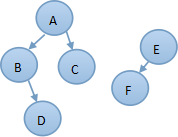
如上图所示,假设A是处于全局数据区的一个对象,那么在GC的时候将作为根节点进行遍历,由于B、C、D对象都可以由A遍历到,因此被标记为活的,E、F对象则没有被标记。注意,由于引用关系是单向的,A引用了B并不代表B也引用了A,所以遍历也只能单向进行。
由于GC以全局数据区和当前寄存器中的对象为根节点进行遍历,所以对象的 被标记意味着该对象可以通过全局对象或者当前上下文访问到 ,而没有被标记的对象则意味着该对象无法通过任何途径访问到,即该对象“失联”了,GC最终会 将所有“失联”的对象内存进行回收 ,上图中的E和F将会在GC过程中被回收。
When does GC happen
The garbage collector runs whenever a heap allocation is requested that cannot be fulfilled using free memory from the heap.
The garbage collector runs automatically from time to time (although the frequency varies by platform).
The garbage collector can be forced to run manually.
frequent heap allocations and deallocations can lead to frequent garbage collection.
Problems with GC
GC本身是比较耗时的操作,而且由于GC会暂停那些需要mono内存分配的线程(C#代码创建的线程和主线程),因此无论是否在主线程中调用,GC都会导致游戏一定程度的卡顿,需要谨慎处理。另外,GC释放的内存只会留给mono使用,并不会交还给操作系统,因此 mono堆内存是只增不减 的。 GC带来的问题主要表现在以下三个方面:
take a considerable amount of time to run. cause our game to stutter or run slowly.
run at inconvenient times. If the CPU is already working hard in a performance-critical part of our game, even a small amount of additional overhead from garbage collection can cause our frame rate to drop and performance to noticeably change.
heap fragmentation. When memory is allocated from the heap it is taken from the free space in blocks of different sizes depending on the size of data that must be stored. When these blocks of memory are returned to the heap, the heap can get split up into lots of small free blocks separated by allocated blocks. This means that although the total amount of free memory may be high, we are unable to allocate large blocks of memory without running the garbage collector and/or expanding the heap because the managed heap cannot find a large enough block of contiguous memory in which to fit the allocation.

The object must always occupy a contiguous block of space in memory.
GC优化原则与策略
从GC的角度分析优化思路 ways:
reduce the time that the garbage collector takes to run.
reduce the frequency with which the garbage collector runs.
deliberately trigger the garbage collector so that it runs at times that are not performance-critical, for example during a loading screen.
strategies:
organize our game so we have fewer heap allocations and fewer object references.
reduce the frequency of heap allocations and deallocations, particularly at performance-critical times.
time garbage collection and heap expansion so that they happen at predictable and convenient times.
思路1:Reducing the amount of garbage created(避免不必要的对象创建)
缓存(Caching)
If our code repeatedly calls functions that lead to heap allocations and then discards the results, this creates unnecessary garbage. Instead, we should store references to these objects and reuse them. This technique is known as caching.
Don’t allocate in functions that are called frequently
避免在循环中创建对象
Update() and LateUpdate(), for example, are called once per frame, so if our code is generating garbage here it will quickly add up. We should consider caching references to objects in Start() or Awake() where possible or ensuring that code that causes allocations only runs when it needs to.
例子如下:
- 必要时调用 , Update当中,在堆内存分配函数外加一层判断.
string s1 = "Hello ";
string s2 = s1;
s1 += "World";

System.Console.WriteLine(s2);
//Output: Hello
- use a timer - This is suitable for when we have a code that generates garbage that must run regularly, but not necessarily every frame.
string s1 = "Hello ";
string s2 = s1;
s1 += "World";

System.Console.WriteLine(s2);
//Output: Hello
在需要的逻辑分支中创建对象
如果对象只在某些逻辑分支中才被用到,那么应只在该逻辑分支中创建对象。
使用常量避免创建对象
如使用Decimal.Zero常量替代new Decimal(0),避免小对象频繁创建及回收。我们在设计自己的类时,也可以学习这个设计手法,应用到类似的场景中。
Clearing collections instead of new
Creating new collections causes allocations on the heap. If we find that we’re creating new collections more than once in our code, we should cache the reference to the collection and use Clear() to empty its contents instead of calling new repeatedly.
string s1 = "Hello ";
string s2 = s1;
s1 += "World";

System.Console.WriteLine(s2);
//Output: Hello
Object pooling
Object pooling is a technique that can reduce allocations and deallocations by reusing objects rather than repeatedly creating and destroying them. Object pooling is used widely in games and is most suitable for situations where we frequently spawn and destroy similar objects; for example, when shooting bullets from a gun.
避免拆箱装箱
C#可以在值类型和引用类型之间自动转换,方法是装箱和拆箱。装箱需要从堆上分配对象并拷贝值,有一定性能消耗。如果这一过程发生在循环中或是作为底层方法被频繁调用,则应该警惕累计的效应。
思路2:降低单次GC的耗时
不要使用空析构函数
如果类包含析构函数,由创建对象时会在 Finalize 队列中添加对象的引用,以保证当对象无法可达时,仍然可以调用到 Finalize 方法。垃圾回收器在运行期间,会启动一个低优先级的线程处理该队列。相比之下,没有析构函数的对象就没有这些消耗。如果析构函数为空,这个消耗就毫无意义,只会导致性能降低!因此,不要使用空的析构函数。
Structuring our code to minimize the impact of garbage collection
The way that our code is structured can impact garbage collection. Structs are value-typed variables, but if we have a struct that contains a reference-typed variable then the garbage collector must examine the whole struct. If we have a large array of these structs, then this can create a lot of additional work for the garbage collector.
In this example, the struct contains a string, which is reference-typed. The whole array of structs must now be examined by the garbage collector when it runs.
string s1 = "Hello ";
string s2 = s1;
s1 += "World";

System.Console.WriteLine(s2);
//Output: Hello
In this example, we store the data in separate arrays. When the garbage collector runs, it need only examine the array of strings and can ignore the other arrays. This reduces the work that the garbage collector must do.
string s1 = "Hello ";
string s2 = s1;
s1 += "World";

System.Console.WriteLine(s2);
//Output: Hello
使用Identifier替代引用, 节省GC遍历的时间.
string s1 = "Hello ";
string s2 = s1;
s1 += "World";

System.Console.WriteLine(s2);
//Output: Hello
string s1 = "Hello ";
string s2 = s1;
s1 += "World";

System.Console.WriteLine(s2);
//Output: Hello
思路3:Timing garbage collection
force the garbage collector to run, freeing up the unused memory at a time that is convenient for us.
string s1 = "Hello ";
string s2 = s1;
s1 += "World";

System.Console.WriteLine(s2);
//Output: Hello
其他内存优化策略
实现 IDisposable 接口
垃圾回收事实上只支持托管内在的回收,对于其他的非托管资源,例如 Window GDI 句柄或数据库连接,在析构函数中释放这些资源有很大问题。原因是垃圾回收依赖于内在紧张的情况,虽然数据库连接可能已濒临耗尽,但如果内存还很充足的话, 垃圾回收是不会运行的。 C#的 IDisposable 接口是一种显式释放资源的机制。通过提供 using 语句,还简化了使用方式(编译器自动生成 try … finally 块,并在 finally 块中调用 Dispose 方法)。对于申请非托管资源对象,应为其实现 IDisposable 接口,以保证资源一旦超出 using 语句范围,即得到及时释放。这对于构造健壮且性能优良的程序非常有意义! 为防止对象的 Dispose 方法不被调用的情况发生,一般还要提供析构函数,两者调用一个处理资源释放的公共方法。同时,Dispose 方法应调用 System.GC.SuppressFinalize(this),告诉垃圾回收器无需再处理 Finalize 方法了。
Common causes of unnecessary heap allocations
Strings
reference types
immutable, which means that their value can’t be changed after they are first created.
Every time we manipulate a string (for example, by using the + operator to concatenate two strings), Unity creates a new string with the updated value and discards the old string. This creates garbage.
1. reuse. **cut down on unnecessary string creation**.

2. **cut down on unnecessary string manipulations**. For example, if we have a Text component that is updated frequently and contains a concatenated string we could consider separating it into two Text components.

3. If we have to build strings at runtime, we should use the **StringBuilder** class. The StringBuilder class is designed for building strings without allocations and will save on the amount of garbage we produce when concatenating complex strings.

4. remove calls to Debug.Log() as soon as they are no longer needed for debugging purposes. Calls to Debug.Log() still execute in all builds of our game, even if they do not output to anything.
Boxing
Boxing - occurs when we pass value-typed variables, such as ints or floats, to a function with object parameters such as Object.Equals().
When a value-typed variable is boxed, Unity creates a temporary System.Object on the heap to wrap the value-typed variable.
For example, the function String.Format() takes a string and an object parameter. When we pass it a string and an int, the int must be boxed. Therefore the following code contains an example of boxing:
string s1 = "Hello ";
string s2 = s1;
s1 += "World";

System.Console.WriteLine(s2);
//Output: Hello
Coroutines
Calling StartCoroutine()产生垃圾的原因:
Unity must create instances of some classes to manage the coroutine.
The values we pass with our yield statement could create unnecessary heap allocations. For example:
string s1 = "Hello ";
string s2 = s1;
s1 += "World";

System.Console.WriteLine(s2);
//Output: Hello
The int with a value of 0 is boxed. the best way to do so is with this code:
string s1 = "Hello ";
string s2 = s1;
s1 += "World";

System.Console.WriteLine(s2);
//Output: Hello
To reduce garbage created in this way, any coroutines that must run at performance-critical times should be started in advance and we should be particularly careful when using nested coroutines that may contain delayed calls to StartCoroutine().
Example: cache and reuse the WaitForSeconds object
string s1 = "Hello ";
string s2 = s1;
s1 += "World";

System.Console.WriteLine(s2);
//Output: Hello
用其他方式重构代码:
If we are using coroutines mainly to manage time, we may wish to simply keep track of time in an Update() function.
If we are using coroutines mainly to control the order in which things happen in our game, we may wish to create some sort of messaging system to allow objects to communicate.
Foreach loops
In versions of Unity prior to 5.5, a foreach loop iterating over anything other than an array generates garbage each time the loop terminates.
string s1 = "Hello ";
string s2 = s1;
s1 += "World";

System.Console.WriteLine(s2);
//Output: Hello
Unity5.5之前, 生成的IL程序集具有如下代码:
string s1 = "Hello ";
string s2 = s1;
s1 += "World";

System.Console.WriteLine(s2);
//Output: Hello
The callvirt instruction discovers the location of the IDisposable.Dispose method in memory before invoking the method, and requires that the Enumerator be boxed. Note that the C# compiler upgrade in Unity 5.5 significantly improves Unity’s ability to generate IL. In particular, the boxing operations has been eliminated from foreach loops. This eliminates the memory overhead associated with foreach loops. However, the CPU performance difference compared to equivalent Array-based code remains, due to method-call overhead.
5.5之后,避免了对一般容器进行foreach在最后阶段的Boxing操作, 避免了堆内存分配, 但是foreach在CPU耗时上还是较高.
另外, 即使是在Unity 5.5之后的版本里, 以下代码也会造成堆内存分配:
string s1 = "Hello ";
string s2 = s1;
s1 += "World";

System.Console.WriteLine(s2);
//Output: Hello


原因:
UnityEngine.Transform::GetEnumerator()函数返回的为引用类型.
对List<int>类型使用foreach进行遍历, GetEnumerator()不会造成堆内存分配的原因是:

System.Collections.Generic.List 1<int32>::GetEnumerator()函数返回的对象是引用类型
LINQ and Regular Expressions
Both LINQ and Regular Expressions generate garbage due to boxing that occurs behind the scenes.
Unity function calls
减少堆内存分配的三种方式
cache the results of the function
call the function less frequently
refactor our code to use a different function
Every time we access a Unity function that returns an array, a new array is created and passed to us as the return value. This behavior isn’t always obvious or expected, especially when the function is an accessor
FindObjectsOfType
Object.FindObjectsOfType() allocates managed memory. Try to avoid calling this method in frequently-updated code. Ideally, this method should only be used during initialisation, and the results should be cached if they need to be re-used.
GetPixels
GetComponentsInChildren/GetComponentsInParents
Others
| 分配函数 | 推荐替换 |
|---|---|
| Mesh.normals | |
| GameObject.name | |
| GameObject.tag | GameObject.CompareTag() |
| Input.touches | Input.GetTouch() and Input.touchCount |
| Physics.SphereCastAll() | Physics.SphereCastNonAlloc() |
| Renderer.sharedMaterials | |
| Renderer.materials | |
| TextAsset.bytes | |
| WWW.bytes |
其他优化知识点
string
String是一个UTF-16编码的文本
String是一个引用类型
String是不可变的
使用 StringBuilder 做字符串连接
String 是不变类,使用 + 操作连接字符串将会导致创建一个新的字符串。 如果字符串连接次数不是固定的 ,例如在一个循环中,则应该使用 StringBuilder 类来做字符串连接工作。因为 StringBuilder 内部有一个 StringBuffer ,连接操作不会每次分配新的字符串空间。只有当连接后的字符串超出 Buffer 大小时,才会申请新的 Buffer 空间。
StringBuilder本身也会在内部申请内存,复用StringBuilder能进一步优化内存。
string s1 = "Hello ";
string s2 = s1;
s1 += "World";

System.Console.WriteLine(s2);
//Output: Hello
| 29 Func | Time Complexity | Time | GC Alloc |
|---|---|---|---|
| StringConcatAppend | O(n^2) | TODO Test | |
| StringFormatAppend1 | |||
| StringFormatAppend2 | |||
| StringBuilderAppend | O(n)~O(nlogn) |
如果连接次数是固定的并且只有几次,可以直接用 + 号连接,或者使用Format,保持程序简洁易读。
- 实际Format的内部使用了StringBuilder来拼接字符串。N次使用StringBuilder来拼接字符串的性能与1次的操作性能有较大差异。Format的正确用法如下:
string s1 = "Hello ";
string s2 = s1;
s1 += "World";

System.Console.WriteLine(s2);
//Output: Hello
- 用 + 号连接,编译器已经做了优化,会依据加号次数调用不同参数个数的 String.Concat 方法:
String str = str1 + str2 + str3 + str4;会被编译为String.Concat(str1, str2, str3, str4)。该方法内部会计算总的 String 长度,仅分配一次,并不会如通常想象的那样分配三次。
作为一个经验值,当字符串连接操作达到 10 次以上时,则应该使用 StringBuilder。 StringBuilder 内部 Buffer 的缺省值为 16 ,这个值实在太小。按 StringBuilder 的使用场景,Buffer 肯定得重新分配。经验值一般用 256 作为 Buffer 的初值。当然,如果能计算出最终生成字符串长度的话,则应该按这个值来设定 Buffer 的初值。
避免不必要的调用 ToUpper 或 ToLower 方法
String是不变类,调用ToUpper或ToLower方法都会导致创建一个新的字符串。如果被频繁调用,将导致频繁创建字符串对象。这违背了前面讲到的“避免频繁创建对象”这一基本原则。相关场景如下:
进行忽略大小写的字符串比较时,使用 Compare 方法,这个方法可以做大小写忽略的比较,并且不会创建新字符串。
使用 HashTable 的时候,有时候无法保证传递 key 的大小写是否符合预期,往往会把 key 强制转换到大写或小写方法。实际上 HashTable 有不同的构造形式,完全支持采用忽略大小写的 key: new HashTable(StringComparer.OrdinalIgnoreCase)。
Ref
https://zhuanlan.zhihu.com/p/21886588 https://learn.unity.com/tutorial/fixing-performance-problems-2019-3 https://docs.unity3d.com/Manual/UnderstandingAutomaticMemoryManagement.html https://docs.unity3d.com/Manual/BestPracticeUnderstandingPerformanceInUnity4-1.html https://docs.unity3d.com/Manual/BestPracticeUnderstandingPerformanceInUnity4-1.html https://zhuanlan.zhihu.com/p/28471848