
本文目录 30 个章节
【OS Unix-like】MacOS开发与使用技巧
# 【OS Unix-like】MacOS开发与使用技巧
创建时间:2021/7/5 0:06
- 快捷键
- System
- 通用 General
- 截屏
- Finder
- 浏览器Safari
- Shell命令
- 美化
- 开发环境配置
- brew 配置
- Java环境
- Python环境
- 使用brew
- pip的使用
- pyenv的使用
- 使用brew
- 实用工具
- 效率之王Afred
- 编辑器
- brew软件管理
- 开发工具
- 自动化工具
- 其他工具
- app
- 常用设置
- 网络相关
- 常用命令
- ping
- 共享
- 远程访问
- 常用命令
- Ref
快捷键
设置方法:系统偏好->键盘->快捷键
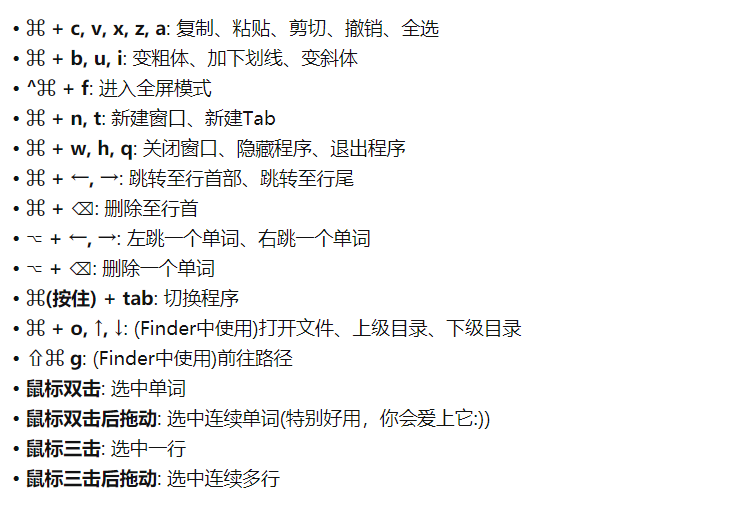
cmd + space 聚焦搜索 cmd + space + ter 快速打开终端 cmd + tab 切换应用程序 cmd + ~ 切换应用程序内窗口
Shift-Command-5 屏幕截图与录制 四指向上滑动:Mission Control 多屏幕调度 点按并按住窗口左上角的全屏按钮:Split View分屏
Shift + Command + . 显示全部隐藏文件
cmd + up/down 上/下一层文件夹 enter 改名

System
cmd + option + esc 强制退出程序 cmd + space 切换输入法
通用 General
cmd + H Hide the window cmd + M Minimize the window cmd + O Open files cmd + s Save cms + shift + s Save as cmd + W Close cmd + Q Quit
Return 重命名
截屏
cmd + shift + 3 截取整个屏幕 cmd + shift + 4 截取选择区域 cmd + shift + 4 + space 截取选择窗口
Finder
cmd + sft + . 显示隐藏文件 option + cmd + i 查看多个文件或文件夹大小 右键目标文件 + option 复制目标文件的路径 cmd + [ / ] 前进或后退 cmd + up / down 进入上级目录 / 下级目录 option + up / down 定位到多文件列表顶部/底部 shift + cmd + g 路径进入文件夹 cmd + f 查询 cmd + N 新建文件夹 cmd + Delete 删除 cmd + shift + delete 清空回收站
cmd + c 复制 cmd + v 粘贴 cmd + option + v 粘贴后删除源文件(等效于Windows的ctrl + x, ctrl + v)
浏览器Safari
cmd + +/- 放大/缩小 cmd + T 新建选项卡 cmd + N 新建窗口 cmd + R 刷新 xmd + F 搜索 cmd + W关闭选项卡
Shell命令
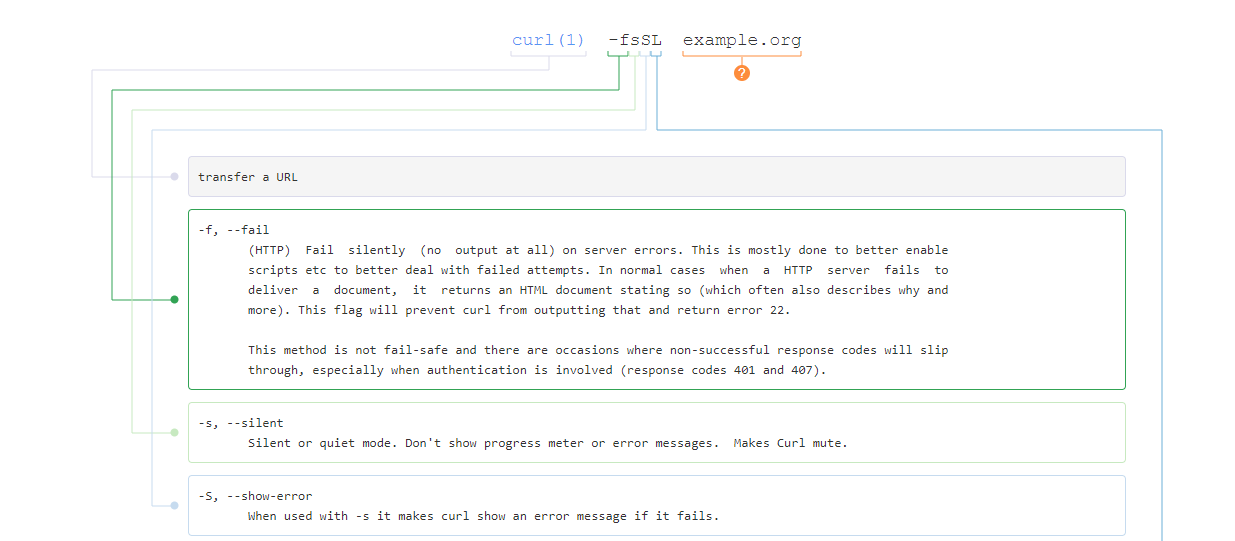
显示隐藏
string str1 = String.Empty;
string str2 = String.Empty;

str2 = String.Intern(sb.ToString());

if((object)str1==(object)str2)
    Console.WriteLine("The strings are equal.");
else
    Console.WriteLine("The strings are not equal.");
美化
壁纸: Desktoppr
开发环境配置
brew 配置
string str1 = String.Empty;
string str2 = String.Empty;

str2 = String.Intern(sb.ToString());

if((object)str1==(object)str2)
    Console.WriteLine("The strings are equal.");
else
    Console.WriteLine("The strings are not equal.");
Java环境
https://docs.oracle.com/javase/8/docs/technotes/guides/install/mac_jdk.html#A1096875
Python环境
Mac上有自带的Python环境,其可执行程序在 /usr/bin 中,安装在 /System/Library/Frameworks/Python.framework 中。不要卸载、改变自带的Python环境,因为操作系统以及一些其他程序是依赖 /usr/bin中的python的。
使用brew
https://www.cjavapy.com/article/928/
使用brew安装的python位置在 /usr/local/Frameworks/Python.framework 当中,二进制程序在 /usr/local/bin 目录下。
在~/.bashrc 中设置符号链接
string str1 = String.Empty;
string str2 = String.Empty;

str2 = String.Intern(sb.ToString());

if((object)str1==(object)str2)
    Console.WriteLine("The strings are equal.");
else
    Console.WriteLine("The strings are not equal.");
pip的使用
pip实质上是一个python脚本,命令行运行pip,实际上是使用相应的python版本执行pip脚本。在pip脚本中规定好使用的python版本,即可为特定的 python版本安装模块。
string str1 = String.Empty;
string str2 = String.Empty;

str2 = String.Intern(sb.ToString());

if((object)str1==(object)str2)
    Console.WriteLine("The strings are equal.");
else
    Console.WriteLine("The strings are not equal.");
使用时,链接到对应的pip文件,或者将pip文件的python版本修改即可。
pyenv的使用
https://opensource.com/article/19/5/python-3-default-mac https://opensource.com/article/19/6/python-virtual-environments-mac https://www.sqlsec.com/2019/12/pyenv.html
实用工具
iTerm2 + zsh + oh-my-zsh https://iterm2.com/features.html https://ohmyz.sh/ https://github.com/ohmyzsh/ohmyzsh https://github.com/wting/autojump
效率之王Afred
Afred https://www.alfredapp.com/ https://github.com/zenorocha/alfred-workflows https://www.zhihu.com/question/20656680
option+space
查找workflow: wf XXX
- 打开应用程序
简单查找文件:空格+FileName, 回车:打开,cmd+回车:打开所在位置 复杂操作文件:find是定位文件,open是定位并打开文件,in是在文件中进行全文检索
输入>即可直接运行shell命令。比如>cat *.py | grep print
简单搜索:直接输入你要查询的内容,回车即可打开默认浏览器进行搜索。
有道词典:https://raw.githubusercontent.com/Louiszhai/tool/master/workflow/youdao.alfredworkflow
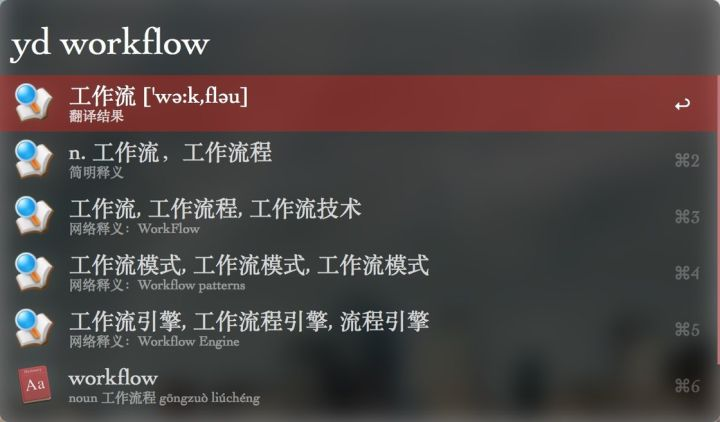
IP 查询:

指定微信好友聊天:

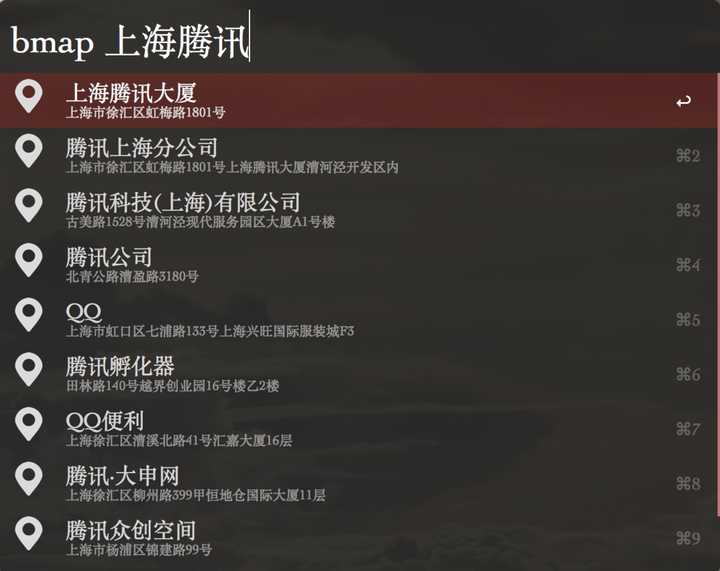
百度地图搜索:
豆瓣电影搜索:

自定义搜索:
string str1 = String.Empty;
string str2 = String.Empty;

str2 = String.Intern(sb.ToString());

if((object)str1==(object)str2)
    Console.WriteLine("The strings are equal.");
else
    Console.WriteLine("The strings are not equal.");
编辑器
主力编辑器:Atom
Intellij IDEA
Sublime Text Open Sublime with terminal: https://ashleynolan.co.uk/blog/launching-sublime-from-the-terminal
brew软件管理
Brew:https://brew.sh/
string str1 = String.Empty;
string str2 = String.Empty;

str2 = String.Intern(sb.ToString());

if((object)str1==(object)str2)
    Console.WriteLine("The strings are equal.");
else
    Console.WriteLine("The strings are not equal.");
开发工具
Dash,离线api文档,搭配aflred食用体验更佳(后文有aflred)
自动化工具
简单:Automator:定制自动化流程,可以配合shell和apple script脚本
- 从PDF文件中提取文本
- 批量重命名一组照片
高级:Jenkins
其他工具
FTP登陆:Cyberduck代替了之前的FileZilla
app
Go2Shell 1password,密码管理软件,多终端密码管理
常用设置
网络相关
常用命令
ifconfig: 查找本机IP地址和网络接口。 netstat: 使用-r来找到特定网络接口的默认网关。 ping: 用来测试本机之间的端对端的IP连接。 arp: 管理本地的ARP缓存。
ping
ICMP(Internet Control Message Protocol) 如果本地连接是同的并且目的主机也是在线上并且是可以达到的,你将会输出每个ICMP(Internet Control Message Protocol)回显请求来显示每个ICMP回显应答。
共享
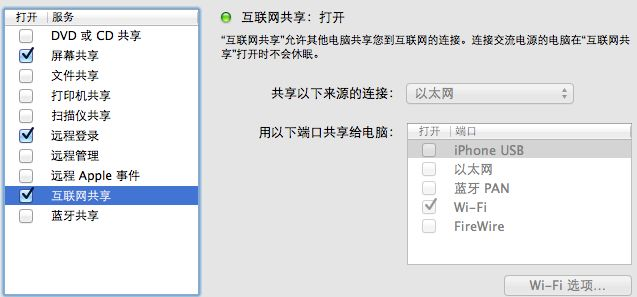
- 互联网共享 - 把以太网接口的网络共享成 Wi-Fi
远程访问
与防火墙无关
“系统偏好设置”->“共享”->“远程登录”。
可以指定哪些用户可以登录
ssh username@IPAddress
Ref
https://www.zhihu.com/question/20873070 https://github.com/hzlzh/Best-App https://www.zhihu.com/question/20656680 https://www.zhihu.com/question/20656680/answer/427583008