
LOD工具调研
本文目录 20 个章节
LOD工具调研
创建时间:2021/1/28 14:13
- LOD工具调研
- LOD Introduction
- generalized
- Methods
- Discrete Levels of Detail (DLOD)
- Continuous Levels of Detail (CLOD)
- HLOD (Hierarchical LOD)
- Applications
- LOD in Unity
- LOD for shaders
- LOD for meshes
- workflow
- 带有LOD的模型
- 不带LOD的模型
- Project-wide LOD settings
- Smooth transitions between LOD levels
- workflow
- LOD Tools
- overview
- Unity AutoLOD
- 发现的问题
- Ref
- LOD Introduction
LOD Introduction
In computer graphics, level of detail (LOD) refers to the complexity of a 3D model representation.
LOD can be decreased as the model moves away from the viewer or according to other metrics such as object importance , viewpoint-relative speed or position.
LOD techniques increase the efficiency of rendering by decreasing the workload on graphics pipeline stages, usually vertex transformations. The reduced visual quality of the model is often unnoticed because of the small effect on object appearance when distant or moving fast.
generalized
Although most of the time LOD is applied to geometry detail , the basic concept can be generalized. Recently, LOD techniques also included shader management to keep control of pixel complexity. A form of level of detail management has been applied to texture maps for years, under the name of mipmapping , also providing higher rendering quality.
It is commonplace to say that “an object has been LOD’d” when the object is simplified by the underlying LOD-ing algorithm.
Methods
Discrete Levels of Detail (DLOD)
Provide various models to represent the same object.
Creating multiple, discrete versions of the original geometry. At runtime, the full-detail models are substituted for the models with reduced detail as necessary. Using less detailed versions of your models that are viewed when they’re further away from the camera.
Due to the discrete nature of the levels, there may be visual popping (sometimes called switchover) when one model is exchanged for another. This may be mitigated by alpha blending or morphing between states during the transition.
Continuous Levels of Detail (CLOD)
uses a structure which contains a continuously variable spectrum of geometric detail. The structure can then be probed to smoothly choose the appropriate level of detail required for the situation.
A significant advantage of this technique is the ability to locally vary the detail ; for instance, the side of a large object nearer to the view may be presented in high detail, while simultaneously reducing the detail on its distant side.
HLOD (Hierarchical LOD)
grouping different objects together
Applications
Video game developers want to provide players with large worlds but are always constrained by hardware, frame rate and the real-time nature of video game graphics.
GIS(geographic information system) and 3D city models
Rendering and modeling software
LOD in Unity
LOD for shaders
You can assign a LOD (level of detail) value to a SubShader. This value indicates how computationally demanding its shader programs are. At runtime, you can tell Unity to exclude SubShaders above a given LOD value, so that Unity falls back to using SubShaders that have a lower LOD value.
Unity does not calculate SubShader LOD automatically, and this feature does not relate to distance from the Camera. You must set the maximum LOD manually.
Shader.maximumLOD Shader.globalMaximumLOD
LOD for meshes
The farther a GameObject is from the Camera, the lower-detail LOD level Unity renders. This technique reduces the load on the hardware for these distant GameObjects, and can therefore improve rendering performance.
For the very lowest level of detail, you can use a Billboard Asset, which Unity displays instead of a 3D mesh.
workflow
带有LOD的模型
- 制作模型时,LOD命名规范,Unity会自动识别LOD,添加LOD Component
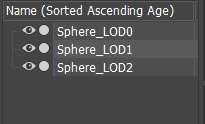
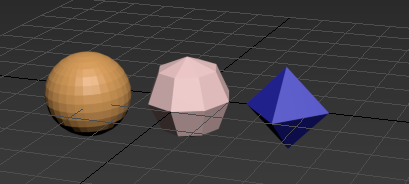
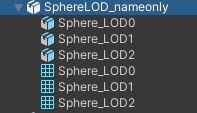
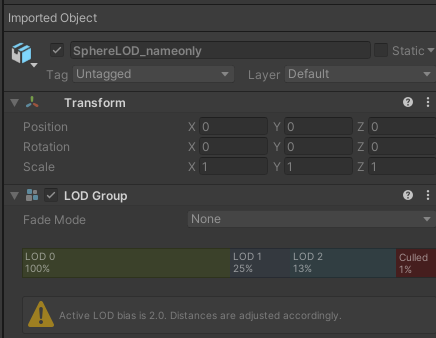
如果制作时,多个LOD的坐标相同,在Unity当中直接就可以使用。如果多个LOD坐标不同,需要调整LOD的坐标
- 命名不规范,无法识别LOD - manually create a GameObject with a LOD Group component, and configure the LOD levels manually.
不带LOD的模型
- AutoLOD,勾选了Generate on import后,在导入模型时,会将fbx中的Mesh都视为LOD0,自动生成LOD1和LOD2 的Mesh,生成lod资源,为FBX模型添加LOD Group组件,放入场景中就是带有LOD的模型。
Project-wide LOD settings
Maximum LOD Level: Exclude meshes above a specified LOD level from your build. LOD Bias: Determine whether to favor higher or lower LOD levels at threshold distances.
Smooth transitions between LOD levels
Smooth transitions take place inside transition zones, where Unity renders both the current and next LOD levels separately, and then cross-fades them together.
Cross-fading is the technique of rendering two levels at the same time, with a weighting of 1 to 0 for the current LOD level and 0 to 1 for the next LOD level:

LOD Tools
overview
MeshLab an open source mesh processing tool that is able to accurately simplify 3D polygonal meshes.
Polygon Cruncher a commercial software from Mootools that reduces the number of polygons of objects without changing their appearance.
Simplygon a commercial mesh processing package for remeshing general input meshes into real-time renderable meshes.
Unity AutoLOD
发现的问题
AutoLOD会把生成的Mesh的顶点的格式自动变为UInt32,该格式的Mesh无法进行动态合批,会增加DrawCall。
Ref
https://en.wikipedia.org/wiki/Level_of_detail_(computer_graphics) https://conceptartempire.com/3d-lod-level-of-detail/