
【CG】GPU programming & Compute Shader
本文目录 32 个章节
【CG】GPU programming & Compute Shader
创建时间:2020/11/26 14:31
- 【CG】GPU programming & Compute Shader
- Overview
- GPGPU
- Compute Shader
- Difference between Compute Shader & other shader stages
- Strengths
- Weaknesses
- GPGPU API
- OpenCL
- CUDA(Compute Unified Device Architecture)
- DirectCompute
- GPU Programming
- 相关GPU架构知识
- Model
- Dispatch
- Thread Group
- Thread
- How to set numthreads(X, Y, Z)
- Kernels
- Data Buffer
- groupshared
- Barrier
- Interlocked
- 其他概念
- Unity Compute Shader
- Invoke
- API
- ComputeShader
- ComputeBuffer
- blittable types
- Cross-platform support
- 性能优化
- Ref
- Overview
Overview
GPGPU
GPGPU (General-purpose computing on graphics processing units) is the use of a graphics processing unit (GPU), which typically handles computation only for computer graphics, to perform computation in applications traditionally handled by the central processing unit (CPU).
CPU擅长逻辑控制和串行的运算,,GPU适用于计算密集型和易于并发的程序,我们可以将二者结合起来,使用CPU做串行,而使用GPU做并行。这种技术就叫做GPGPU,也就是利用GPU进行通用计算的技术(General Purpose Computing on GPU)。
Compute Shader
Unity Documentation - Compute shaders are programs that run on the graphics card, outside of the normal rendering pipeline.
OpenGL wiki - A Compute Shader is a Shader Stage that is used entirely for computing arbitrary information.
Simply put, a compute shader is a program executed on the GPU that doesn’t need to operate on mesh or texture data, works inside the OpenGL or DirectX memory space (unlike OpenCL which has its own memory space), and can output buffers of data or textures and share memory across threads of execution.
应用:利用GPU的并行性来进行一些与常规渲染流水线无关的计算
massively parallel GPGPU algorithms
accelerate parts of game rendering
需要的知识:an in-depth knowledge of GPU architectures and parallel algorithms
A compute shader provides high-speed general purpose computing and takes advantage of the large numbers of parallel processors on the graphics processing unit (GPU). The compute shader provides memory sharing and thread synchronization features to allow more effective parallel programming methods.
Difference between Compute Shader & other shader stages
Other Shader - All of the other shader stages have a well-defined set of input values, some built-in and some user-defined. The frequency at which a shader stage executes is specified by the nature of that stage; vertex shaders execute once per input vertex, for example (though some executions can be skipped via caching). Fragment shader execution is defined by the fragments generated from the rasterization process.
Compute Shader - The “space” that a compute shader operates on is largely abstract; it is up to each compute shader to decide what the space means. The number of compute shader executions is defined by the function used to execute the compute operation. Most important of all, compute shaders have no user-defined inputs and no outputs at all.
Therefore, if a compute shader wants to take some values as input, it is up to the shader itself to fetch that data , via texture access, arbitrary image load, shader storage blocks, or other forms of interface. Similarly, if a compute shader is to actually compute anything, it must explicitly write to an image or shader storage block.
Strengths
parallelization A compute shader provides high-speed general purpose computing and takes advantage of the large numbers of parallel processors on the graphics processing unit (GPU). The compute shader provides memory sharing and thread synchronization features to allow more effective parallel programming methods.
Weaknesses
Conditional branching really kills your performance
latency - Getting memory from the GPU back to your CPU takes time, and will likely be your bottleneck when working with compute shaders.
Moving data between memory spaces is what will introduce latency to your program, and the amount of slowdown you see is proportional to the amount of data that you are transferring. For this reason, if you plan on running a compute shader every frame you’ll need to aggressively optimize how much data is actually get operated on.
GPGPU API
OpenCL
OpenCL (Open Computing Language) is a framework for writing programs that execute across heterogeneous platforms consisting of central processing units (CPUs), graphics processing units (GPUs), digital signal processors (DSPs), field-programmable gate arrays (FPGAs) and other processors or hardware accelerators. OpenCL provides a standard interface for parallel computing using task- and data-based parallelism.
CUDA(Compute Unified Device Architecture)
CUDA (Compute Unified Device Architecture) is a parallel computing platform and application programming interface (API) model created by Nvidia. It allows software developers and software engineers to use a CUDA-enabled graphics processing unit (GPU) for general purpose processing – an approach termed GPGPU (General-Purpose computing on Graphics Processing Units).
The CUDA platform is a software layer that gives direct access to the GPU’s virtual instruction set and parallel computational elements, for the execution of compute kernels.[2]
DirectCompute
Microsoft DirectCompute is an application programming interface (API) that supports running compute kernels on general-purpose computing on graphics processing units on Microsoft’s Windows Vista, Windows 7 and later versions.
GPU Programming
相关GPU架构知识
Stream processing - GPUs are stream processors – processors that can operate in parallel by running one kernel on many records in a stream at once.
- A stream is simply a set of records that require similar computation. Streams provide data parallelism.
In the GPUs, vertices and fragments are the elements in streams and vertex and fragment shaders are the kernels to be run on them.
Kernels are the functions that are applied to each element in the stream.
GPU包含多个GPC(Graphics Processing Cluster)
每个GPC拥有多个SM(Streaming Multiprocessor)
SM当中包含多个Core来执行线程(Thread)
每个Core对Shader的一次调用称为一个线程(Thread)
N个(NVIDIA:32个)线程(Thread)为一个线程束(Warp)
Core执行线程的过程由Warp Schedulers调用
Model
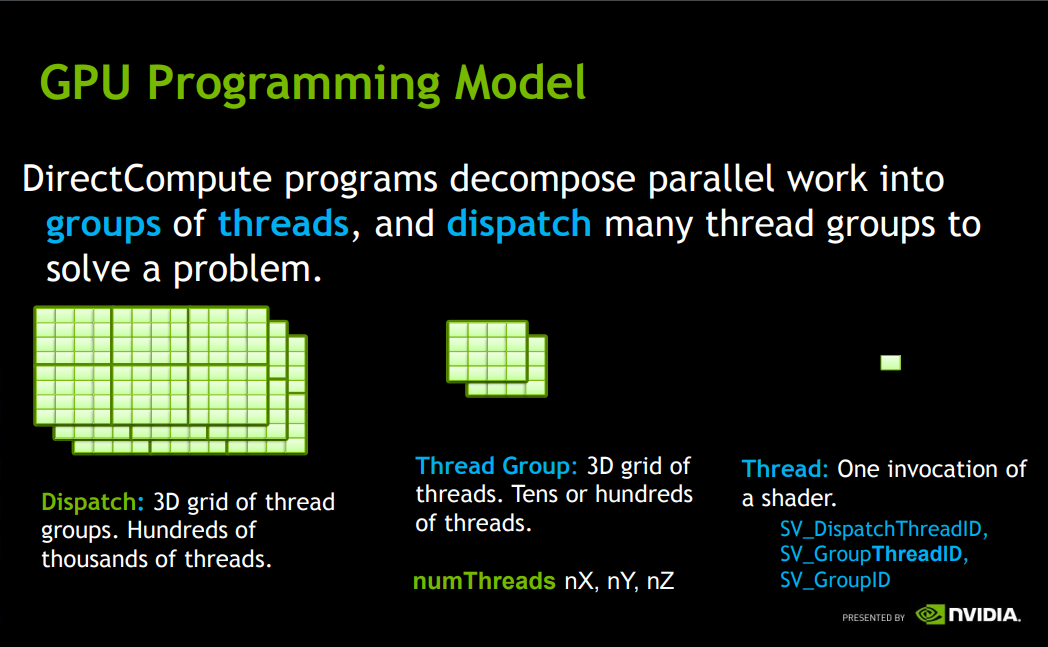
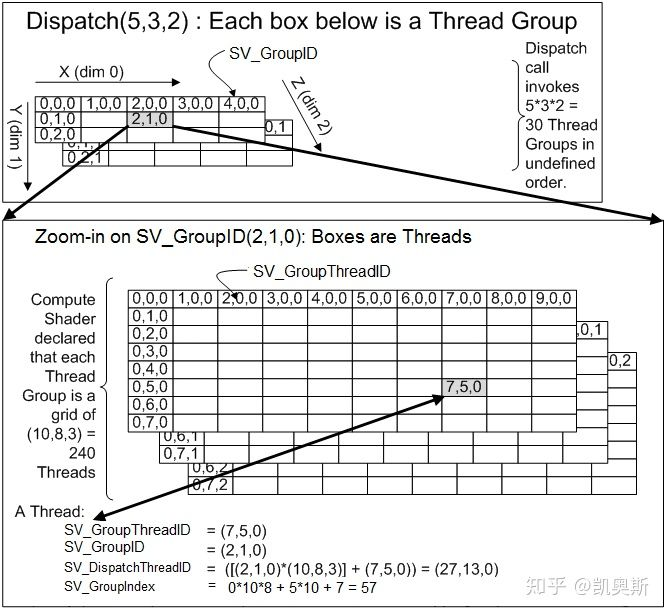
GroupThreadID,GroupID,DispatchThreadID和GroupInde一般是用来作为索引来获取Buffer、Texture或者thread group shared memory里的数据。
Dispatch
在CPU端,我们可以通过这个接口,将Compute Shader dispatch出去。Dispatch就相当于Drawcall,但是没有draw。 kernelIndex可以通过ComputeShader.FindKernel来获取。
string s = String.Empty;
Thread Group
将多个线程组合成为一个group,在这个group里面,每个线程有自己的相对位置。group内,还可以使用 共享变量,相互通信 。
Thread
将numthreads这个attribute声明在kernel函数的前面,就表示一个thread group中有多少个thread。
string s = String.Empty;
The kernel function determines what pixel it should be working on based on the id of the thread running the function.
How to set numthreads(X, Y, Z)
The X, Y and Z values indicate the size of the thread group in a particular direction and the total of XYZ gives the number of threads in the group.
Compute Shader代码中划分的线程组大小应当是GPU划分的线程组(Warp)大小的整倍数倍。GPU硬件上会分线程组来执行,以实现代码中划分的一个线程组的功能。 如果代码中定义的线程组的大小是65个Thread,而GPU划分的线程组(Warp)的大小是64,则GPU会先用一个Warp完成64个线程的工作,再用一个Warp完成剩下1个现成的工作。
nVidia’s hardware is organized in groups of 32 threads, any threadgroups of less than 32 threads is still using 32 hardware threads. The extra hardware threads are just prevented from writing to memory so they have no effect.
AMD’s hardware threadgroup size is 64 which is why 64 is recommended as a good common minimum.
Kernels
Compute kernels can be thought of as the body of loops. In computing, a compute kernel is a routine compiled for high throughput accelerators separate from but used by a main program. They are sometimes called compute shaders , sharing execution units with vertex shaders and pixel shaders on GPUs, but are not limited to execution on one class of device, or graphics APIs.
Compute kernels roughly correspond to inner loops when implementing algorithms in traditional languages.
Data Buffer
| GPU Side | CPU Side |
|---|---|
| *StructuredBuffer | ComputeBuffer |
| RWTexture*D | RenderTexture |
string s = String.Empty;
ComputeBuffer - ComputeShader programs often need arbitrary data to be read & written into memory buffers. ComputeBuffer class is exactly for that - you can create & fill them from script code, and use them in compute shaders or regular shaders.
Render Textures - can also be written into from compute shaders, if they have “random access” flag set (“unordered access view” in DX11).
groupshared
使用groupshared可以将一个变量标记为组内共享。又叫TGSM(Thread Group Shared Memory)。
Barrier
当我们在不同线程访问同一个资源的时候,我们需要使用barrier来进行阻塞和同步。
string s = String.Empty;
Interlocked
原子操作,不会被线程调度机制打断。 只能用于int/uint。
string s = String.Empty;
其他概念
Programmable processors – vertex, primitive, fragment and mainly compute pipelines allow programmer to perform kernel on streams of data
Rasterizer – creates fragments and interpolates per-vertex constants such as texture coordinates and color
Texture unit – read-only memory interface
Framebuffer – write-only memory interface
Unity Compute Shader
The #pragma kernel line can optionally be followed by a number of preprocessor macros to define while compiling that kernel, for example:
string s = String.Empty;
Invoke
In your script, define a variable of ComputeShader type and assign a reference to the Asset.
invoke them with ComputeShader.Dispatch function
API
ComputeShader
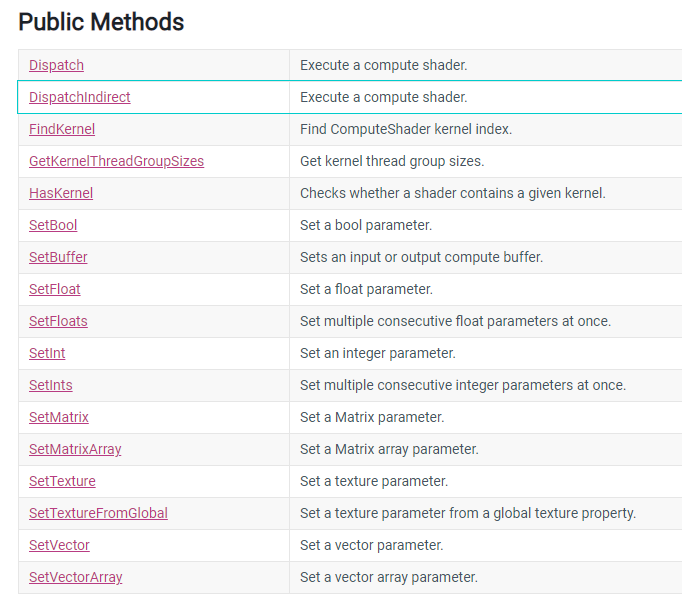
ComputeBuffer
GPU data buffer, mostly for use with compute shaders.
You can create & fill them from script code, and use them in compute shaders or regular shaders.
On the shader side, ComputeBuffers with default ComputeBufferType map to StructuredBuffer and RWStructuredBuffer in HLSL.
string s = String.Empty;
ComputeBuffer.GetData - Read data values from the buffer into an array.
ComputeBuffer.SetData - Set the buffer with values from an array.
The array can only use blittable types.
blittable types
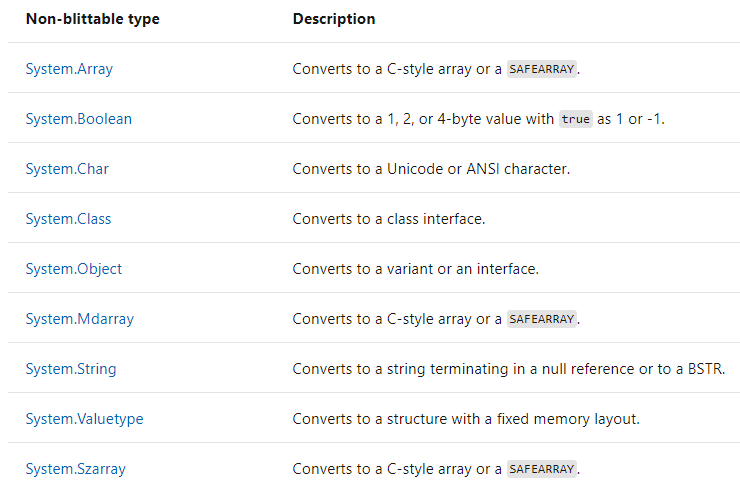
Most data types have a common representation in both managed and unmanaged memory and do not require special handling by the interop marshaler. These types are called blittable types because they do not require conversion when they are passed between managed and unmanaged code.
Structures that are returned from platform invoke calls must be blittable types. Platform invoke does not support non-blittable structures as return types.
string s = String.Empty;
One-dimensional arrays of blittable primitive types, such as an array of integers.
Formatted value types that contain only blittable types.
Cross-platform support
As with regular shaders, Unity is capable of translating compute shaders from HLSL to other shader languages.
Out-of-bounds memory accesses are bad.
Initialize your resources.
Bind all the resources your compute shader declares.
Metal (for iOS and tvOS platforms) does not support atomic operations on Textures. Metal also does not support GetDimensions queries on buffers. Pass the buffer size info as constant to the shader if needed.
OpenGL ES 3.1 (for (Android, iOS, tvOS platforms) only guarantees support for 4 compute buffers at a time.
性能优化
尽量减少Group之间的交互:硬件不支持全局同步,不同步的话容易导致错误和崩溃。
GPU一次Dispatch会调用64(AMD称为wavefront)或32(NVIDIA称为warp)个线程束,所以,numthreads的乘积最好是这个值的整数倍。但是Mali不需要这种优化。此外,Metal可以通过api获取这个值。
避免回读:回读操作在渲染管线中使用的比较少,而在CS中可能会被用到,所以重点提一下。
避免分支,重点避免在thread group中间的分支,这其实跟第二点是相关的,如果在wavefront/warp整数倍的地方发生分支,消耗就会小很多。
尽量保证内存连续性。
使用[unroll]来打开循环,有些时候需要手动unroll。
Getting memory from the GPU back to your CPU takes time. ( this is the spot where you’ll notice the biggest performance hit when using compute shaders ) optimize your buffers so that they’re as small as possible while still being useable and to only pull data out of your shader when you absolutely need it.
注意: once you’re done working with your buffer, you should call buffer.Dispose() to make sure the buffer can be GC’ed.
Ref
https://docs.unity3d.com/Manual/class-ComputeShader.html http://kylehalladay.com/blog/tutorial/2014/06/27/Compute-Shaders-Are-Nifty.html https://en.wikipedia.org/wiki/OpenCL https://en.wikipedia.org/wiki/General-purpose_computing_on_graphics_processing_units https://en.wikipedia.org/wiki/CUDA https://www.khronos.org/opengl/wiki/Compute_Shader https://zhuanlan.zhihu.com/p/53785954 http://kylehalladay.com/blog/tutorial/2014/06/27/Compute-Shaders-Are-Nifty.html https://www.reddit.com/r/GraphicsProgramming/comments/aeyfkh/for_compute_shaders_is_there_an_ideal_numthreads/