
【CG】Front, Back, and Other Buffers
本文目录 7 个章节
【CG】Front, Back, and Other Buffers
创建时间:2020/12/7 17:14
- 【CG】Front, Back, and Other Buffers
- frame buffer
- color buffer
- double buffering
- Buffer Functions
- Creating a framebuffer
- related links
- Ref
OpenGL stores and manipulates pixel data in a framebuffer.
frame buffer
The framebuffer consists of a set of logical buffers:
color buffer - for writing color values
depth - buffer to write and test depth information
stencil buffers - allows us to discard certain fragments based on some condition.
The combination of these buffers is stored somewhere in GPU memory and is called a framebuffer.
color buffer
The color buffer itself consists of a set of logical buffers; this set can include a front-left, a front-right, a back-left, a back-right, and some number of auxiliary buffers.
A particular pixel format or OpenGL implementation may not supply all of these buffers. For example, the current version of Microsoft’s implementation of OpenGL in Windows does not support stereoscopic images, so a pixel format cannot have left and right color buffers.
double buffering
Two color buffers are available to applications that use double buffering: a front buffer and a back buffer. By default, drawing commands are directed to the back buffer (the off-screen buffer ), while the front buffer is displayed on the screen. When the off-screen buffer is ready for display, you call SwapBuffers, and Windows copies the contents of the off-screen buffer to the on-screen buffer.
The generic implementation uses a device-independent bitmap (DIB) as the back buffer and the screen display as the front buffer. Hardware devices and their drivers may use different approaches.
The OpenGL core function, glDrawBuffer, selects buffers for writing and clearing.
Buffer Functions
To copy the contents of an off-screen buffer to an on-screen buffer, call SwapBuffers.
The following illustration shows how the contents of the buffers are copied when calling SwapBuffers.
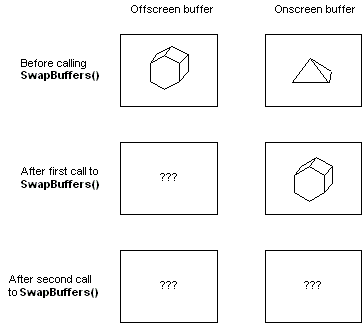
The following functions also affect buffers: glReadBuffer glReadPixels glCopyPixels glAccum glColorMask glDepthMask glIndexMask glStencilMask glClearAccum glClearColor glClearDepth glClearIndex glClearStencil
Creating a framebuffer
Just like any other object in OpenGL we can create a framebuffer object (abbreviated to FBO ) by using a function called glGenFramebuffers:
related links
https://www.khronos.org/opengl/wiki/Default_Framebuffer https://learnopengl.com/Advanced-OpenGL/Framebuffers
Ref
https://docs.microsoft.com/en-us/windows/win32/opengl/front–back–and-other-buffers