
本文目录 20 个章节
【OS Unix-like】环境变量相关问题
# 【OS Unix-like】环境变量相关问题
创建时间:2021/7/8 16:17
- Environment variable
- Shell
- Shell类型与使用方式
- Mac上的shell类型
- 设置使用的Shell
- login shell & interactive shell
- MacOS与Linux的不同
- 各种情况
- 命令与技巧
- Initialization files与环境变量
- sh
- bash Initialization files
- interactive/non-interactive + login shell
- interactive + non-login shell
- non-interactive + non-login shell
- bash以sh命启动
- Best Practice
- zsh profile
- SSH登录的情况
- Ref
- Shell
Environment variable
环境变量(environment variables)一般是指在操作系统中用来指定操作系统运行环境的一些参数,它包含了一个或者多个应用程序所将使用到的信息,会影响程序运行的行为。
常见环境变量:
PATH: 当要求系统运行一个程序而没有告诉它程序所在的完整路径时,系统除了在当前目录下面寻找此程序外,还应到path中指定的路径去找。 JAVA_HOME ANDROID_HOME ANDROID_NDK_ROOT ANDROID_SDK_ROOT
TEMP: 临时文件夹位置
Shell
The shell is a command line interpreter.
Shell类型与使用方式
shell - the command-line interpreter
Bourne Shell(sh) Korn shell(ksh) Bourne Again shell(bash) POSIX shell(sh)
Mac上的shell类型
Mac uses either zsh or bash as the command-line interpreter for the login shell and interactive shell.
Mac系统上的命令行解释程序有: /bin/zsh, /bin/bash, /bin/csh, /bin/dash, /bin/ksh, /bin/sh, or /bin/tcsh
listed in /etc/shells
使用SSH远程登录Mac用户,使用的Shell程序取决于该用户设置的默认Login shell。
设置使用的Shell
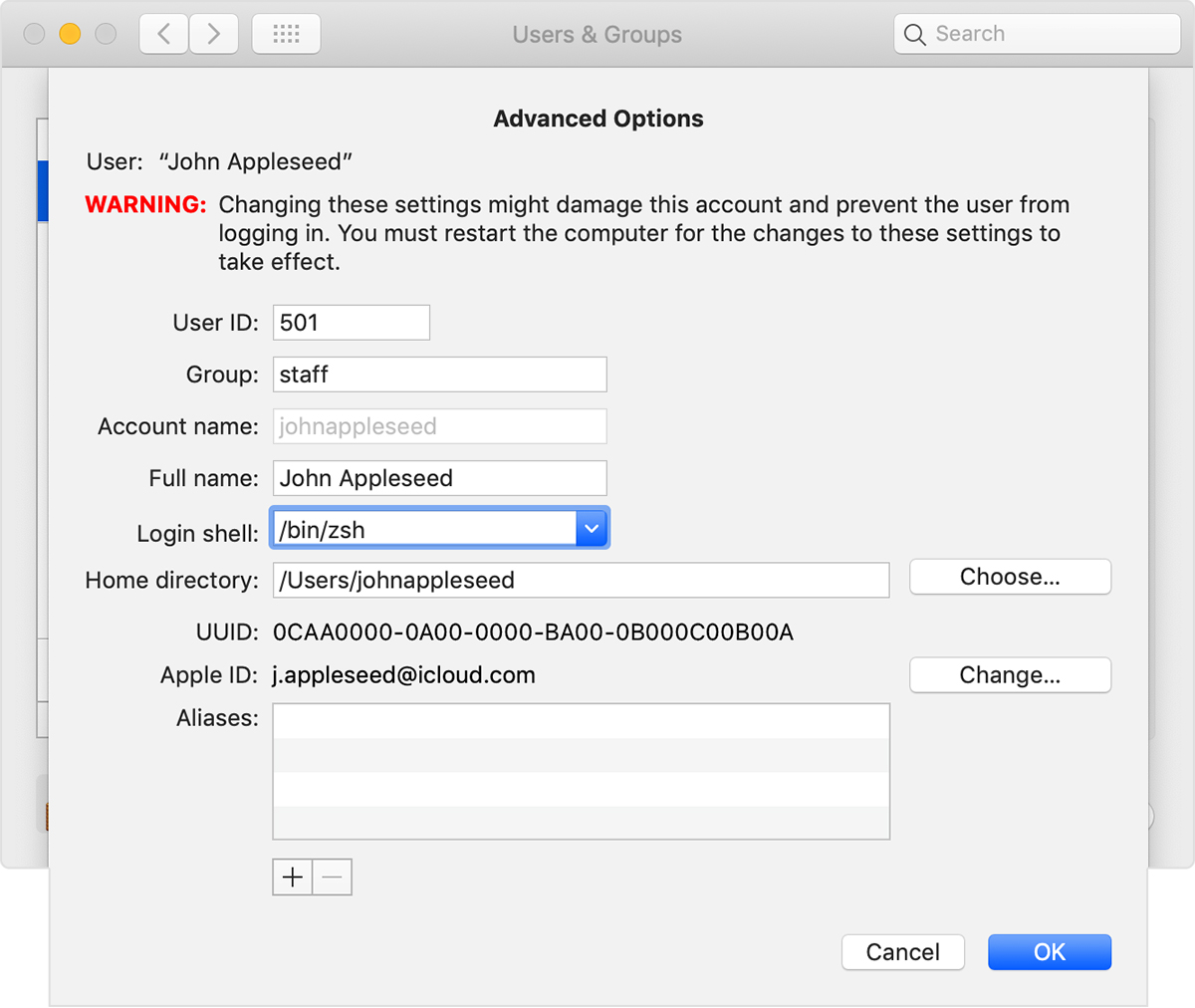
- 设置用户的默认Login shell: System Preferences->Users & Groups->Unlock->Control-click User
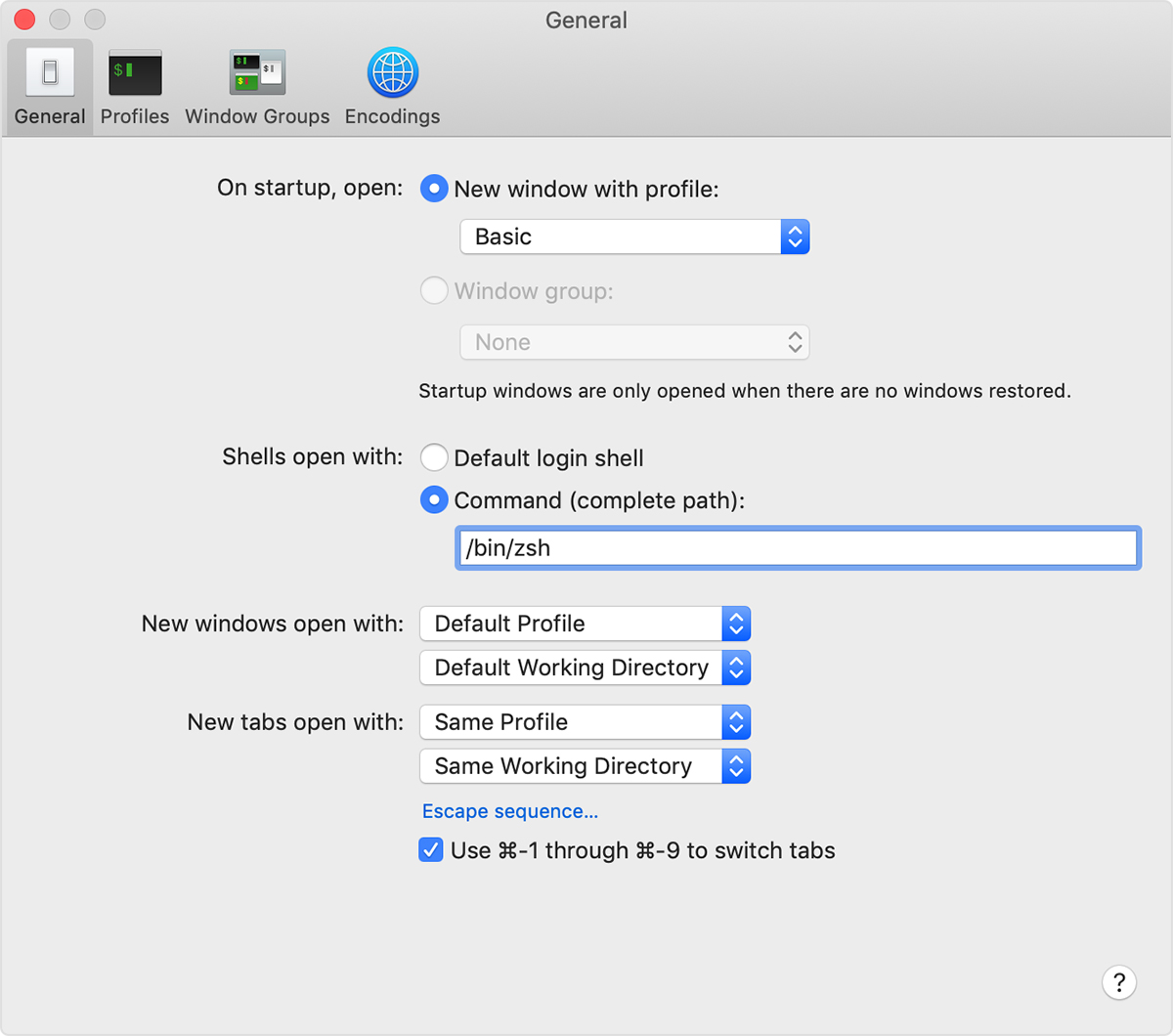
- 设置Terminal的shell
- 设置某个脚本使用的shell: If the program is a file beginning with #!, the remainder of the first line specifies an interpreter for the program.
login shell & interactive shell
A login shell is one whose first character of argument zero is a -, or one started with the --login option.
Log in at the console connect via ssh use sudo -i or su - to run commands as another user
An interactive shell is one started without non-option arguments and without the -c option whose standard input and error are both connected to terminals (as determined by isatty(3)), or one started with the -i option.
bash script.sh 执行脚本的命令就会启动一个non-interactive shell,它不需要与用户进行交互,执行完后它便会退出创建的shell。
MacOS与Linux的不同
Linux runs a login shell when the user logs into a graphical session, when you open a terminal application, those shells are non-login shells;
OS X does not run a shell upon graphical login, when you run a shell from Terminal.app, that is a login shell.
If you want your aliases to work in both login and non-login shells, you should put them in .bashrc and source .bashrc in your .bash_profile
string str1 = String.Empty;
string str2 = String.Empty;

str2 = String.Intern(sb.ToString());

if((object)str1==(object)str2)
    Console.WriteLine("The strings are equal.");
else
    Console.WriteLine("The strings are not equal.");
各种情况
登陆机器后的第一个shell:login + interactive 新启动一个shell进程,如运行bash:non-login + interactive 执行脚本,如bash script.sh:non-login + non-interactive 运行头部有如#!/usr/bin/env bash的可执行文件,如./executable:non-login + non-interactive 通过ssh登陆到远程主机:login + interactive 远程执行脚本,如ssh user@remote script.sh:non-login + non-interactive 远程执行脚本,同时请求控制台,如ssh user@remote -t 'echo $PWD':non-login + interactive 在图形化界面中打开terminal: Linux上: non-login + interactive Mac OS X上: login + interactive
命令与技巧
显示环境变量:
string str1 = String.Empty;
string str2 = String.Empty;

str2 = String.Intern(sb.ToString());

if((object)str1==(object)str2)
    Console.WriteLine("The strings are equal.");
else
    Console.WriteLine("The strings are not equal.");
临时设置环境变量:
string str1 = String.Empty;
string str2 = String.Empty;

str2 = String.Intern(sb.ToString());

if((object)str1==(object)str2)
    Console.WriteLine("The strings are equal.");
else
    Console.WriteLine("The strings are not equal.");
显示当前运行的程序
string str1 = String.Empty;
string str2 = String.Empty;

str2 = String.Intern(sb.ToString());

if((object)str1==(object)str2)
    Console.WriteLine("The strings are equal.");
else
    Console.WriteLine("The strings are not equal.");
Initialization files与环境变量
bash profile - to set environment variables , aliases , or path variables
- 系统级环境变量在
/etc/目录下配置,所有用户都生效 - 用户级的环境变量在
~/目录下配置
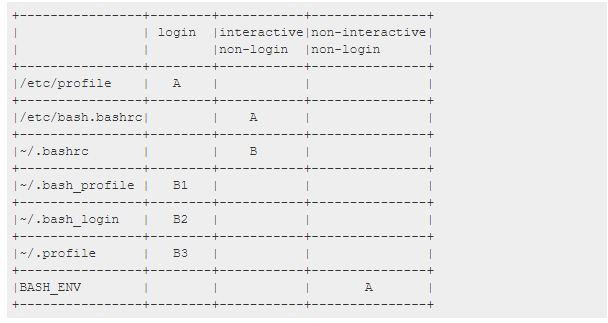
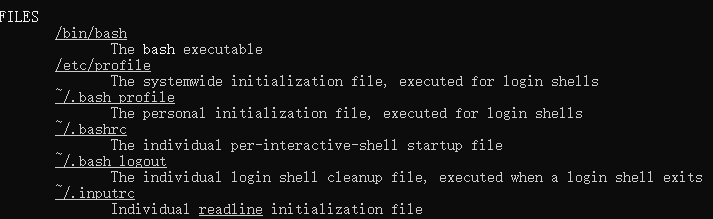
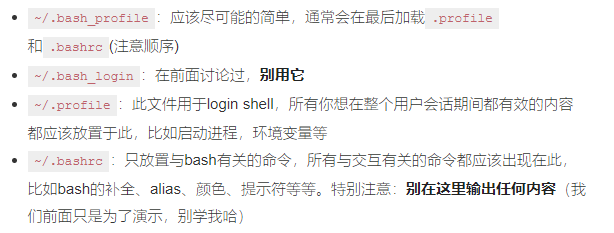
对profile文件的加载,不同的shell程序的规则不同,但大体上都类似。可以通过命令man bash 来查看对应shell程序的规则。
- profile is loaded when the shell is a login shell
- rc(Run Commands) runs for each new Terminal session
sh
- interactive + login: 读取/etc/profile和~/.profile
- non-interactive + login: 同上
- interactive + non-login: 读取ENV环境变量对应的文件
- non-interactive + non-login: 不读取任何文件
bash Initialization files
string str1 = String.Empty;
string str2 = String.Empty;

str2 = String.Intern(sb.ToString());

if((object)str1==(object)str2)
    Console.WriteLine("The strings are equal.");
else
    Console.WriteLine("The strings are not equal.");
string str1 = String.Empty;
string str2 = String.Empty;

str2 = String.Intern(sb.ToString());

if((object)str1==(object)str2)
    Console.WriteLine("The strings are equal.");
else
    Console.WriteLine("The strings are not equal.");
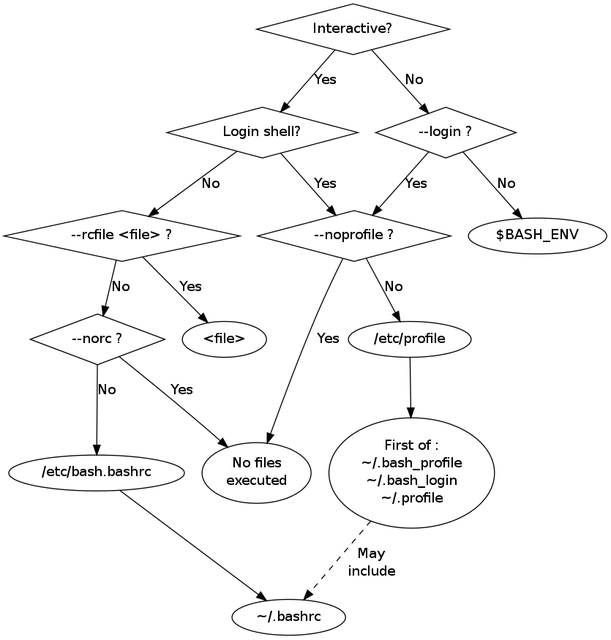
为何要设置这么多文件?是为了不同shell之间进行兼容,可参考:https://feihu.me/blog/2014/env-problem-when-ssh-executing-command-on-remote/
interactive/non-interactive + login shell
除去/etc/profile首先被加载外,其余三个文件的加载顺序为:/.bash_profile > ~/.bash_login > ~/.profile,只要找到一个便终止查找。
加载过程的伪代码:
string str1 = String.Empty;
string str2 = String.Empty;

str2 = String.Intern(sb.ToString());

if((object)str1==(object)str2)
    Console.WriteLine("The strings are equal.");
else
    Console.WriteLine("The strings are not equal.");
interactive + non-login shell
启动shell时加载 /etc/bashrc ~/.bashrc
non-interactive + non-login shell
string str1 = String.Empty;
string str2 = String.Empty;

str2 = String.Intern(sb.ToString());

if((object)str1==(object)str2)
    Console.WriteLine("The strings are equal.");
else
    Console.WriteLine("The strings are not equal.");
会去寻找环境变量BASH_ENV,将变量的值作为文件名进行查找,如果找到便加载它。
bash以sh命启动
If bash is invoked with the name sh, it tries to mimic the startup behavior of historical versions of sh as closely as possible, while conforming to the POSIX standard as well. bash会尽可能的模仿sh,读取文件规则与sh相同。
Best Practice
zsh profile
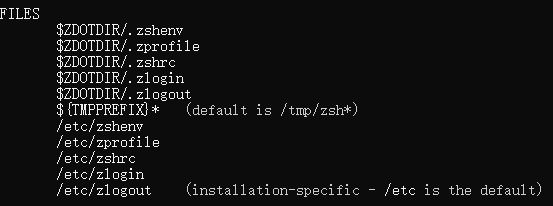
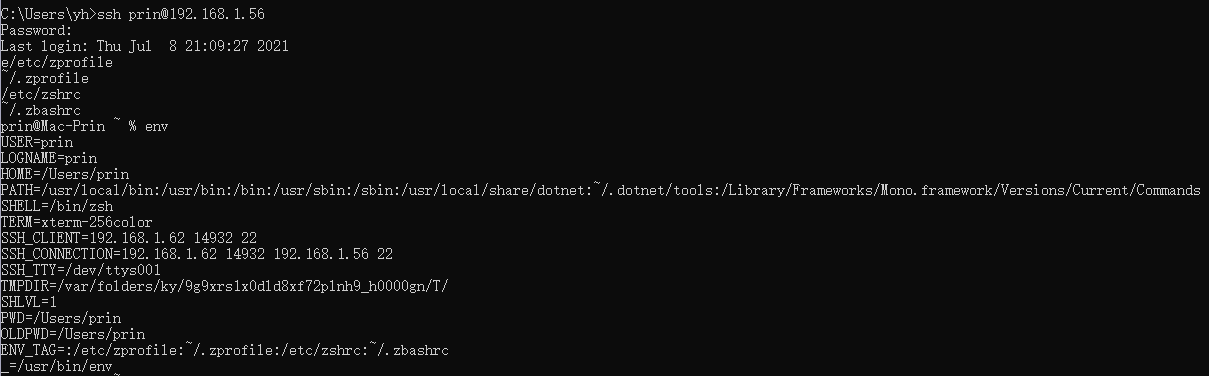
- .zprofile is equivalent to .bash_profile and runs at login, including over SSH
- .zshrc is equivalent to .bashrc and runs for each new Terminal session
加载顺序: /etc/zprofile ~/.zprofile /etc/zshrc ~/.zbashrc
If you're using .profile (a POSIX-compliant profile), you can make zsh automatically read its settings by adding this command to .zprofile:
string str1 = String.Empty;
string str2 = String.Empty;

str2 = String.Intern(sb.ToString());

if((object)str1==(object)str2)
    Console.WriteLine("The strings are equal.");
else
    Console.WriteLine("The strings are not equal.");
SSH登录的情况
以下两种方法执行的结果不同:
- 不指定命令——ssh会直接返回一个Login shell,会执行 ~/.profile中的内容。
- ssh访问时,直接输入要执行的命令——非login,非interactable,~/.profile 不会生效。命令会在远程主机上执行,返回结果后退出。
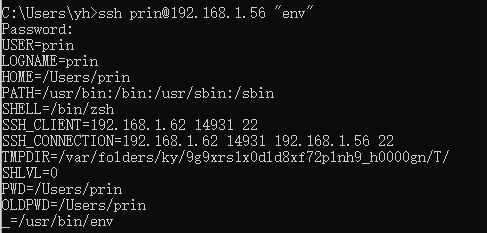
man ssh:If command is specified, it is executed on the remote host instead of a login shell.
Ref
https://support.apple.com/en-us/HT208050 https://cloud.tencent.com/developer/article/1773182 https://feihu.me/blog/2014/env-problem-when-ssh-executing-command-on-remote/