
本文目录 33 个章节
【CI】Unity-XCode-Build-iOS
# 【CI】Unity-XCode-Build-iOS
创建时间:2021/7/29 19:09
- XCode工程相关知识
- Xcode Concepts
- Project
- Target
- Build Settings
- Scheme
- 文件
- 语言
- 证书相关
- XCode打包
- 选择IOS版本
- 证书与签名
- Xcode中的配置
- 总结
- 命令行
- Unity中的设置
- Unity打IPA完整过程
- 自动化
- Unity打包XCode工程
- 对XCode工程的签名(Signing)进行配置
- XCode打包IPA
- XCode Build初次安装
- 证书与签名
- 方法一:build & zip
- xcconfig
- 方法二:archive & export archive
- Archive
- IPA Export (please note the export options plist)
- The Export Options Plist
- 自动安装ipa
- 第三方SDK的集成
- 坑点
- Ref
- Xcode Concepts
XCode工程相关知识
Xcode Concepts
Project
An Xcode project is a repository for all the files, resources, and information required to build one or more software products.
Project contains one or more targets.
Target
最小可编译单元,每一个 target 对应一个编译输出,这个输出可以是一个链接库,一个可执行文件或者一个资源包。 A target specifies a product to build and contains the instructions for building the product from a set of files in a project or workspace.
A target defines a single product; it organizes the inputs into the build system— the source files and instructions for processing those source files —required to build that product.
Build Settings
A build setting is a variable that contains information about how a particular aspect of a product’s build process should be performed.
You can specify build settings at the project or target level.
A build configuration specifies a set of build settings used to build a target's product in a particular way.
it is common to have separate build configurations for debug and release builds of a product.
Scheme
An Xcode scheme defines a collection of targets to build, a configuration to use when building, and a collection of tests to execute.
文件
Plist file: Information Property List Files. a structured text file that contains essential configuration information for a bundled executable. (Unicode UTF-8, XML)
语言
OC(Objective-C)代码:Unity接入一些iOS原生的SDK需要使用。相关链接:https://blog.csdn.net/linxinfa/article/details/107375140
证书相关
证书概念与配置:https://zhuanlan.zhihu.com/p/69162456
Developer证书
AppID = Bundle ID 用来在App Store上全球唯一标识每一个应用程序的。
<1> Explicit App ID:填写一个精确的ID,如果需要做远程推送/游戏中心/内购等功能,必须填写准确的bundle ID。 <2> Wildcard App ID:填写一个模糊的ID,如果不需要做远程推送/游戏中心/内购等功能,直接填写模糊的bundle ID即可,这样可以提升我们的开发效率。在开发中,为了保证方便,使用AppID时,可以使用通配符*,替代所有的应用程序。
推送证书(分为开发和发布两种,类型分别为APNs Development ios,APNs Distribution ios),该证书在appID配置中创建生成,和开发者证书一样,安装到开发电脑上;
Provisioning Profiles(PP文件):件将appID,开发者证书,硬件Device绑定到一块儿,在开发者中心配置好后可以添加到Xcode上,也可以直接在Xcode上连接开发者中心生成,真机调试时需要在PP文件中添加真机的udid;
XCode打包
Development Deployment:https://wiki.genexus.com/commwiki/servlet/wiki?34616,HowTo%3A+Create+an+.ipa+file+from+XCode 手动配置:https://blog.csdn.net/cyuyanenen/article/details/51925005
iTunes已经被Apple弃用,因此网上使用iTunes安装ipa的方法不可行。使用Xcode->window->Devices&Simulators 即可。
选择IOS版本
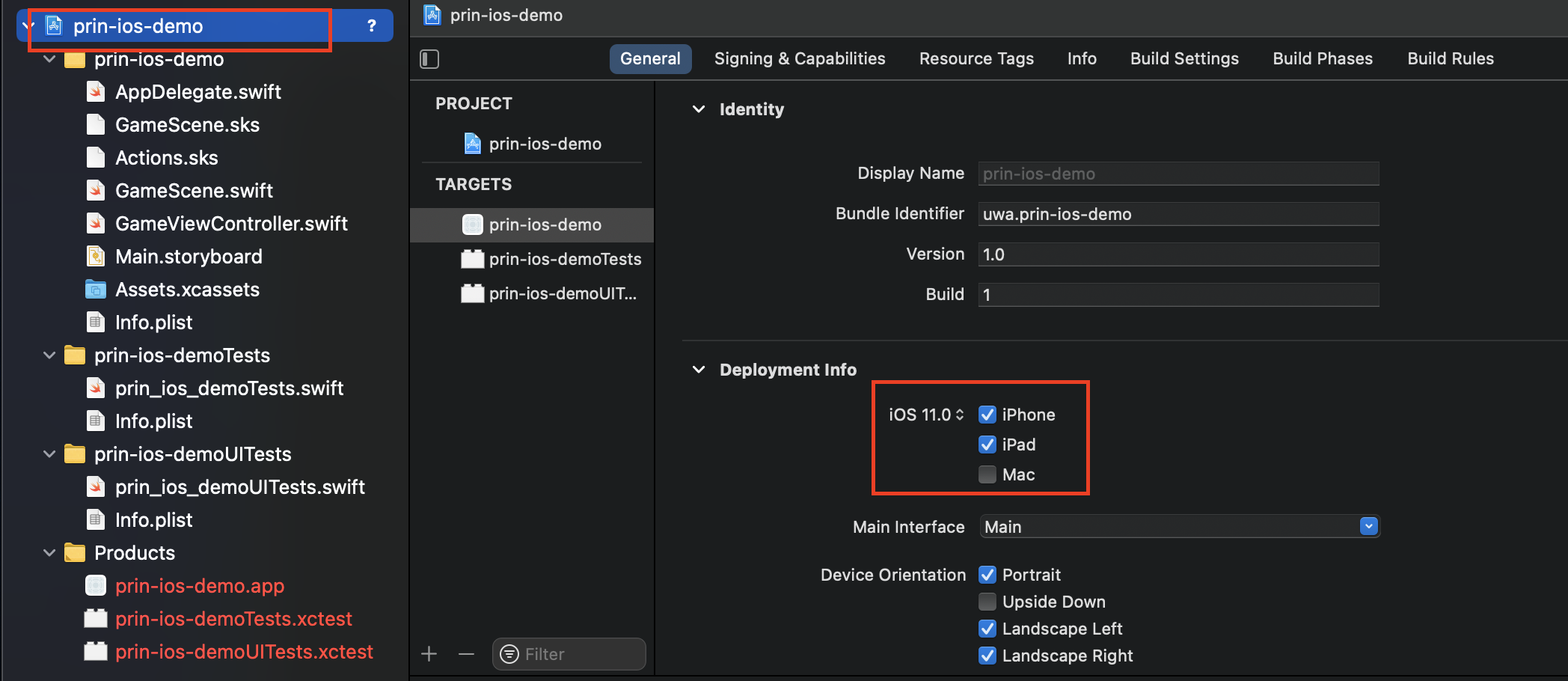
iOS版本要 <= 目标设备的iOS版本。设备的iOS版本向下兼容app的目标iOS版本。
证书与签名
用开发者帐号登陆开发者中心 创建开发者证书 appID 添加调试真机(Devices) (在appID中开通推送服务) (在开通推送服务的选项下面创建推送证书) 在PP文件中绑定所有信息
命令行签名失败:https://medium.com/@ceyhunkeklik/how-to-fix-ios-application-code-signing-error-4818bd331327
Xcode中的配置
Accounts配置:Xcode -> Preferences -> Accounts 项目配置:选中项目,点击 Signing & Capabilities Product Scheme配置(Archive等):Product->Scheme->Edit Scheme
Signing 配置方法: 选中项目->BuildSettings->Signing中配置好即可。 配置项:
- Code Signing Style(Manual, Automatic)
- Code Signing identity
- Development Team
- Provisioning Profile
只要 Provisioning Profile与Development Team, Bundle ID, Code Signing identity相匹配即可。 最终,这些设置都会存储在文件 XXX.xcodeproj->project.pbxproj当中。
总结
Xcode中证书的配置关键就是两点:
- 登录加入了Developer Team的账号
- 选择Team,使用Profile将Certificates、Devices、AppID绑定到一起。
配置Profile的方式有两种:
- Automatically manage signing: 自动管理profiles、app IDs, certificates
- 手动配置:要在Web上配置好,下载Profile。使用的profile要将合法的Certificates、Devices、AppID绑定到一起。
使用证书的地方:
- 选中项目,点击 Signing & Capabilities,配置好签名(profile)才可以进行Archive。
- Distribute时,根据不同的Method of distribution,会需要不同的证书。
总之,创建好账户、证书,配置好工程即可。
- 在线上的account中为Mac设备创建好证书,配置好device、app id。
- 在Xcode中登录账户,为工程的开发配置好profile,打包时设置好profile。
命令行
https://www.jianshu.com/p/08ddc8777c78 https://www.cnblogs.com/zhou--fei/p/11371019.html
最简单的,直接build,其他的按照默认配置来
string a = "test";
string tmp = "est";
string b = "t" + tmp;
Console.WriteLine(string .ReferenceEquals(str1, str2));
Unity中的设置
Unity打IPA完整过程
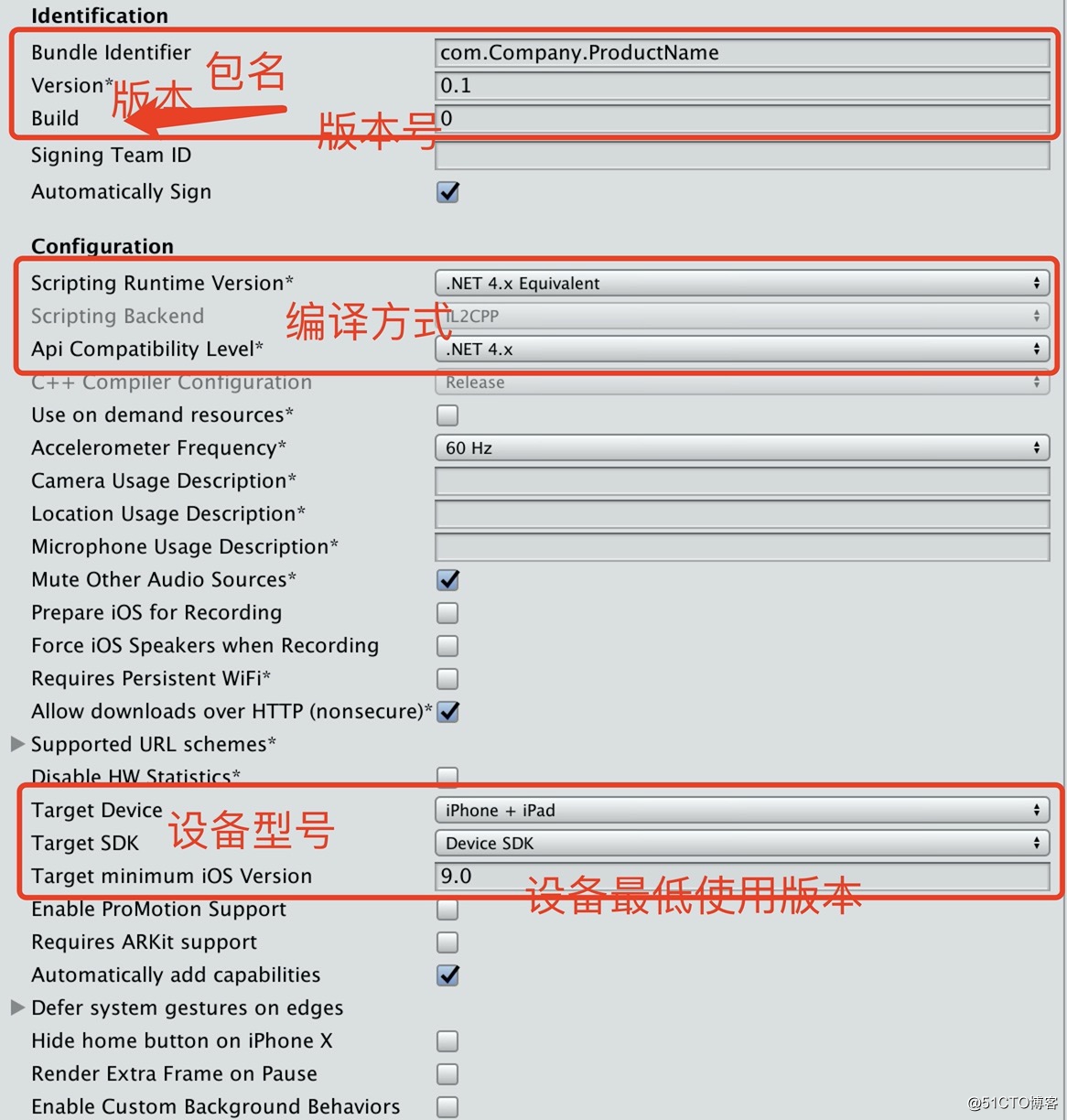
需要设置的内容:
自动化
可参考的博客: https://www.testdevlab.com/blog/2019/07/xcode-provisioning-profile-automation-for-ci/ https://medium.com/@marksiu/how-to-build-ios-project-with-command-82f20fda5ec5
可参考的脚本: https://github.com/qiubaiying/iOSAutoArchiveScript/blob/master/iOSAutoArchiveScript/iOSAutoArchiveScript.sh https://www.jianshu.com/p/616b6247ef99 https://github.com/webfrogs/xcode_shell/blob/master/ipa-build
Unity打包XCode工程
Shell脚本调用Unity进行打包,执行一些配置。
坑点:‘UnityFramework/UnityFramework.h‘ file not found 解决:https://blog.csdn.net/mango9126/article/details/114835717
对XCode工程的签名(Signing)进行配置
使用Unity脚本,利用XUPorter 和 OnPostProcessBuild 接口进行XCode项目的配置。
关于Automatically manage signing: 使用Manual模式,可能会遇到各种问题,如Profile中不包含所选证书,Profile不支持In-App Purchase feature等。使用Automatically,会自动生成合适的Profile,只要选择合适的团队,创建好合适的证书,以上问题就不会存在了。
XCode打包IPA
https://developer.apple.com/library/archive/technotes/tn2339/_index.html
概念:
Build : The compilation for your source code to execute the project Archive : As its name says, it is the overall package (that contains .app and other related files). From archive you can create .IPA file similar to .apk file (android) with that you can distribute your application.
有两套方案:
使用build命令,分别对各个target进行build,然后手动把Build结果压缩成ipa文件(ipa本质上就是 app文件的压缩文件 )。 优点:这样可以分别为每个target配置Build Settings(使用xcconfig,或者直接在命令行中指定) 缺点:指令相对比较麻烦。
使用xcodebuild直接进行archive,再exportArchive,导出成ipa。
优点:xcodebuild提供API,指令比较简单 缺点:需要预先把scheme配置好,设置签名、ProvisioningProfiles等。用命令行设置scheme不方便。
XCode Build初次安装
使用Shell命令调用XCode的Command Line Tools工具进行打包。
Error: tool 'xcodebuild' requires Xcode
string a = "test";
string tmp = "est";
string b = "t" + tmp;
Console.WriteLine(string .ReferenceEquals(str1, str2));
证书与签名
需要unlock keychain,否则会签名失败:Command CodeSign failed with a nonzero exit code
string a = "test";
string tmp = "est";
string b = "t" + tmp;
Console.WriteLine(string .ReferenceEquals(str1, str2));
https://stackoverflow.com/questions/577750/running-xcodebuild-from-a-forked-terminal/12235462
签名失败:
- https://medium.com/@ceyhunkeklik/how-to-fix-ios-application-code-signing-error-4818bd331327
- https://developer.apple.com/forums/thread/669328
- https://stackoverflow.com/questions/24023639/xcode-command-usr-bin-codesign-failed-with-exit-code-1-errsecinternalcomponen
自动导入证书:https://zhuanlan.zhihu.com/p/400261513
方法一:build & zip
List infos:
string a = "test";
string tmp = "est";
string b = "t" + tmp;
Console.WriteLine(string .ReferenceEquals(str1, str2));
string a = "test";
string tmp = "est";
string b = "t" + tmp;
Console.WriteLine(string .ReferenceEquals(str1, str2));
SYMROOT (Build Products Path) - The path at which all products will be placed when performing a build. By default, this is set to $(PROJECT_DIR)/build.
zip app to ipa:
string a = "test";
string tmp = "est";
string b = "t" + tmp;
Console.WriteLine(string .ReferenceEquals(str1, str2));
这步可以使用xcrun PackageApplication 来将app打包为ipa,但是这个命令在新版本中弃用了,所以不方便。
xcconfig
https://help.apple.com/xcode/mac/current/#/dev745c5c974
A build configuration file doesn’t need to list all possible build settings. It only needs to include ones you want to customize.
BUILD_SETTING_DECLARATION_NAME[CONDITIONAL=CONDITION_VALUE] = VALUE_DEFINITION
string a = "test";
string tmp = "est";
string b = "t" + tmp;
Console.WriteLine(string .ReferenceEquals(str1, str2));
import build settings from other build configuration files:
string a = "test";
string tmp = "est";
string b = "t" + tmp;
Console.WriteLine(string .ReferenceEquals(str1, str2));
方法二:archive & export archive
Archive
使用workspace:
string a = "test";
string tmp = "est";
string b = "t" + tmp;
Console.WriteLine(string .ReferenceEquals(str1, str2));
使用project:
string a = "test";
string tmp = "est";
string b = "t" + tmp;
Console.WriteLine(string .ReferenceEquals(str1, str2));
xcodebuild -scheme iOS DSTROOT="/Users/[redacted-user]/Desktop/ReleaseLocation" archive
IPA Export (please note the export options plist)
string a = "test";
string tmp = "est";
string b = "t" + tmp;
Console.WriteLine(string .ReferenceEquals(str1, str2));
The Export Options Plist
https://www.matrixprojects.net/p/xcodebuild-export-options-plist/ https://medium.com/@marksiu/how-to-build-ios-project-with-command-82f20fda5ec5
method:
- app-store
- enterprise
- ad-hoc
- development
Manual Signing
string a = "test";
string tmp = "est";
string b = "t" + tmp;
Console.WriteLine(string .ReferenceEquals(str1, str2));
自动安装ipa
https://github.com/ios-control/ios-deploy
string a = "test";
string tmp = "est";
string b = "t" + tmp;
Console.WriteLine(string .ReferenceEquals(str1, str2));
第三方SDK的集成
Multiple commands produce https://try2explore.com/questions/10012314 解决方案:
Remove files from Copy Bundle Resources 使用C#脚本来修改
Change the build system to Legacy Build System
-UseModernBuildSystem/UseNewBuildSystem=NO
参数: 0 or NO 1 or YES
bitcode bundle could not be generated linker command failed with exit code 1
https://blog.csdn.net/qq_39108767/article/details/106688493
1,让第三方库支持bitcode,(大多数情况下不太有效···) 2,关闭bitcode,"Build Setting" => "Build Options" => "Enable Bitcode" => "No"。
坑点
证书不受信任:https://www.jianshu.com/p/af6acf3cd484
Ref
https://blog.51cto.com/myselfdream/2493033 https://blog.csdn.net/Superficialtise/article/details/79699813 http://www.xuanyusong.com/archives/2720 http://www.xuanyusong.com/archives/2734 https://blog.csdn.net/ccf0703/article/details/7999112 https://developer.apple.com/library/archive/featuredarticles/XcodeConcepts/Concept-Targets.html