
【SCM】SVN使用方法与管理规范
本文目录 26 个章节
【SCM】SVN使用方法与管理规范
# 【SCM】SVN使用方法与管理规范
创建时间:2021/4/26 13:24
- SVN
- 术语
- 特性
- 版本号(Revision)
- 不同版本之间如何保存
- 常用命令
- remove & add files
- 认证相关
- 用户名密码的保存
- 冲突解决
- file conflicts
- tree conflicts
- 分支创建与合并
- 分支创建
- 分支合并
- Merge a range of revisions
- commit message
- SVN Server搭建与使用
- Linux
- 相关教程
- Windows
- Linux
- Unity项目管理方式
- Unity工程设置
- ignore配置
- 坑点
- Ref
SVN
术语
repository(版本库):文件统一存放的地方。 checkout(检出):当你手上没有源文件的时候,你需要从repository 提取一份。 commit(提交):当你已经修改了文件,你就需要Commit到repository。 update (更新):当你已经Checkout了一份文件,Update一下,你的文件就会与服务器同步。
特性
版本号(Revision)
在一个repository,版本号是一个全局资源,不管是trunk、branch还是tag,他们使用的版本号不会重复,比如现在trunk已经用掉2这个版本号,那么分支就只能往下一个,用3
不同版本之间如何保存
svn在不同的revision之间,只保留差异(diff),而不会在某个版本保留完整的项目内容。
常用命令
svn info 仓库信息 svn st 查版本状态 svn revert . -R 还原所有更改 svn cleanup . --remove-unversioned 清理未被版本控制的文件 svn update
输入用户名密码 svn update --username xxx --password xxx 其他:https://gist.github.com/hendrauzia/5123163
命令行分支与合并:https://www.cnblogs.com/zhming26/p/5886209.html
remove & add files
svn status (stat, st) — Print the status of working copy files and directories.
'?' - Item is not under version control. '!' - Item is missing
svn add — Add files, directories, or symbolic links.
-force option makes svn add recurse into versioned directories:
svn delete (del, remove, rm) — Delete an item from a working copy or the repository.
add unversioned files
string s = String.Empty;
ref: https://stackoverflow.com/questions/1071857/how-do-i-svn-add-all-unversioned-files-to-svn
delete all locally missing files
string s = String.Empty;
异常: 此处不允许铆钉版本范围(peg revision is not allowed here) Because: SVN uses the @ symbol as a way to determine a specific revision. 文件路径中有@就会报错。 解决方法:add an @ symbol at the end of the filename, like so:
string s = String.Empty;
string s = String.Empty;
ref: https://stackoverflow.com/questions/9600382/svn-command-to-delete-all-locally-missing-files ref: https://newbedev.com/svn-command-to-delete-all-locally-missing-files
认证相关
用户名密码的保存
Unix-like systems:
~/.subversion 目录保存了svn相关配置信息
~/.subversion/auth 目录下包含了svn使用过的用户信息 ~/.subversion/auth/svn.simple 一些svn账号信息,如果保存了密码,在这里还可以看保存下来的密码。
Windows: C:\Documents and Settings\Administrator\Application Data\Subversion\auth
TortoiseSVN: Settings->Saved Data->Authentication data
MacOS X上,保存密码的方式为keychain。svn.simple目录下只保存仓库的用户名,密码保存在keychain(钥匙串访问)程序中。可以打开程序来查看。
删除密码的方式:
string s = String.Empty;
或者直接删除svn.simple目录下的相关文件。
冲突解决
file conflicts
A file conflict occurs if two (or more) developers have changed the same few lines of a file.
方式一: revert 放弃修改 update 更新至最新 在最新的基础上修改后再提交
方式二: update 产生冲突文件
手动解决冲突
- 手动编辑
- 右键冲突文件->TortoiseSVN->Edit Conflicts
Mark as resolve Commit
svn产生的冲突文件:
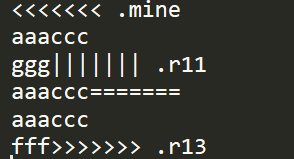
文件名.扩展名.mine : 我修改后的文件 文件名.扩展名.r旧版本 文件名.扩展名.r新版本
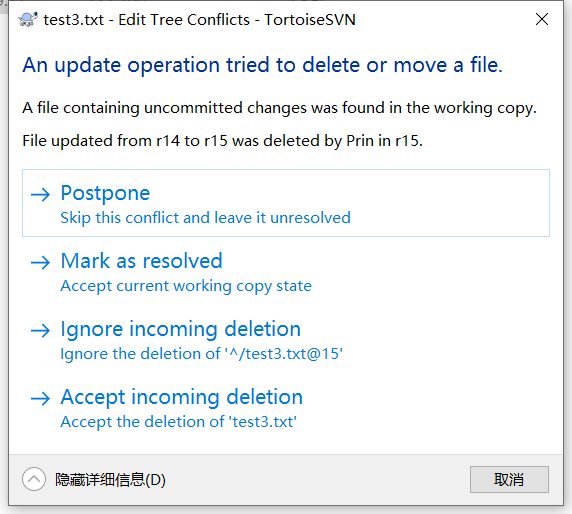
tree conflicts
A tree conflict occurs when a developer moved/renamed/deleted a file or folder, which another developer either also has moved/renamed/deleted or just modified.
解决方式:
分支创建与合并
https://blog.csdn.net/justry_deng/article/details/82259470 https://www.cnblogs.com/xdouby/p/7237005.html
分支创建
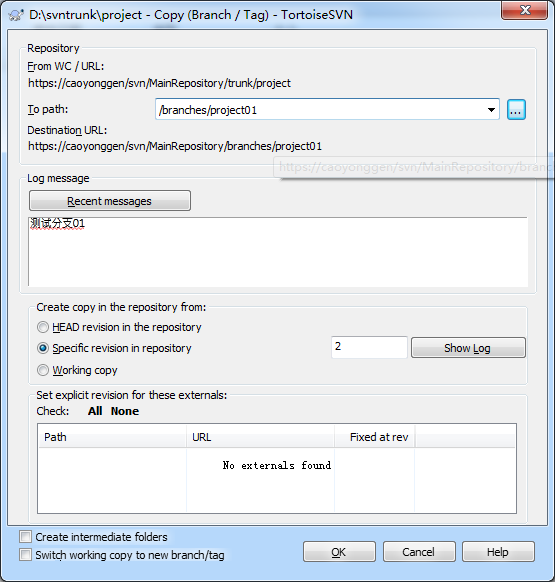
可以直接在branches目录下创建文件夹,并进行commit,也可以使用Tortoise的Branch/Tag功能,如下图所示。
分支合并
使用TortoiseSVN进行合并,实际上是合并到本地,合并完成之后,需要进行commit才会将合并结果提交到中央仓库当中。
svn上每个提交版本,都对应一组操作,你可能在本次提交中修改、新增、删除了某些文件,这些操作和这个版本对应。也就是说,SVN对每个版本只保留了这个版本与上个版本的差异信息。
合并的本质是:将某个版本(或者某个版本范围)的 操作 应用到本地的working copy。
Merge a range of revisions
all revisions: 获取指定的工程最新一个版本和最初的一个版本的差异diff,将这个diff合并到当前working copy。
假设最新版本是r-last,最初的版本r-first,r-last相对r-first而言,增加了文件a,修改了文件b,那么在合并的时候,就将“增加文件a,修改文件b”的操作应用在本地的working copy上面去,这就完成了合并
specific range,单独指定一个版本:将这个版本与最初版本的diff合并到当前working copy specific range,不填写任何值:当于选all revisions specific range,选择一个版本范围:假设用户指定了版本r1-r3,其中r1新增了文件a,r2新增了文件b,r3删除了文件c,那么在合并的时候TortoiseSVN就会将“新增文件a,新增文件b,删除文件c”应用于本地的 working copy;
一般选择specific range,明确哪些差异是我们要合并的版本的差异,把相应范围的revision合并进来即可。
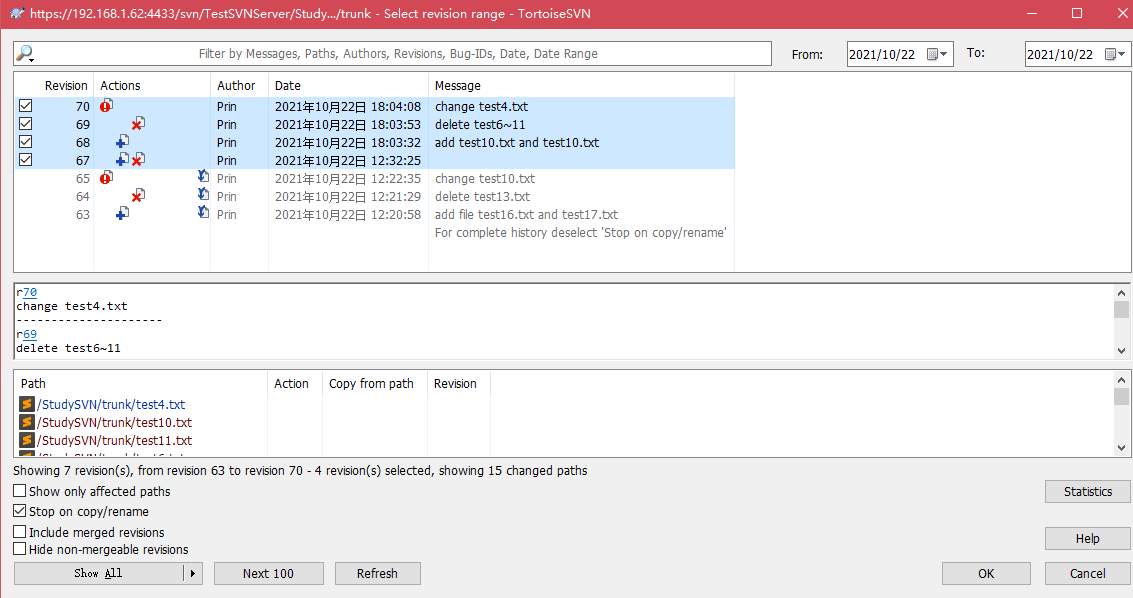
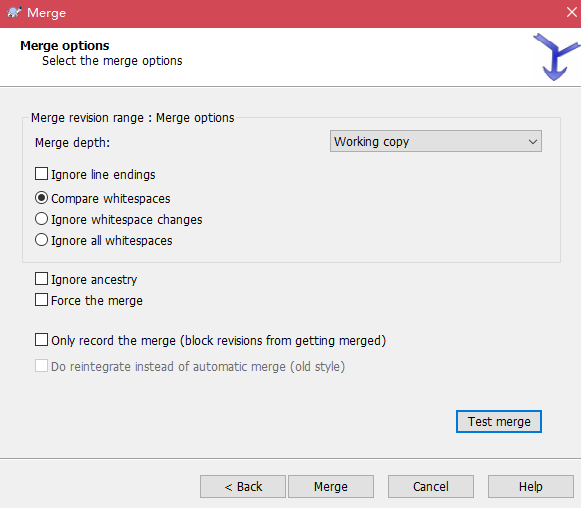
Test Merge可以预测试合并的结果:
commit message
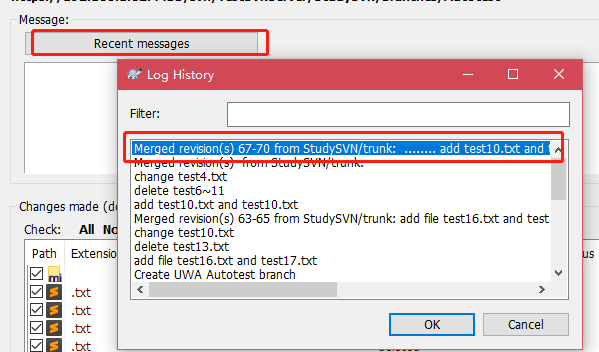
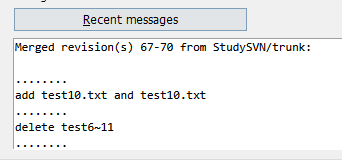
在提交合并结果时,点击“Recent Messages”即可获取自动生成的合并信息。
SVN Server搭建与使用
Linux
https://www.runoob.com/w3cnote/linux-subversion-yum.html
string s = String.Empty;
权限配置:
authz文件:
string s = String.Empty;
password文件
string s = String.Empty;
相关教程
- SVN Server
https://www.runoob.com/w3cnote/linux-subversion-yum.html https://svnbook.red-bean.com/en/1.7/svn.serverconfig.svnserve.html#svn.serverconfig.svnserve.invoking.daemon https://www.cnblogs.com/xieyuan/p/3787322.html https://www.jianshu.com/p/e7037e010635
Windows
常用操作: Create New Repository Import Existing Repository 右键Users -> Create User 右键Groups -> Create Group 右键仓库目录 -> Properties :管理用户权限
Unity项目管理方式
详细教程: https://www.jianshu.com/p/1e9a1b1ad7e4
只有两个目录是需要版本管理的:Assets、ProjectSettings。 提交的时候仅提交Assets 和 ProjectSettings 两个目录下所有东西,忽略掉其他所有目录和文件。
Unity工程设置
- Edit->Project Settings->Editor:Version Control 选择为[Visible Meta Files];
- Editor-> Project Settings->Editor:Asset Serialization Mode选择为:[Force Text]
- Edit->Preferences -> Packages:Repository选择为[External];
ignore配置
string s = String.Empty;
坑点
svn log无法显示信息:
resolution1: Set Anonomous Access to none resolution2: add * = r to authz [/]
https://bugzilla.redhat.com/show_bug.cgi?id=556712 https://devzing.com/blog/index.php/subversion-tip-fix-missing-date-and-author-in-log/