
本文目录 29 个章节
Python模块导入错误排查
Terminology
python module - a single file with a .py extension.
python package - a folder that contains at least one python module.
- For python2, a package requires a init.py file
- A python package can contain any number of nested sub-packages
└── myproject

 ├── mypackage

 │ ├──
a
.py


 └── anotherpackage

 ├──
b
.py


 ├── c
.py


 └── mysubpackage

 └── d.py
Project myproject contains two packages, mypackage and anotherpackage each of which contains a number of python modules, while the latter also contains a sub-package called mysubpackage which in turn contains an additional python module.
How does module import work behind the scenes?
import
 a
Python will execute the above statement in two steps:
- Locate, load and initialise (if required) the requested module
- Define necessary names in the local namespace and corresponding scope
Now Python interpreter is going to follow the next steps in an attempt to resolve a .
Step 1: sys.modules lookup
Initially, Python will try to search for the module’s name in sys.modules , which is a dictionary that maps module names to modules which have already been loaded. If the name is resolved successfully (which means that another module has already loaded) it will be then be made available to the local namespace otherwise, jump into step 2.
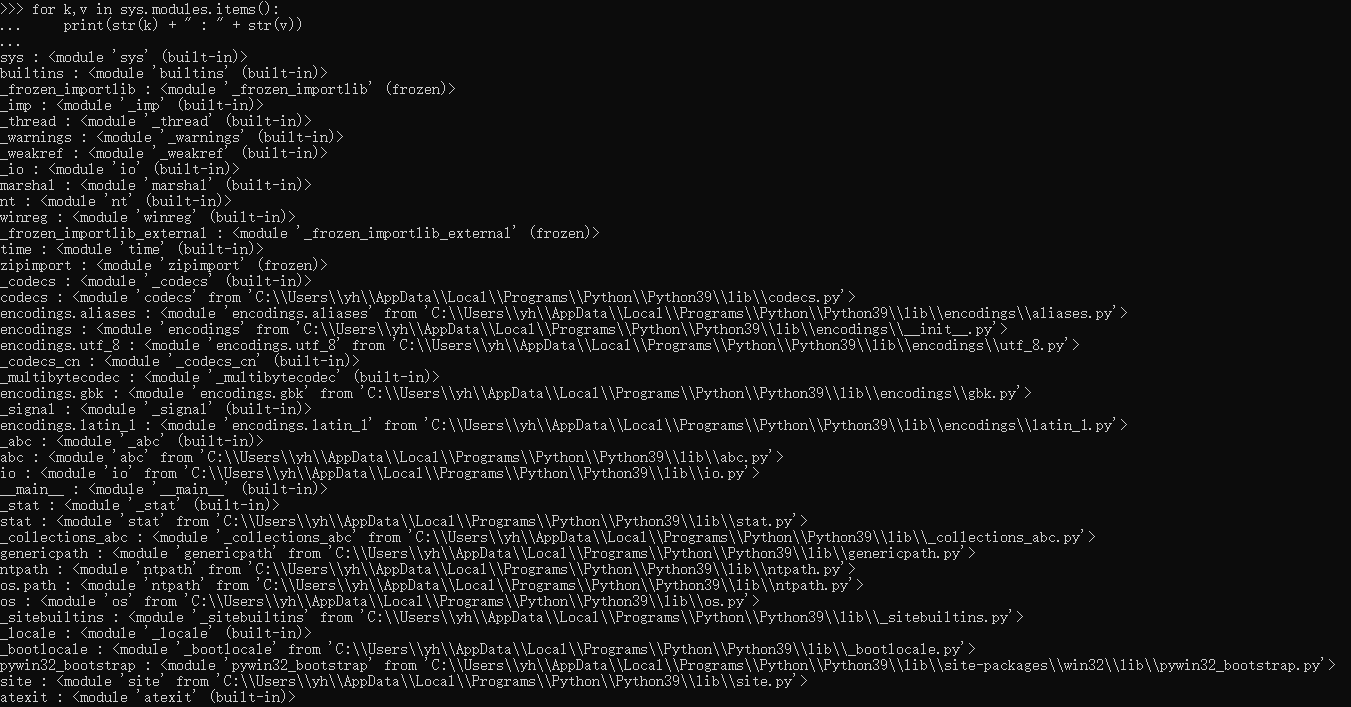
sys : <
module

'sys'
 (built-
in
)>

builtins : <
module

'builtins'
 (built-
in
)>

_frozen_importlib : <
module

'_frozen_importlib'
 (frozen)>

_imp : <
module

'_imp'
 (built-
in
)>

_thread : <
module

'_thread'
 (built-
in
)>

_warnings : <
module

'_warnings'
 (built-
in
)>

_weakref : <
module

'_weakref'
 (built-
in
)>

_io : <
module

'io'
 (built-
in
)>

marshal : <
module

'marshal'
 (built-
in
)>

nt : <
module

'nt'
 (built-
in
)>

winreg : <
module

'winreg'
 (built-
in
)>

_frozen_importlib_external : <
module

'_frozen_importlib_external'
 (frozen)>

time : <
module

'time'
 (built-
in
)>

zipimport : <
module

'zipimport'
 (frozen)>

_codecs : <
module

'_codecs'
 (built-
in
)>

codecs : <
module

'codecs'

from

'C:\\Users\\yh\\AppData\\Local\\Programs\\Python\\Python39\\lib\\codecs.py'
>

encodings.aliases : <
module

'encodings.aliases'

from

'C:\\Users\\yh\\AppData\\Local\\Programs\\Python\\Python39\\lib\\encodings\\aliases.py'
>
Step 2: Python Standard Library lookup
Python Standard Library contains built-in modules (written in C) that provide access to system functionality such as file I/O that would otherwise be inaccessible to Python programmers, as well as modules written in Python that provide standardized solutions for many problems that occur in everyday programming. Some of these modules are explicitly designed to encourage and enhance the portability of Python programs by abstracting away platform-specifics into platform-neutral APIs.
If the name couldn’t be found in sys.modules then Python is going to search for it in Python Standard Library. Again, if the name is resolved then it will be defined in the local namespace otherwise step 3 needs to be followed.
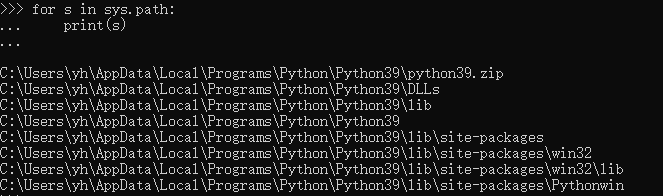
Step 3: sys.path lookup
Now if the module’s name was not found either in sys.modules nor in standard library, Python will finally attempt to resolve it under sys.path.
Absolute vs Relative imports
We discourage the use of relative imports as they are not as readable as absolute imports
└── myproject

 ├── mypackage

 │ ├──
a
.py


 └── anotherpackage

 ├──
b
.py


 ├── c
.py


 └── mysubpackage

 └── d.py
absolute imports
import
 mypackage.a


#
in

module
 a.py

import
 anotherpackage.mysubpackage.d


#
in

module
 b

import
 anotherpackage.c
relative imports
#
in

module
 a.py

from
 ..anotherpackage
import
 b

from
 ..anotherpackage.b
import
 another_function


#
in

module
 b

from
 .
import
 c

from
 .c
import
 my_function
Resolution
核心原则:
- use absolute imports
- append your project’s root directory to PYTHONPATH
本质是:
- 给sys.path中添加路径,使得import时能够找到相应的module。
- 给sys.modules中添加item
Use IDE
Most modern Python IDEs will do the trick automatically but if this is not the case, I am pretty sure there will be such option where you’ll be able to define the PYTHONPATH for your Python application
Other cases
以下两种方法效果相同。
方法一:命令行
If you are running your Python application in any other environment such as Docker, Vagrant or inside your virutal environment you can run the below command in your bash:
export
 PYTHONPATH=
"
${PYTHONPATH}
:/path/to/your/project/"


## * For Windows

set
 PYTHONPATH=%PYTHONPATH%;C:\path\to\your\project\
上述命令会将相应的path添加到 sys.path 当中。
方法二:python scripts
Add this code in your python scripts:
sys.path.
append
(
/path/
to
/your/
project
/)
Ref
https://towardsdatascience.com/how-to-fix-modulenotfounderror-and-importerror-248ce5b69b1c
%u3010Python%u3011How to Fix ModuleNotFoundError and ImportError
@(10. DevOps)
[TOC]
Terminology
python module - a single file with a .py extension. python package - a folder that contains at least one python module.
- For python2, a package requires a init.py file
- A python package can contain any number of nested sub-packages
%u2514%u2500%u2500 myproject
    %u251C%u2500%u2500 mypackage
│   ├── a.py
    %u2514%u2500%u2500 anotherpackage
        %u251C%u2500%u2500 b.py
        %u251C%u2500%u2500 c.py
        %u2514%u2500%u2500 mysubpackage
            %u2514%u2500%u2500 d.py
Project myproject contains two packages, mypackage and anotherpackage each of which contains a number of python modules, while the latter also contains a sub-package called mysubpackage which in turn contains an additional python module.
How does module import work behind the scenes?
import a
Python will execute the above statement in two steps:
- Locate, load and initialise (if required) the requested module
- Define necessary names in the local namespace and corresponding scope
Now Python interpreter is going to follow the next steps in an attempt to resolve a .
Step 1: sys.modules lookup
Initially, Python will try to search for the module%u2019s name in sys.modules , which is a dictionary that maps module names to modules which have already been loaded. If the name is resolved successfully (which means that another module has already loaded) it will be then be made available to the local namespace otherwise, jump into step 2.
sys : <module 'sys' (built-in)>
builtins : <module 'builtins' (built-in)>
_frozen_importlib : <module '_frozen_importlib' (frozen)>
_imp : <module '_imp' (built-in)>
_thread : <module '_thread' (built-in)>
_warnings : <module '_warnings' (built-in)>
_weakref : <module '_weakref' (built-in)>
_io : <module 'io' (built-in)>
marshal : <module 'marshal' (built-in)>
nt : <module 'nt' (built-in)>
winreg : <module 'winreg' (built-in)>
_frozen_importlib_external : <module '_frozen_importlib_external' (frozen)>
time : <module 'time' (built-in)>
zipimport : <module 'zipimport' (frozen)>
_codecs : <module '_codecs' (built-in)>
codecs : <module 'codecs' from 'C:\\Users\\yh\\AppData\\Local\\Programs\\Python\\Python39\\lib\\codecs.py'>
encodings.aliases : <module 'encodings.aliases' from 'C:\\Users\\yh\\AppData\\Local\\Programs\\Python\\Python39\\lib\\encodings\\aliases.py'>
Step 2: Python Standard Library lookup
Python Standard Library contains built-in modules (written in C) that provide access to system functionality such as file I/O that would otherwise be inaccessible to Python programmers, as well as modules written in Python that provide standardized solutions for many problems that occur in everyday programming. Some of these modules are explicitly designed to encourage and enhance the portability of Python programs by abstracting away platform-specifics into platform-neutral APIs.
If the name couldn%u2019t be found in sys.modules then Python is going to search for it in Python Standard Library. Again, if the name is resolved then it will be defined in the local namespace otherwise step 3 needs to be followed.
Step 3: sys.path lookup
Now if the module%u2019s name was not found either in sys.modules nor in standard library, Python will finally attempt to resolve it under sys.path.
Absolute vs Relative imports
We discourage the use of relative imports as they are not as readable as absolute imports
%u2514%u2500%u2500 myproject
    %u251C%u2500%u2500 mypackage
│   ├── a.py
    %u2514%u2500%u2500 anotherpackage
        %u251C%u2500%u2500 b.py
        %u251C%u2500%u2500 c.py
        %u2514%u2500%u2500 mysubpackage
            %u2514%u2500%u2500 d.py
absolute imports
import mypackage.a

## in module a.py
import anotherpackage.mysubpackage.d

## in module b
import anotherpackage.c
relative imports
## in module a.py
from ..anotherpackage import b
from ..anotherpackage.b import another_function

## in module b
from . import c
from .c import my_function
Resolution
核心原则:
- use absolute imports
- append your project%u2019s root directory to PYTHONPATH
本质是:
- 给sys.path中添加路径,使得import时能够找到相应的module。
- %u7ED9sys.modules%u4E2D%u6DFB%u52A0item
Use IDE
Most modern Python IDEs will do the trick automatically but if this is not the case, I am pretty sure there will be such option where you%u2019ll be able to define the PYTHONPATH for your Python application
Other cases
以下两种方法效果相同。
方法一:命令行
If you are running your Python application in any other environment such as Docker, Vagrant or inside your virutal environment you can run the below command in your bash:
export PYTHONPATH="${PYTHONPATH}:/path/to/your/project/"

## * For Windows
set PYTHONPATH=%PYTHONPATH%;C:\path\to\your\project\
上述命令会将相应的path添加到 sys.path 当中。
%u65B9%u6CD5%u4E8C%uFF1Apython scripts
Add this code in your python scripts:
sys.path.append(/path/to/your/project/)
Ref
https://towardsdatascience.com/how-to-fix-modulenotfounderror-and-importerror-248ce5b69b1c