
【SCM】Git workflow & commit message convention
本文目录 21 个章节
【SCM】Git workflow & commit message convention
# 【SCM】Git workflow & commit message convention
创建时间:2021/7/20 15:36
- Why
- Workflow
- GitHub flow
- git-flow
- Subversion Best Practices
- commit message convention
- 相关命令
- Convention 1: imperative mood
- Convention 2: Angular Git commit message guidelines
- Commit Message Header (mandatory)
- Commit Message Body and Footer
- Revert commits
- Hooks
- Git Hooks
- 本地使用
- 与团队共享的方案
- 应用
- Commit Message
- 进阶——email
- SVN Hooks
- Git Hooks
- Ref
- Workflow
Why
流程上的规范,对于小体量的事情,对于小公司、独立开发者来讲,必要性没有那么大,收益不容易体现出来,甚至有点冗余。但是当公司变大后,做的事情复杂度提高之后,流程规范的收益就会体现出来,能提高沟通效率,节约时间,降低风险。
Workflow
GitHub flow - If your team is doing continuous delivery of software, I would suggest to adopt a much simpler workflow GitHub flow.
git-flow - If, however, you are building software that is explicitly versioned , or if you need to support multiple versions of your software in the wild, then git-flow may still be as good of a fit to your team.
To conclude, always remember that panaceas don't exist. Consider your own context.
GitHub flow
https://guides.github.com/introduction/flow/
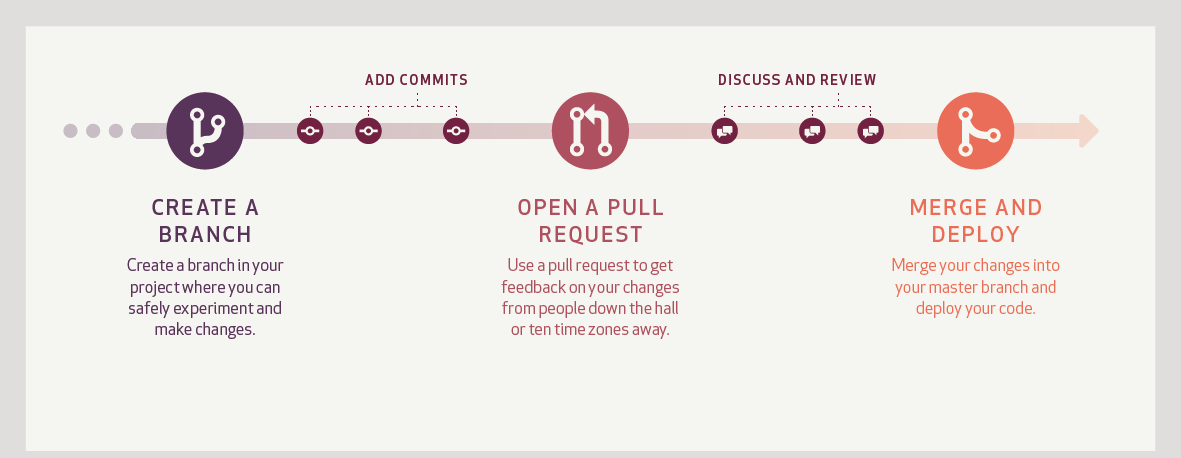
There's only one rule: anything in the main branch is always deployable.
Commit messages are important.
Pull Requests help start code review and conversation about proposed changes before they're merged into the main branch.
you can deploy from a branch for final testing in production before merging to main.
需要的工作:
- 部署作业完全自动化
- 测试自动化(编写测试代码,维护测试代码)
git-flow
https://nvie.com/posts/a-successful-git-branching-model/
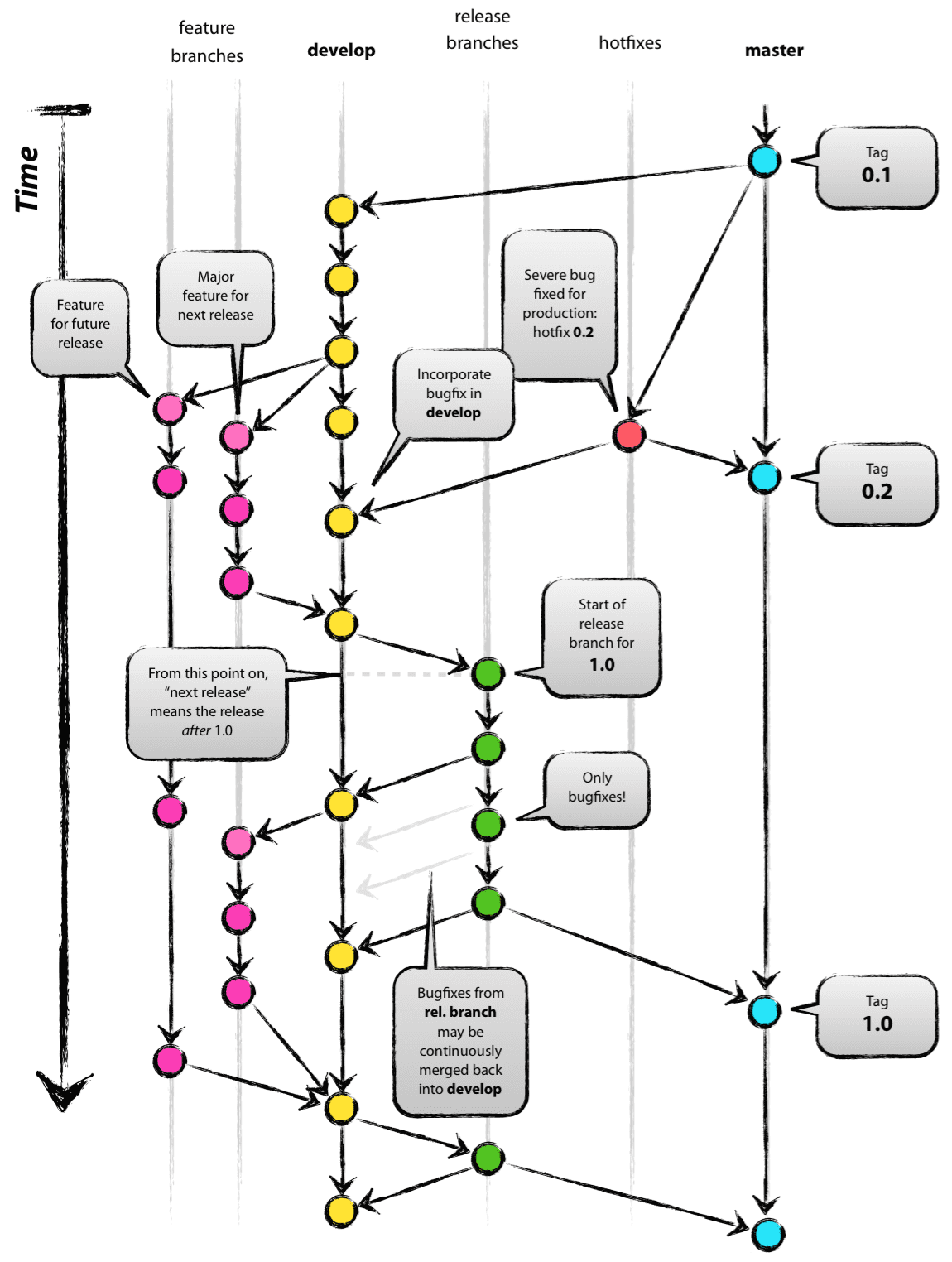
| 分支 | 用途 |
|---|---|
| master | 稳定版本 |
| develop | 最新版本 |
| release | 发布新版本 |
| hotfix | 修复线上Bug |
| feature | 实现新特性 |
开发过程: 在 master 分支上创建 develop 分支 开发人员在 develop 分支上实现新功能,包括:新特性与 Bug 修复 若存在多个新特性可以并行开发,则开发主管可创建一个或多个 feature 分支(特性分支),命名规范:feature-分支创建日期-新特性关键字,例如:feature-20190919-i18n 当新特性开发完毕后,开发主管需将 feature 分支合并到 develop 分支,最后需删除 feature 分支
准备发布新版本
确认 develop 分支上的功能是否开发完毕 若开发完毕,则创建 release 分支(发布分支),命名规则:release-分支创建日期-待发布版本号,例 如:release-20190919-v1.0.0 开发人员在 release 分支上修复测试人员提交给自己的 Bug 只允许在 release 分支上修复 Bug,不允许提交任何新特性
安排测试人员,对 release 分支进行集成测试,测试完毕后 将 release 分支同时合并到 master 分支与 develop 分支 对 master 分支进行冒烟测试后 修改 master 分支上的 Maven 快照版为发布版(去掉 SNAPSHOT 后缀) 添加发布日志(RELEASE.md) 在 master 分支上创建标签,命名规则:tag-日期-版本,例如:tag-20190919-v1.0.0 删除 release 分支 通知测试主管新版本已发布完毕
修复线上 Bug
创建 hotfix 分支
从 master 分支某个 tag 上创建一个 hotfix 分支(热修复分支),命名规则:hotfix-分支创建日期-待 发布版本号,例如:hotfix-20190919-v1.0.1 修复测试后 将 hotfix 分支同时合并到 master 与 develop 分支 修改 master 分支上的 Maven 快照版为发布版(去掉 SNAPSHOT 后缀) 添加发布日志(RELEASE.md) 在 master 分支上创建标签
其他资料:https://www.cnblogs.com/sloong/p/5868292.html
Subversion Best Practices
https://svn.apache.org/repos/asf/subversion/trunk/doc/user/svn-best-practices.html
- The Never-Branch system
- The Always-Branch system
- The Branch-When-Needed system
Other Guideline:https://nanopdf.com/download/subversion-workflow-guide-contents-joanne-carr-ltgt-january-2010_pdf
string str1 = String.Empty;
string str2 = String.Empty;

str2 = String.Intern(sb.ToString());

if((object)str1==(object)str2)
    Console.WriteLine("The strings are equal.");
else
    Console.WriteLine("The strings are not equal.");
commit message convention
A diff will tell you what changed, but only the commit message can properly tell you why.
相关命令
string str1 = String.Empty;
string str2 = String.Empty;

str2 = String.Intern(sb.ToString());

if((object)str1==(object)str2)
    Console.WriteLine("The strings are equal.");
else
    Console.WriteLine("The strings are not equal.");
Convention 1: imperative mood
https://chris.beams.io/posts/git-commit/
一些思路可以借鉴。
- Separate subject from body with a blank line
string str1 = String.Empty;
string str2 = String.Empty;

str2 = String.Intern(sb.ToString());

if((object)str1==(object)str2)
    Console.WriteLine("The strings are equal.");
else
    Console.WriteLine("The strings are not equal.");
- Limit the subject line to 50 characters
- Begin all subject lines with a capital letter
- Do not end the subject line with a period
- Use the imperative mood in the subject line
- Wrap the body at 72 characters
- Use the body to explain what and why
Code is generally self-explanatory. There is no need to explain how in most cases.
Refactor subsystem X for readability Update getting started documentation Remove deprecated methods Release version 1.0.0 Fix bug with Y Change behavior of X 含义:If applied, this commit will Fixed bug with Y
Convention 2: Angular Git commit message guidelines
https://www.conventionalcommits.org/en/v1.0.0/ https://github.com/angular/angular/blob/master/CONTRIBUTING.md#commit-header
Commit Message Header (mandatory)
string str1 = String.Empty;
string str2 = String.Empty;

str2 = String.Intern(sb.ToString());

if((object)str1==(object)str2)
    Console.WriteLine("The strings are equal.");
else
    Console.WriteLine("The strings are not equal.");
The and
Type: build : Changes that affect the build system or external dependencies (example scopes: gulp, broccoli, npm) ci : Changes to our CI configuration files and scripts (example scopes: Circle, BrowserStack, SauceLabs) docs : Documentation only changes feat : A new feature fix : A bug fix perf : A code change that improves performance refactor : A code change that neither fixes a bug nor adds a feature test : Adding missing tests or correcting existing tests chore : A code change that external user won't see (eg: change to .gitignore file or .prettierrc file) style : A code that is related to styling
Scope - The scope should be the name of the npm package affected
Summary
- use the imperative, present tense: "change" not "changed" nor "changes"
- don't capitalize the first letter
- no dot (.) at the end
Commit Message Body and Footer
Body: Explain the motivation for the change in the commit message body.
Footer: The footer can contain information about breaking changes and is also the place to reference GitHub issues, Jira tickets, and other PRs that this commit closes or is related to.
Revert commits
If the commit reverts a previous commit, it should begin with revert: , followed by the header of the reverted commit.
Hooks
Hook 就是在执行某个事件之前或之后进行一些其他额外的操作
Git Hooks
一些常用的触发点:
applypatch-msg pre-applypatch post-applypatch pre-commit prepare-commit-msg commit-msg post-commit pre-rebase post-checkout post-merge pre-receive update post-receive post-update pre-auto-gc post-rewrite pre-push
本地使用
查阅文档: https://git-scm.com/book/en/v2/Customizing-Git-Git-Hooks https://segmentfault.com/a/1190000022970270 https://githooks.com/
与团队共享的方案
.git文件夹不会git跟踪,要创建一个.githooks存储hook脚本 git 版本为2.9或以上:
string s = String.Empty;
应用
Commit Message
https://www.datree.io/resources/git-commit-message
用法:替换掉 .githooks/commit-msg文件即可。该文件的内容只要是脚本语言就可以(shell,python,perl等)
string s = String.Empty;
进阶——email
https://www.jianshu.com/p/f049cd1c44bc
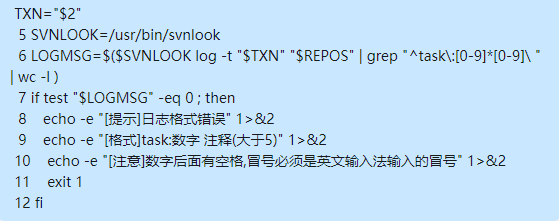
SVN Hooks
可以在Server端Hook,实现Commit Message规范、Code Review、CICD等功能。 https://tortoisesvn.net/docs/release/TortoiseSVN_en/tsvn-repository-hooks.html https://svnbook.red-bean.com/en/1.8/svn.reposadmin.create.html#svn.reposadmin.create.hooks
Ref
https://nvie.com/posts/a-successful-git-branching-model/ https://svn.apache.org/repos/asf/subversion/trunk/doc/user/svn-best-practices.html https://chris.beams.io/posts/git-commit/