
ELF文件
本文目录 14 个章节
ELF文件
ELF(Executable and Linkable Format)是一种行业标准的二进制数据封装格式,主要用于封装可执行文件、动态库、object 文件和 core dumps 文件。
在 Linux / Android 中可执行文件是 ELF 格式,执行的程序可能还会依赖别的函数库,在 Andorid 中我们称为 native 库,通常分为静态库(以 .a 结尾,该库不会再依赖其他的库)和动态链接库(以 .so 结尾,全称 Shared Object,在程序运行时动态链接加载到内存中,它本身还有可能依赖其他库)。
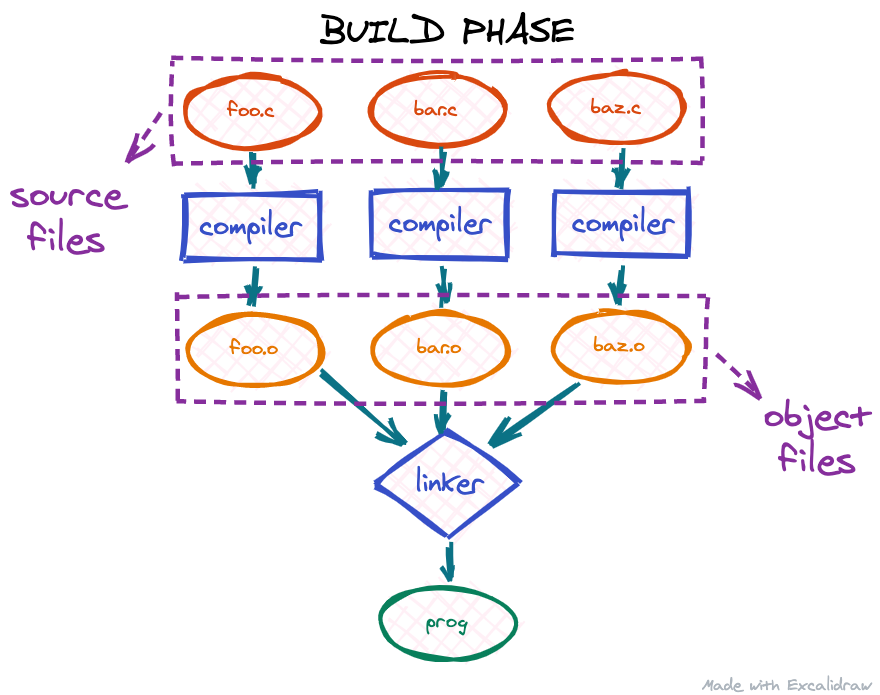
Build Phase
- 预处理:预处理阶段将源代码中包含的头文件全部合并到源码文件中,并执行宏脚本和条件编译指令。预处理后的文件通常具有
.i后缀。- 扩展宏定义。
- 处理
#include指令,插入头文件内容。 - 处理条件编译指令如
#ifdef、#ifndef、#if、#else、#endif。 - 移除注释。
gcc -E source.c -o source.i
- 编译:编译器将预处理后的源代码转换为汇编代码。编译后的文件通常具有
.s后缀。
gcc -S source.i -o source.s
- 汇编:汇编器将汇编代码转换为机器码,生成目标文件。目标文件通常具有
.o后缀。
gcc -c source.s -o source.o
- 链接:链接器将所有目标文件和所需的库文件链接合并成一个可执行文件。可执行文件的入口地址由
main()函数确定,生成的文件可以独立执行。
gcc source.o -o executable
Runtime Phase
These days, most executables on Linux are dynamically linked: the executable itself does not have all the code it needs to run a program.Instead it expects to "borrow" part of the code at runtime from shared libraries for some of its functionality.
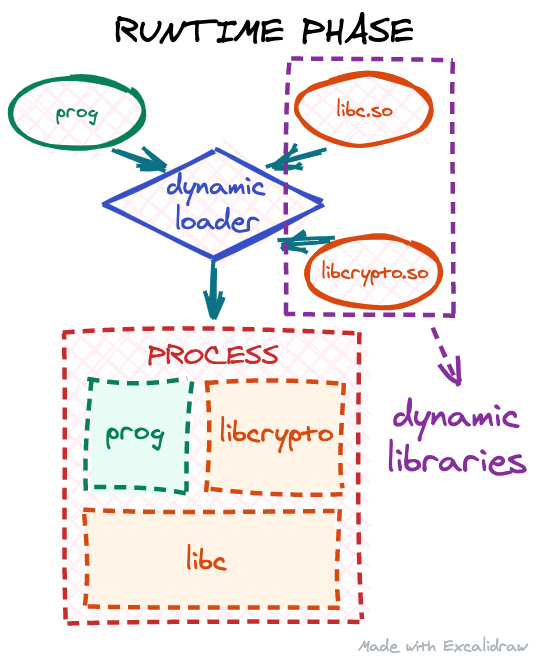 This process is called runtime linking: when our executable is being started, the operating system will invoke the dynamic loader, which should find all the needed libraries, copy/map their code into our target process address space, and resolve all the dependencies our code has on them.
ELF文件内容
组成
ELF Header
- 位于 ELF 文件的最前面。
- 提供全局信息,如文件类型(可执行、共享库等)、程序头表的位置和大小、节头表的位置和大小。
typedef struct {
    unsigned char e_ident[16]; /* ELF标识符 */
    uint16_t e_type;           /* 文件类型 */
    uint16_t e_machine;        /* 目标架构 */
    uint32_t e_version;        /* 版本 */
    uint64_t e_entry;          /* 程序入口地址 */
    uint64_t e_phoff;          /* 程序头表偏移 */
    uint64_t e_shoff;          /* 节头表偏移 */
    // 省略其他字段
} Elf64_Ehdr;
caikelun@debian:~$ arm-linux-androideabi-readelf -h ./libtest.so

ELF Header:
  Magic:   7f 45 4c 46 01 01 01 00 00 00 00 00 00 00 00 00
  Class:                             ELF32
  Data:                              2's complement, little endian
  Version:                           1 (current)
  OS/ABI:                            UNIX - System V
  ABI Version:                       0
  Type:                              DYN (Shared object file)
  Machine:                           ARM
  Version:                           0x1
  Entry point address:               0x0
  Start of program headers:          52 (bytes into file)
  Start of section headers:          12744 (bytes into file)
  Flags:                             0x5000200, Version5 EABI, soft-float ABI
  Size of this header:               52 (bytes)
  Size of program headers:           32 (bytes)
  Number of program headers:         8
  Size of section headers:           40 (bytes)
  Number of section headers:         25
  Section header string table index: 24
Program Header Table
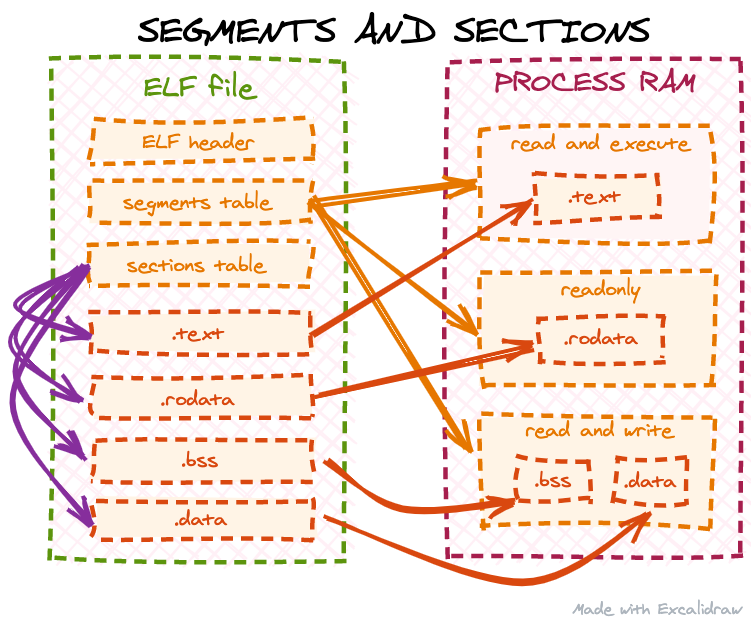
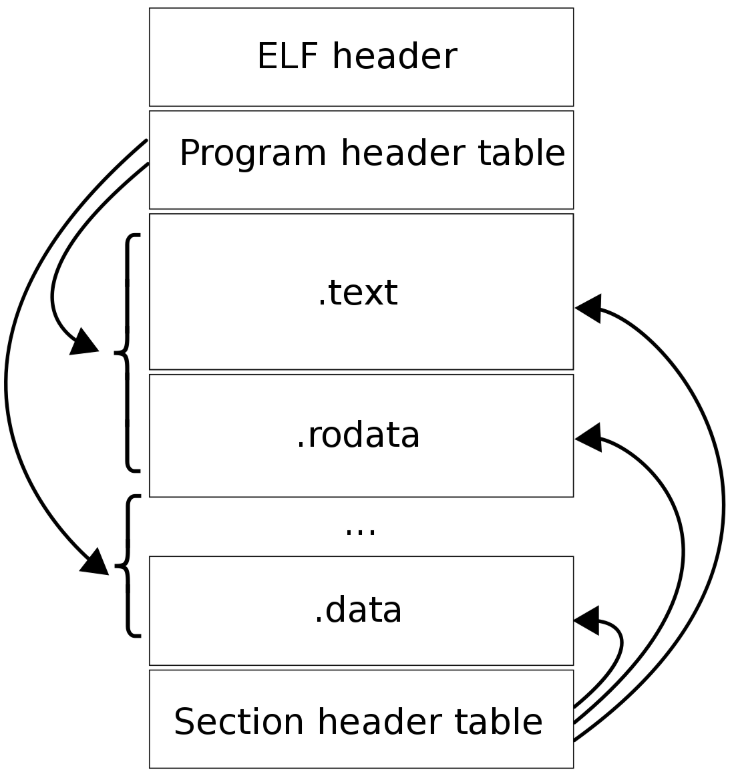
ELF 被加载到内存时,是以 segment 为单位的。一个 segment 包含了一个或多个 section。ELF 使用 PHT 来记录所有 segment 的基本信息。主要包括:segment 的类型、在文件中的偏移量、大小、加载到内存后的虚拟内存相对地址、内存中字节的对齐方式等。
- 每个段对应一个
Elf64_Phdr条目,记录段的文件偏移、虚拟地址、内存大小、对齐等信息。 - 通常紧跟在 ELF Header 之后。
Elf64_Phdr 的定义如下(位于 <elf.h>):
typedef struct {
    uint32_t p_type;    // 段的类型(PT_LOAD, PT_DYNAMIC 等)
    uint32_t p_flags;   // 段的权限标志(R/W/X)
    uint64_t p_offset;  // 段在文件中的偏移
    uint64_t p_vaddr;   // 段在虚拟内存中的起始地址
    uint64_t p_paddr;   // 段在物理内存中的地址(通常未使用)
    uint64_t p_filesz;  // 段在文件中的大小
    uint64_t p_memsz;   // 段在内存中的大小
    uint64_t p_align;   // 段的对齐要求
} Elf64_Phdr;
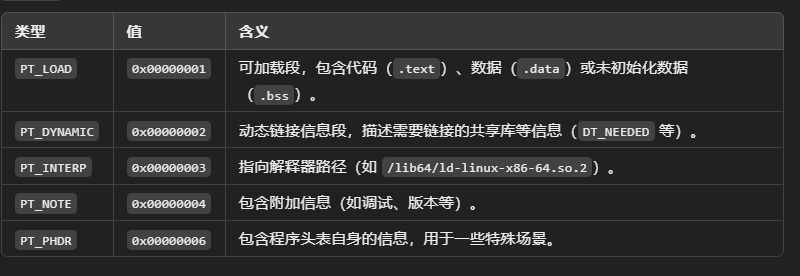
- 根据
p_offset,读取段在文件中的数据。 - 根据
p_vaddr,将段映射到虚拟内存的目标地址。 - 根据
p_filesz和p_memsz,决定加载的内容大小和清零大小。
Object files do not contain any segments. an object file is not meant to be directly loaded by the OS. Instead, it is assumed it will be linked with some other code, so ELF segments are usually generated by the linker, not the compiler.
caikelun@debian:~$ arm-linux-androideabi-readelf -l ./libtest.so

Elf file type is DYN (Shared object file)
Entry point 0x0
There are 8 program headers, starting at offset 52

Program Headers:
  Type           Offset   VirtAddr   PhysAddr   FileSiz MemSiz  Flg Align
  PHDR           0x000034 0x00000034 0x00000034 0x00100 0x00100 R   0x4
  LOAD           0x000000 0x00000000 0x00000000 0x02604 0x02604 R E 0x1000
  LOAD           0x002e3c 0x00003e3c 0x00003e3c 0x001c8 0x001c8 RW  0x1000
  DYNAMIC        0x002e48 0x00003e48 0x00003e48 0x00118 0x00118 RW  0x4
  NOTE           0x000134 0x00000134 0x00000134 0x000bc 0x000bc R   0x4
  GNU_STACK      0x000000 0x00000000 0x00000000 0x00000 0x00000 RW  0x10
  EXIDX          0x002504 0x00002504 0x00002504 0x00100 0x00100 R   0x4
  GNU_RELRO      0x002e3c 0x00003e3c 0x00003e3c 0x001c4 0x001c4 RW  0x4

 Section to Segment mapping:
  Segment Sections...
   00
   01     .note.android.ident .note.gnu.build-id .dynsym .dynstr .hash .gnu.version .gnu.version_d .gnu.version_r .rel.dyn .rel.plt .plt .text .ARM.extab .ARM.exidx
   02     .fini_array .init_array .dynamic .got .data
   03     .dynamic
   04     .note.android.ident .note.gnu.build-id
   05
   06     .ARM.exidx
   07     .fini_array .init_array .dynamic .got
Section Header Table
ELF 以 section 为单位来组织和管理各种信息。ELF 使用 SHT 来记录所有 section 的基本信息。主要包括:section 的类型、在文件中的偏移量、大小、加载到内存后的虚拟内存相对地址、内存中字节的对齐方式等。
- Section Header Table 的条目描述了文件中各个节(如
.text、.data、.bss等)。 - 每个节的名称(通过
.shstrtab指定)。 - 每个节的文件偏移(
sh_offset)和大小(sh_size)。 - 节的类型(
sh_type)和标志(sh_flags)。
caikelun@debian:~$ arm-linux-androideabi-readelf -S ./libtest.so

There are 25 section headers, starting at offset 0x31c8:

Section Headers:
  [Nr] Name              Type            Addr     Off    Size   ES Flg Lk Inf Al
  [ 0]                   NULL            00000000 000000 000000 00      0   0  0
  [ 1] .note.android.ide NOTE            00000134 000134 000098 00   A  0   0  4
  [ 2] .note.gnu.build-i NOTE            000001cc 0001cc 000024 00   A  0   0  4
  [ 3] .dynsym           DYNSYM          000001f0 0001f0 0003a0 10   A  4   1  4
  [ 4] .dynstr           STRTAB          00000590 000590 0004b1 00   A  0   0  1
  [ 5] .hash             HASH            00000a44 000a44 000184 04   A  3   0  4
  [ 6] .gnu.version      VERSYM          00000bc8 000bc8 000074 02   A  3   0  2
  [ 7] .gnu.version_d    VERDEF          00000c3c 000c3c 00001c 00   A  4   1  4
  [ 8] .gnu.version_r    VERNEED         00000c58 000c58 000020 00   A  4   1  4
  [ 9] .rel.dyn          REL             00000c78 000c78 000040 08   A  3   0  4
  [10] .rel.plt          REL             00000cb8 000cb8 0000f0 08  AI  3  18  4
  [11] .plt              PROGBITS        00000da8 000da8 00017c 00  AX  0   0  4
  [12] .text             PROGBITS        00000f24 000f24 0015a4 00  AX  0   0  4
  [13] .ARM.extab        PROGBITS        000024c8 0024c8 00003c 00   A  0   0  4
  [14] .ARM.exidx        ARM_EXIDX       00002504 002504 000100 08  AL 12   0  4
  [15] .fini_array       FINI_ARRAY      00003e3c 002e3c 000008 04  WA  0   0  4
  [16] .init_array       INIT_ARRAY      00003e44 002e44 000004 04  WA  0   0  1
  [17] .dynamic          DYNAMIC         00003e48 002e48 000118 08  WA  4   0  4
  [18] .got              PROGBITS        00003f60 002f60 0000a0 00  WA  0   0  4
  [19] .data             PROGBITS        00004000 003000 000004 00  WA  0   0  4
  [20] .bss              NOBITS          00004004 003004 000000 00  WA  0   0  1
  [21] .comment          PROGBITS        00000000 003004 000065 01  MS  0   0  1
  [22] .note.gnu.gold-ve NOTE            00000000 00306c 00001c 00      0   0  4
  [23] .ARM.attributes   ARM_ATTRIBUTES  00000000 003088 00003b 00      0   0  1
  [24] .shstrtab         STRTAB          00000000 0030c3 000102 00      0   0  1
Key to Flags:
  W (write), A (alloc), X (execute), M (merge), S (strings), I (info),
  L (link order), O (extra OS processing required), G (group), T (TLS),
  C (compressed), x (unknown), o (OS specific), E (exclude),
  y (noread), p (processor specific)
sections
- Segments (段):运行时加载的单位,由一个或多个 Sections 组成。
- Sections (节):文件中的逻辑划分,用于存储代码、数据、符号表等。
Different sections contain different types of ELF data: executable code (which we are most interested in in this post), constant data, global variables etc.
.text: this section contains the executable code (the actual machine code, which was created by the compiler from our source code)..dataand.bss: these sections contain global and static local variables. The difference is:.datahas variables with an initial value (defined likeint foo = 5;) and.bssjust reserves space for variables with no initial value (defined likeint bar;)..rodata: this section contains constant data (mostly strings or byte arrays). For example, if we use a string literal in the code (for example, forprintfor some error message), it will be stored here..symtab(symbol table): this section contains information about the symbols in the object file: functions, global variables, constants etc. It may also contain information about external symbols the object file needs, like needed functions from the external libraries..strtaband.shstrtab: contain packed strings for the ELF file. Note, that these are not the strings we may define in our source code (those go to the.rodatasection). These are the strings describing the names of other ELF structures, like symbols from.symtabor even section names from the table above. ELF binary format aims to make its structures compact and of a fixed size, so all strings are stored in one place and the respective data structures just reference them as an offset in either.shstrtabor.strtabsections instead of storing the full string locally.
或者参阅中文描述:
.text段:存储可执行的机器代码。
.data段:存储初始化的全局和静态变量。.bss段:存储未初始化的全局和静态变量。.rodata段:存储只读数据,如字符串常量。.symtab段:符号表,记录程序中的函数、变量等符号信息。.strtab段:符号表的字符串表,存储符号的名称。- **
.rel.*或.rela.*段:存储重定位信息,用于动态链接或静态链接时处理符号地址。
以下sections与Native hook技术关系比较大:
.dynstr:保存了所有的字符串常量信息。.dynsym:保存了符号(symbol)的信息(符号的类型、起始地址、大小、符号名称在.dynstr中的索引编号等)。函数也是一种符号。.text:程序代码经过编译后生成的机器指令。.dynamic:供动态链接器使用的各项信息,记录了当前 ELF 的外部依赖,以及其他各个重要 section 的起始位置等信息。.got:Global Offset Table。用于记录外部调用的入口地址。动态链接器(linker)执行重定位(relocate)操作时,这里会被填入真实的外部调用的绝对地址。.plt:Procedure Linkage Table。外部调用的跳板,主要用于支持 lazy binding 方式的外部调用重定位。(Android 目前只有 MIPS 架构支持 lazy binding).rel.plt:对外部函数直接调用的重定位信息。.rel.dyn:除.rel.plt以外的重定位信息。(比如通过全局函数指针来调用外部函数)
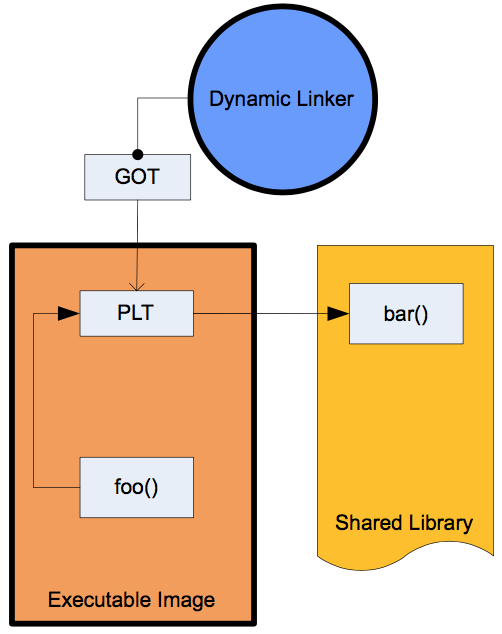 图片来源:https://github.com/iqiyi/xHook/blob/master/docs/overview/android_plt_hook_overview.zh-CN.md
连接视图(Linking View)和执行视图(Execution View)
- 连接视图:ELF 未被加载到内存执行前,以 section 为单位的数据组织形式。
- 执行视图:ELF 被加载到内存后,以 segment 为单位的数据组织形式。
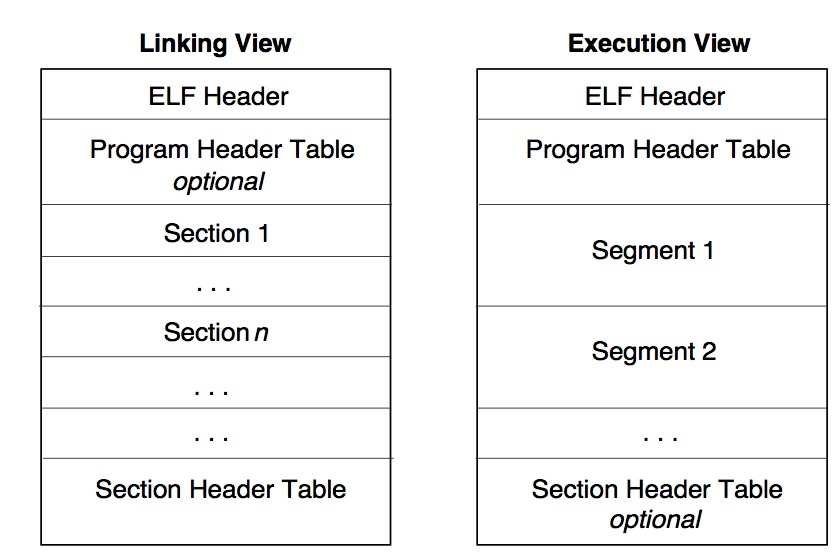
示例
obj.c:
int add5(int num) { return num + 5; }
int add10(int num) { return num + 10; }
生成的.o文件:
$ readelf --sections obj.o
There are 11 section headers, starting at offset 0x268:

Section Headers:
  [Nr] Name              Type             Address           Offset
       Size              EntSize          Flags  Link  Info  Align
  [ 0]                   NULL             0000000000000000  00000000
       0000000000000000  0000000000000000           0     0     0
  [ 1] .text             PROGBITS         0000000000000000  00000040
       000000000000001e  0000000000000000  AX       0     0     1
  [ 2] .data             PROGBITS         0000000000000000  0000005e
       0000000000000000  0000000000000000  WA       0     0     1
  [ 3] .bss              NOBITS           0000000000000000  0000005e
       0000000000000000  0000000000000000  WA       0     0     1
  [ 4] .comment          PROGBITS         0000000000000000  0000005e
       000000000000001d  0000000000000001  MS       0     0     1
  [ 5] .note.GNU-stack   PROGBITS         0000000000000000  0000007b
       0000000000000000  0000000000000000           0     0     1
  [ 6] .eh_frame         PROGBITS         0000000000000000  00000080
       0000000000000058  0000000000000000   A       0     0     8
  [ 7] .rela.eh_frame    RELA             0000000000000000  000001e0
       0000000000000030  0000000000000018   I       8     6     8
  [ 8] .symtab           SYMTAB           0000000000000000  000000d8
       00000000000000f0  0000000000000018           9     8     8
  [ 9] .strtab           STRTAB           0000000000000000  000001c8
       0000000000000012  0000000000000000           0     0     1
  [10] .shstrtab         STRTAB           0000000000000000  00000210
       0000000000000054  0000000000000000           0     0     1
Key to Flags:
  W (write), A (alloc), X (execute), M (merge), S (strings), I (info),
  L (link order), O (extra OS processing required), G (group), T (TLS),
  C (compressed), x (unknown), o (OS specific), E (exclude),
  l (large), p (processor specific)
符号表内容(.symtab)
$ readelf --symbols obj.o

Symbol table '.symtab' contains 10 entries:
   Num:    Value          Size Type    Bind   Vis      Ndx Name
     0: 0000000000000000     0 NOTYPE  LOCAL  DEFAULT  UND
     1: 0000000000000000     0 FILE    LOCAL  DEFAULT  ABS obj.c
     2: 0000000000000000     0 SECTION LOCAL  DEFAULT    1
     3: 0000000000000000     0 SECTION LOCAL  DEFAULT    2
     4: 0000000000000000     0 SECTION LOCAL  DEFAULT    3
     5: 0000000000000000     0 SECTION LOCAL  DEFAULT    5
     6: 0000000000000000     0 SECTION LOCAL  DEFAULT    6
     7: 0000000000000000     0 SECTION LOCAL  DEFAULT    4
     8: 0000000000000000    15 FUNC    GLOBAL DEFAULT    1 add5
     9: 000000000000000f    15 FUNC    GLOBAL DEFAULT    1 add10
- The
Ndxcolumn tells us the index of the section, where the symbol is located. We can cross-check it with the section table above and confirm that indeed these functions are located in.text(section with the index1). Typebeing set toFUNCconfirms that these are indeed functions.Sizetells us the size of each function, but this information is not very useful in our context. The same goes forBindandVis.- Probably the most useful piece of information is
Value. The name is misleading, because it is actually an offset from the start of the containing section in this context. That is, theadd5function starts just from the beginning of.textandadd10is located from 15th byte and onwards.
如何用代码手动加载并执行一个o文件
参考资料: https://blog.cloudflare.com/how-to-execute-an-object-file-part-1/ 总体步骤: ELF 文件解析
- 定位 ELF 段表和
.shstrtab段(用于查找段名)。 - 找到
.symtab和.strtab段(用于查找符号名)。 - 找到
.text段并复制到带有可执行权限的内存中。
函数查找与执行
- 使用符号表查找函数地址: 从
.symtab中找到add5和add10函数的偏移量。 - 通过函数指针调用目标函数: 执行
add5和add10函数。
函数实现
parse_obj: 解析 ELF 文件,找到段表、段名字符串表、符号表和字符串表,复制.text段到内存。lookup_section: 查找指定段名的段表条目。lookup_function: 查找指定函数名的函数地址。execute_funcs: 执行add5和add10函数。
#include <stdio.h>
#include <signal.h>
#include <ucontext.h>
#include <unistd.h>    // 包含 _exit 的头文件
#include <stdlib.h>    // 包含 exit 的头文件
#include <sys/mman.h>  // 包含内存映射相关函数 mmap 和 mprotect 的头文件

/* 全局变量 */
static const Elf64_Shdr *sections;
static const char *shstrtab = NULL;
static const Elf64_Sym *symbols;
static int num_symbols;
static const char *strtab = NULL;
static uint8_t *text_runtime_base;
static uint64_t page_size;

/* 辅助函数 */
static inline uint64_t page_align(uint64_t n) {
    return (n + (page_size - 1)) & ~(page_size - 1);
}

static const Elf64_Shdr *lookup_section(const char *name) {
    size_t name_len = strlen(name);
    for (Elf64_Half i = 0; i < obj.hdr->e_shnum; i++) {
        const char *section_name = shstrtab + sections[i].sh_name;
        if (name_len == strlen(section_name) && !strcmp(name, section_name) && sections[i].sh_size) {
            return sections + i;
        }
    }
    return NULL;
}

static void *lookup_function(const char *name) {
    for (int i = 0; i < num_symbols; i++) {
        if (ELF64_ST_TYPE(symbols[i].st_info) == STT_FUNC) {
            const char *function_name = strtab + symbols[i].st_name;
            if (!strcmp(name, function_name)) {
                return text_runtime_base + symbols[i].st_value;
            }
        }
    }
    return NULL;
}

/* 解析 ELF 文件 */
static void parse_obj(void) {
    sections = (const Elf64_Shdr *)(obj.base + obj.hdr->e_shoff);
    shstrtab = (const char *)(obj.base + sections[obj.hdr->e_shstrndx].sh_offset);

    const Elf64_Shdr *symtab_hdr = lookup_section(".symtab");
    if (!symtab_hdr) { fputs("Failed to find .symtab\n", stderr); exit(ENOEXEC); }
    symbols = (const Elf64_Sym *)(obj.base + symtab_hdr->sh_offset);
    num_symbols = symtab_hdr->sh_size / symtab_hdr->sh_entsize;

    const Elf64_Shdr *strtab_hdr = lookup_section(".strtab");
    if (!strtab_hdr) { fputs("Failed to find .strtab\n", stderr); exit(ENOEXEC); }
    strtab = (const char *)(obj.base + strtab_hdr->sh_offset);

    page_size = sysconf(_SC_PAGESIZE);

    const Elf64_Shdr *text_hdr = lookup_section(".text");
    if (!text_hdr) { fputs("Failed to find .text\n", stderr); exit(ENOEXEC); }
    text_runtime_base = mmap(NULL, page_align(text_hdr->sh_size), PROT_READ | PROT_WRITE, MAP_PRIVATE | MAP_ANONYMOUS, -1, 0);
    if (text_runtime_base == MAP_FAILED) { perror("Failed to allocate memory for .text"); exit(errno); }
    memcpy(text_runtime_base, obj.base + text_hdr->sh_offset, text_hdr->sh_size);
    if (mprotect(text_runtime_base, page_align(text_hdr->sh_size), PROT_READ | PROT_EXEC)) { perror("Failed to make .text executable"); exit(errno); }
}

/* 执行函数 */
static void execute_funcs(void) {
    int (*add5)(int);
    int (*add10)(int);

    add5 = lookup_function("add5");
    if (!add5) { fputs("Failed to find add5 function\n", stderr); exit(ENOENT); }
    printf("add5(%d) = %d\n", 42, add5(42));

    add10 = lookup_function("add10");
    if (!add10) { fputs("Failed to find add10 function\n", stderr); exit(ENOENT); }
    printf("add10(%d) = %d\n", 42, add10(42));
}

int main() {
    parse_obj();
    execute_funcs();
    return 0;
}
代码来源:https://blog.cloudflare.com/how-to-execute-an-object-file-part-1/
延申-so的加载与内存对齐
操作系统管理内存时,以“页面”为最小单位,通常页面大小是 4KB(在大多数系统上)。这种行为保证了内存管理的效率,同时为程序的执行提供了安全性和性能优化。
在加载共享库(so 文件)时,系统会将 so 文件的各段(如 .text、.data、.bss 等)映射到内存中,每段的起始地址会以页面为单位对齐。
对齐前:
 对齐后的内存映射:
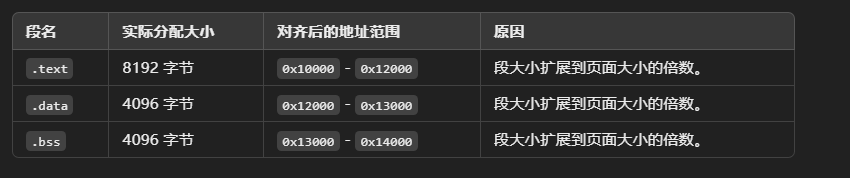 加载共享库的过程中,内存对齐通过
 mmap 实现。以下是 mmap 如何完成段加载和对齐的示例代码:
#include <sys/mman.h>
#include <unistd.h>
#include <stdio.h>
#include <string.h>

void load_segment(const char *name, void *file_start, size_t size, size_t offset, int prot) {
    size_t page_size = sysconf(_SC_PAGESIZE); // 获取页面大小(通常为 4096 字节)

    // 对齐起始地址和大小
    size_t aligned_offset = offset & ~(page_size - 1);
    size_t padding = offset - aligned_offset; // 文件偏移的非对齐部分
    size_t aligned_size = ((size + padding + page_size - 1) / page_size) * page_size;

    // 使用 mmap 加载段
    void *addr = mmap(NULL, aligned_size, prot, MAP_PRIVATE | MAP_ANONYMOUS, -1, 0);
    if (addr == MAP_FAILED) {
        perror("mmap failed");
        return;
    }

    // 将文件内容复制到映射的内存中
    memcpy((char *)addr + padding, (char *)file_start + offset, size);

    printf("Segment %s loaded at %p (aligned to %zu bytes)\n", name, addr, page_size);

    // 设置段的内存保护
    if (mprotect(addr, aligned_size, prot)) {
        perror("mprotect failed");
    }
}

int main() {
    // 模拟加载段
    char file_data[16000]; // 假设文件数据已经加载到此内存中

    // 加载 .text 段
    load_segment(".text", file_data, 6000, 0, PROT_READ | PROT_EXEC);

    // 加载 .data 段
    load_segment(".data", file_data, 2000, 6000, PROT_READ | PROT_WRITE);

    // 加载 .bss 段
    load_segment(".bss", NULL, 3000, 8000, PROT_READ | PROT_WRITE);

    return 0;
}
利用ELF符号表手动解读崩溃信息
https://juejin.cn/post/7302230973739581477
引用与更多资料
引用 https://blog.cloudflare.com/how-to-execute-an-object-file-part-1/ https://juejin.cn/post/7299667259902263306 https://medium.com/@boutnaru/linux-elf-executable-and-linkable-format-part-1-intro-47bd61af105e https://github.com/iqiyi/xHook/blob/master/docs/overview/android_plt_hook_overview.zh-CN.md
其他关于ELF文件内容的解析见 https://juejin.cn/post/7248599585752285221 https://en.wikipedia.org/wiki/Executable_and_Linkable_Format https://refspecs.linuxbase.org/elf/elf.pdf