
dotNET版本相关
本文目录 10 个章节
dotNET版本相关
# dotNET版本相关
创建时间:2021/5/18 11:41
- 相关概念
- C#版本与.NET版本对应关系以及各版本的特性
- .Net Framework Vs .Net Core Vs .Net Standard
- .Net Framework
- .Net Core
- .Net Standard
- Other links
- Unity Api Compability Level如何选择
- 当使用.NET 4.x profile时,添加assembly引用
- Ref
相关概念
Intermediate Language (IL) - .Net code is compiled into a special language called Intermediate Language. It is stored in .dll or .exe files.
Common language runtime (CLR) - Common language runtime handles the execution of application.
Just In Time (JIT) - CLR used assembly and turn into machine code through process. This process is known as Just In time (JIT) compilation.
Base Class Library (BCL) - Microsoft provided reusable library which can be used in your application while developing code.
Expect these concepts; .Net framework has CTS (Common Type System), Garbage collection, Memory management etc.
C#版本与.NET版本对应关系以及各版本的特性
https://www.cnblogs.com/MingsonZheng/p/11273700.html
.Net Framework Vs .Net Core Vs .Net Standard
.Net Framework
Microsoft introduced .Net framework in 2000 to build Web and Windows applications (desktop applications) using different languages like C#, Visual Studio, F# etc.
In simple words, we can say, .Net Framework can be used for web and window application development which works with Windows operating system.
The latest available version of .Net Framework is 4.8.
.Net Core
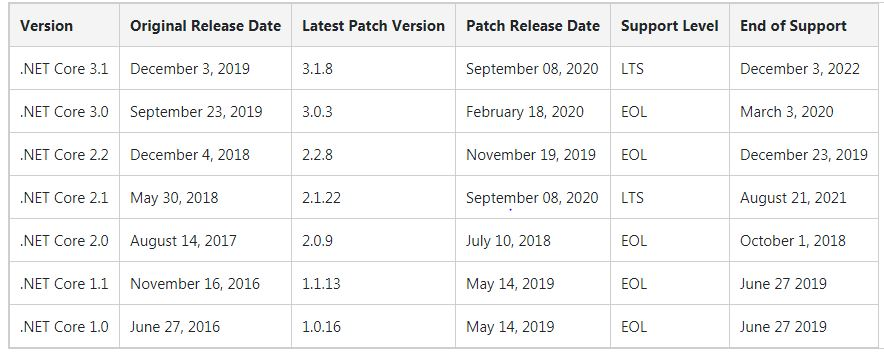
**.NET Core: This is the latest .NET implementation. It’s open source and available for multiple OSes. With .NET Core, you can build cross-platform console apps and ASP.NET Core Web applications and cloud services. **
Now the IT Industry needs platforms which can be used with different operating systems.
As .Net framework was working with only Windows, Microsoft introduced .Net core for cross platform as per market demand.
.Net Standard
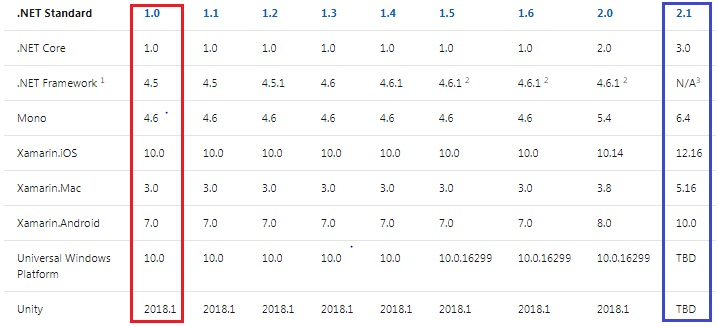
.NET Standard: This is the set of fundamental APIs (commonly referred to as base class library or BCL) that all .NET implementations must implement. By targeting .NET Standard, you can build libraries that you can share across all your .NET apps, no matter on which .NET implementation or OS they run.
Before starting with .Net Standard, let’s discuss .Net framework and .Net core architecture using the below diagram. All three frameworks have their own base class libraries.
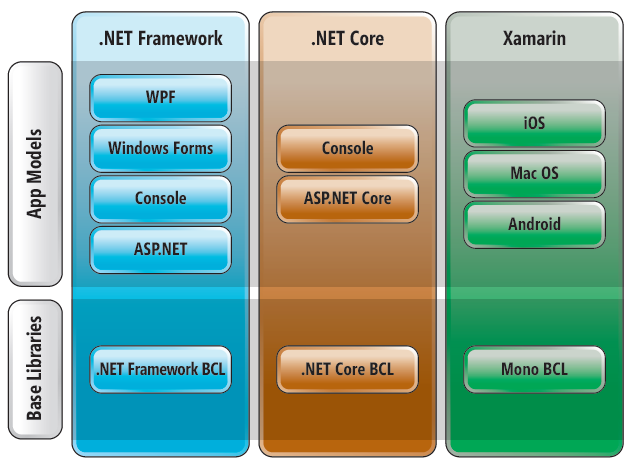
Let’s assume that I have shared a library developed in .Net Framework. I want to use this Library in multiple projects in which some of the projects have been created in .Net core. That’s where the problem starts.
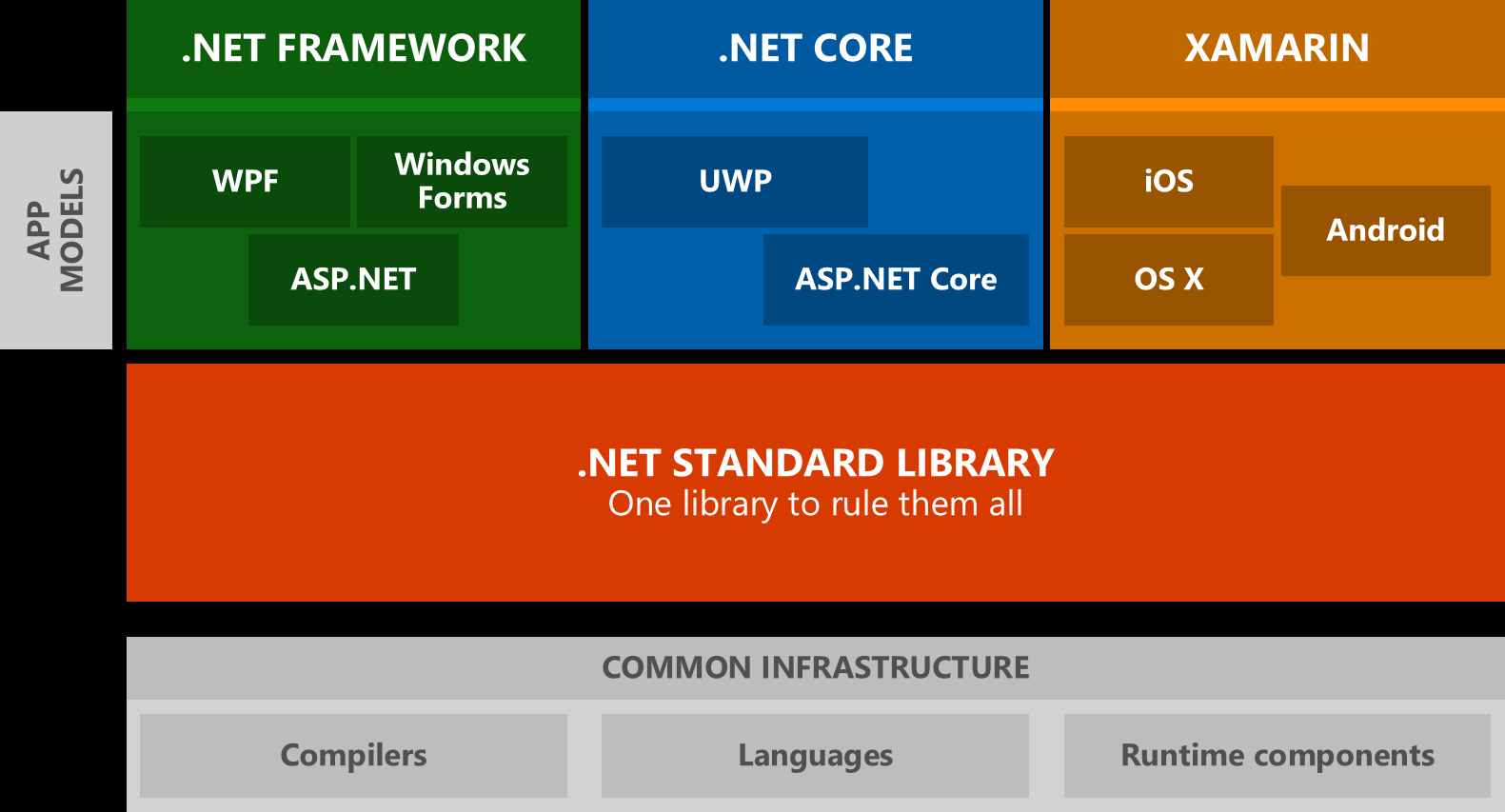
Al frameworks have common BCLs called .Net standard. .Net standard is a set of APIs that all .Net framework implements.
Other links
http://www.mukeshkumar.net/articles/dotnetcore/dotnet-framework-vs-dotnet-core-vs-dotnet-standard
Unity Api Compability Level如何选择
.NET Standard 2.0 对平台的支持性更广、兼容性更好。.NET Standard 2.0的API是.NET 4.x的子集。 或者说,.NET 4.x支持的API更多一些,兼容.NET Standard 2.0,但是有些API在有些平台上是不兼容的。 Unity默认选择的是.NET Standard 2.0,如果想要跨平台兼容,那么就选Standard 2.0。如果使用的外部类库或者脚本里面调用的API不被Standard 2.0支持,再考虑换成4.x来试试。
当使用.NET 4.x profile时,添加assembly引用
当使用NET Standard 2.0时,API profile中的所有assemblies都是默认被引用且可用的。但是当使用.NET 4.x profile时,某些assemblies没有被Unity默认引用。此时需要手动添加assembly引用。如果缺少assembly的引用,在Visual Studio中就会报错。
在Unity工程的Assets根目录创建一个文本文件,命名为 mcs.rsp 。其中填入 -r:System.Net.Http.dll这样的行来添加引用。然后重启Unity。
因为Visual Studio打开Unity工程时会重新生成.csproj和.sln文件,因为不能直接在Visual Studio中添加assembly引用,否则再次开启工程时会丢失这些修改。
Ref
https://www.c-sharpcorner.com/article/net-framework-vs-net-core-vs-net-standard/
https://docs.unity3d.com/2019.1/Documentation/Manual/dotnetProfileSupport.html