
Android Application 启动过程
本文目录 23 个章节
Android Application 启动过程
Zygote的Java框架层中,会创建一个Server端的Socket,这个Socket用来等待ActivityManagerService来请求Zygote来创建新的应用程序进程的 Zygote进程通过fock自身创建的应用程序进程,这样应用程序程序进程就会获得Zygote进程在启动时创建的虚拟机实例, Binder线程池和消息循环.
应用程序就可以方便的使用Binder进行进程间通信以及消息处理机制
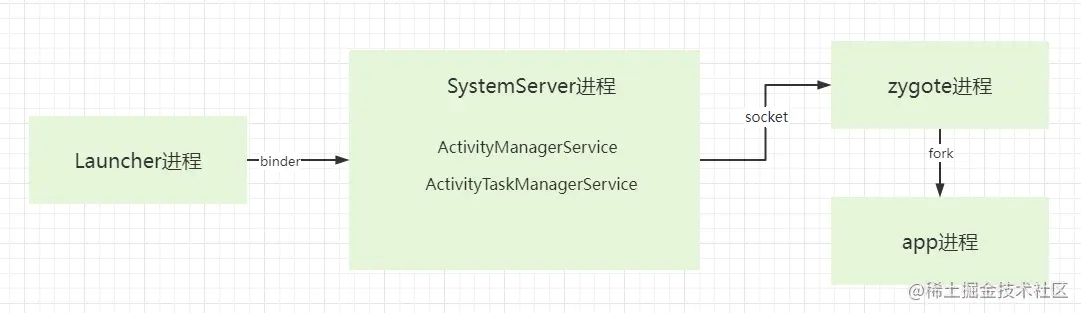
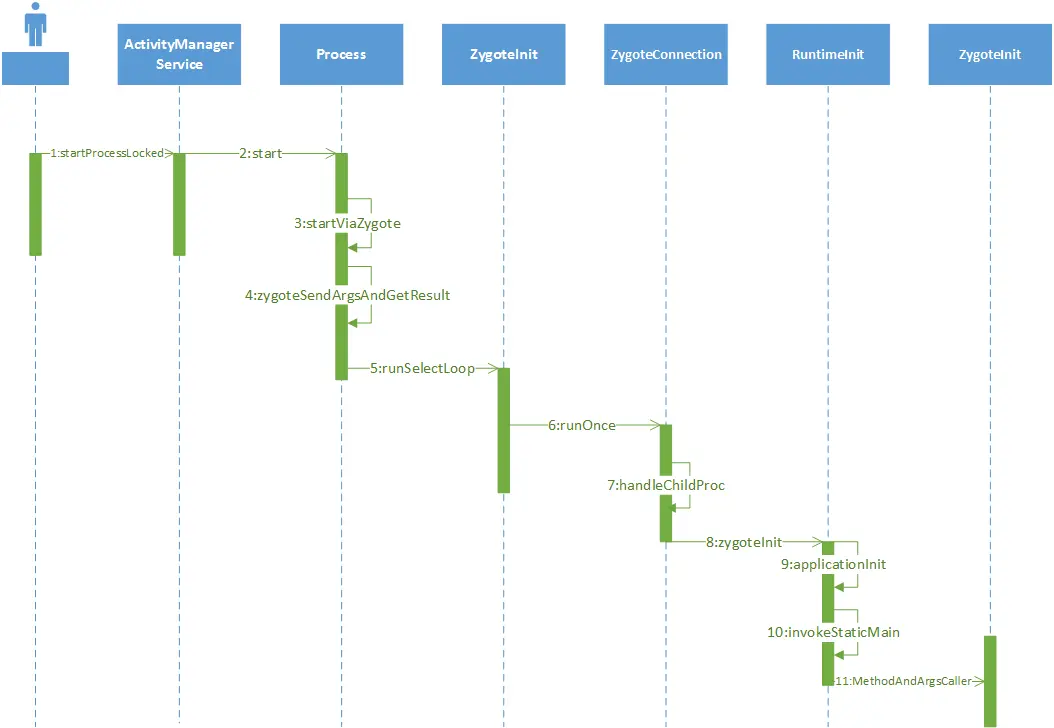
1. Launcher:用户点击图标启动应用
1.1 处理用户点击事件
- 用户点击桌面上的应用图标,
Launcher的ItemClickHandler处理这个点击事件。 ItemClickHandler调用onClick()方法,进一步触发startAppShortcutOrInfoActivity()来启动目标应用。
private static void startAppShortcutOrInfoActivity(View v, ItemInfo item, Launcher launcher,
		@Nullable String sourceContainer) {
	//省略部分代码

	//执行Launcher中的方法
	launcher.startActivitySafely(v, intent, item, sourceContainer);
}
1.2 构建并启动 Intent
- 在
startAppShortcutOrInfoActivity()方法中,构建一个Intent,该Intent包含启动目标应用的相关配置信息。 - 通过
startActivity()启动目标应用的Activity。
    @Override
    public boolean startActivitySafely(View v, Intent intent, ItemInfo item,
            @Nullable String sourceContainer) {
        //省略部分代码

		//执行父类BaseDraggingActivity的方法
        boolean success = super.startActivitySafely(v, intent, item, sourceContainer);
        if (success && v instanceof BubbleTextView) {
            // This is set to the view that launched the activity that navigated the user away
            // from launcher. Since there is no callback for when the activity has finished
            // launching, enable the press state and keep this reference to reset the press
            // state when we return to launcher.
            BubbleTextView btv = (BubbleTextView) v;
            btv.setStayPressed(true);
            addOnResumeCallback(btv);
        }
        return success;
    }
2. SystemServer:ActivityManagerService 处理启动请求
2.1 Instrumentation 向 ActivityManagerService 发送启动请求
Instrumentation通过execStartActivity()将Activity启动请求传递给ActivityManagerService,开始跨进程通信。
2.2 ActivityManagerService 获取 IActivityTaskManager
ActivityManagerService调用ActivityTaskManager.getService()获取IActivityTaskManager,这个接口用于与系统的 Activity 管理服务进行远程交互。
2.3 ActivityManagerService 校验并处理启动请求
ActivityManagerService在接收到启动请求后,执行一系列参数检查,确保请求合法。- 如果目标应用的进程未启动,
ActivityManagerService会通过ActivityStarter来决定是否需要启动新的进程。
2.4 通过 ActivityStarter 配置启动参数
ActivityManagerService将请求交给ActivityStarter,ActivityStarter配置启动所需的各项参数,如ActivityRecord,这是启动目标Activity的必要数据结构。ActivityStarter调用startActivityUnchecked()来执行启动操作。
2.5 启动目标 Activity 并处理 Activity Stack
- 在
startActivityUnchecked()中,调用startActivityInner(),处理Activity Stack,将目标Activity放到栈中,并通过resumeFocusedStacksTopActivities()确保目标Activity被移至前台,开始显示。
3. 应用进程启动:ActivityManagerService 请求进程创建
3.1 检查应用进程是否存在
ActivityManagerService会首先检查目标应用的进程是否已经存在。如果进程不存在,系统需要启动新的进程。
	void startSpecificActivity(ActivityRecord r, boolean andResume, boolean checkConfig) {
        // Is this activity's application already running?
        final WindowProcessController wpc =
                mService.getProcessController(r.processName, r.info.applicationInfo.uid);

        boolean knownToBeDead = false;
        //判断app有没有启动,如果已经启动了,则直接启动Activity
        if (wpc != null && wpc.hasThread()) {
            try {
                realStartActivityLocked(r, wpc, andResume, checkConfig);
                return;
            } catch (RemoteException e) {
                Slog.w(TAG, "Exception when starting activity "
                        + r.intent.getComponent().flattenToShortString(), e);
            }

            // If a dead object exception was thrown -- fall through to
            // restart the application.
            knownToBeDead = true;
        }

        r.notifyUnknownVisibilityLaunchedForKeyguardTransition();

        final boolean isTop = andResume && r.isTopRunningActivity();
        //app没有启动,说明是第一次启动,则需要先创建进程
        mService.startProcessAsync(r, knownToBeDead, isTop, isTop ? "top-activity" : "activity");
    }
3.2 通过 startProcessAsync() 启动新进程
ActivityManagerService调用startProcessAsync()方法请求启动目标应用的进程。如果目标进程未启动,则执行进程创建操作。
3.3 ActivityManagerInternal 处理进程创建请求
ActivityManagerInternal接收到启动进程的请求,并调用startProcess()方法进行处理,准备启动新进程。
startProcess()是一个抽象方法,由ActivityManagerInternal的子类ActivityManagerService.LocalService实现
        @Override
        public void startProcess(String processName, ApplicationInfo info, boolean knownToBeDead,
                boolean isTop, String hostingType, ComponentName hostingName) {
            try {
                if (Trace.isTagEnabled(Trace.TRACE_TAG_ACTIVITY_MANAGER)) {
                    Trace.traceBegin(Trace.TRACE_TAG_ACTIVITY_MANAGER, "startProcess:"
                            + processName);
                }
                synchronized (ActivityManagerService.this) {
                    // If the process is known as top app, set a hint so when the process is
                    // started, the top priority can be applied immediately to avoid cpu being
                    // preempted by other processes before attaching the process of top app.
                    //执行AMS的startProcessLocked()
                    startProcessLocked(processName, info, knownToBeDead, 0 /* intentFlags */,
                            new HostingRecord(hostingType, hostingName, isTop),
                            ZYGOTE_POLICY_FLAG_LATENCY_SENSITIVE, false /* allowWhileBooting */,
                            false /* isolated */, true /* keepIfLarge */);
                }
            } finally {
                Trace.traceEnd(Trace.TRACE_TAG_ACTIVITY_MANAGER);
            }
        }
3.4 通过 ProcessList.startProcess() 启动进程
ActivityManagerService将进程创建请求传递给ProcessList.startProcess(),负责启动目标应用进程。
    private Process.ProcessStartResult startProcess(HostingRecord hostingRecord, String entryPoint,
            ProcessRecord app, int uid, int[] gids, int runtimeFlags, int zygotePolicyFlags,
            int mountExternal, String seInfo, String requiredAbi, String instructionSet,
            String invokeWith, long startTime) {
        try {
            Trace.traceBegin(Trace.TRACE_TAG_ACTIVITY_MANAGER, "Start proc: " +
                    app.processName);
            //请求zygote开启进程
            checkSlow(startTime, "startProcess: asking zygote to start proc");
            //省略部分代码

            final Process.ProcessStartResult startResult;
            //根据进程的类型,用不同的方式创建
            if (hostingRecord.usesWebviewZygote()) {
                startResult = startWebView(entryPoint,
                        app.processName, uid, uid, gids, runtimeFlags, mountExternal,
                        app.info.targetSdkVersion, seInfo, requiredAbi, instructionSet,
                        app.info.dataDir, null, app.info.packageName, app.mDisabledCompatChanges,
                        new String[]{PROC_START_SEQ_IDENT + app.startSeq});
            } else if (hostingRecord.usesAppZygote()) {
                final AppZygote appZygote = createAppZygoteForProcessIfNeeded(app);

                // We can't isolate app data and storage data as parent zygote already did that.
                startResult = appZygote.getProcess().start(entryPoint,
                        app.processName, uid, uid, gids, runtimeFlags, mountExternal,
                        app.info.targetSdkVersion, seInfo, requiredAbi, instructionSet,
                        app.info.dataDir, null, app.info.packageName,
                        /*zygotePolicyFlags=*/ ZYGOTE_POLICY_FLAG_EMPTY, isTopApp,
                        app.mDisabledCompatChanges, pkgDataInfoMap, whitelistedAppDataInfoMap,
                        false, false,
                        new String[]{PROC_START_SEQ_IDENT + app.startSeq});
            } else {
                startResult = Process.start(entryPoint,
                        app.processName, uid, uid, gids, runtimeFlags, mountExternal,
                        app.info.targetSdkVersion, seInfo, requiredAbi, instructionSet,
                        app.info.dataDir, invokeWith, app.info.packageName, zygotePolicyFlags,
                        isTopApp, app.mDisabledCompatChanges, pkgDataInfoMap,
                        whitelistedAppDataInfoMap, bindMountAppsData, bindMountAppStorageDirs,
                        new String[]{PROC_START_SEQ_IDENT + app.startSeq});
            }
            checkSlow(startTime, "startProcess: returned from zygote!");
            return startResult;
        } finally {
            Trace.traceEnd(Trace.TRACE_TAG_ACTIVITY_MANAGER);
        }
    }
hostingRecord描述了启动一个进程所需要的各种信息,根据进程类型的不同,用不同的方式创建,普通app的进程由Process.start()创建
	/**
     * State associated with the zygote process.
     * @hide
     */
    public static final ZygoteProcess ZYGOTE_PROCESS = new ZygoteProcess();

	public static ProcessStartResult start(@NonNull final String processClass,
                                           @Nullable final String niceName,
                                           int uid, int gid, @Nullable int[] gids,
                                           int runtimeFlags,
                                           int mountExternal,
                                           int targetSdkVersion,
                                           @Nullable String seInfo,
                                           @NonNull String abi,
                                           @Nullable String instructionSet,
                                           @Nullable String appDataDir,
                                           @Nullable String invokeWith,
                                           @Nullable String packageName,
                                           int zygotePolicyFlags,
                                           boolean isTopApp,
                                           @Nullable long[] disabledCompatChanges,
                                           @Nullable Map<String, Pair<String, Long>>
                                                   pkgDataInfoMap,
                                           @Nullable Map<String, Pair<String, Long>>
                                                   whitelistedDataInfoMap,
                                           boolean bindMountAppsData,
                                           boolean bindMountAppStorageDirs,
                                           @Nullable String[] zygoteArgs) {
        //调用zygoteProcess的方法
        return ZYGOTE_PROCESS.start(processClass, niceName, uid, gid, gids,
                    runtimeFlags, mountExternal, targetSdkVersion, seInfo,
                    abi, instructionSet, appDataDir, invokeWith, packageName,
                    zygotePolicyFlags, isTopApp, disabledCompatChanges,
                    pkgDataInfoMap, whitelistedDataInfoMap, bindMountAppsData,
                    bindMountAppStorageDirs, zygoteArgs);
    }
Process.start()又调用了ZygoteProcess.start()
    public final Process.ProcessStartResult start(@NonNull final String processClass,
                                                  final String niceName,
                                                  int uid, int gid, @Nullable int[] gids,
                                                  int runtimeFlags, int mountExternal,
                                                  int targetSdkVersion,
                                                  @Nullable String seInfo,
                                                  @NonNull String abi,
                                                  @Nullable String instructionSet,
                                                  @Nullable String appDataDir,
                                                  @Nullable String invokeWith,
                                                  @Nullable String packageName,
                                                  int zygotePolicyFlags,
                                                  boolean isTopApp,
                                                  @Nullable long[] disabledCompatChanges,
                                                  @Nullable Map<String, Pair<String, Long>>
                                                          pkgDataInfoMap,
                                                  @Nullable Map<String, Pair<String, Long>>
                                                          whitelistedDataInfoMap,
                                                  boolean bindMountAppsData,
                                                  boolean bindMountAppStorageDirs,
                                                  @Nullable String[] zygoteArgs) {
        // TODO (chriswailes): Is there a better place to check this value?
        if (fetchUsapPoolEnabledPropWithMinInterval()) {
            informZygotesOfUsapPoolStatus();
        }

        try {
            //调用startViaZygote()
            return startViaZygote(processClass, niceName, uid, gid, gids,
                    runtimeFlags, mountExternal, targetSdkVersion, seInfo,
                    abi, instructionSet, appDataDir, invokeWith, /*startChildZygote=*/ false,
                    packageName, zygotePolicyFlags, isTopApp, disabledCompatChanges,
                    pkgDataInfoMap, whitelistedDataInfoMap, bindMountAppsData,
                    bindMountAppStorageDirs, zygoteArgs);
        } catch (ZygoteStartFailedEx ex) {
            Log.e(LOG_TAG,
                    "Starting VM process through Zygote failed");
            throw new RuntimeException(
                    "Starting VM process through Zygote failed", ex);
        }
    }

	private Process.ProcessStartResult startViaZygote(@NonNull final String processClass,
                                                      @Nullable final String niceName,
                                                      final int uid, final int gid,
                                                      @Nullable final int[] gids,
                                                      int runtimeFlags, int mountExternal,
                                                      int targetSdkVersion,
                                                      @Nullable String seInfo,
                                                      @NonNull String abi,
                                                      @Nullable String instructionSet,
                                                      @Nullable String appDataDir,
                                                      @Nullable String invokeWith,
                                                      boolean startChildZygote,
                                                      @Nullable String packageName,
                                                      int zygotePolicyFlags,
                                                      boolean isTopApp,
                                                      @Nullable long[] disabledCompatChanges,
                                                      @Nullable Map<String, Pair<String, Long>>
                                                              pkgDataInfoMap,
                                                      @Nullable Map<String, Pair<String, Long>>
                                                              whitelistedDataInfoMap,
                                                      boolean bindMountAppsData,
                                                      boolean bindMountAppStorageDirs,
                                                      @Nullable String[] extraArgs)
                                                      throws ZygoteStartFailedEx {
        //收集进程参数
        ArrayList<String> argsForZygote = new ArrayList<>();

        // --runtime-args, --setuid=, --setgid=,
        // and --setgroups= must go first
        argsForZygote.add("--runtime-args");
        argsForZygote.add("--setuid=" + uid);
        argsForZygote.add("--setgid=" + gid);
        argsForZygote.add("--runtime-flags=" + runtimeFlags);
        //省略部分代码

        synchronized(mLock) {
            // The USAP pool can not be used if the application will not use the systems graphics
            // driver.  If that driver is requested use the Zygote application start path.
            //想zygote进程发送要创建的进程参数
            return zygoteSendArgsAndGetResult(openZygoteSocketIfNeeded(abi),
                                              zygotePolicyFlags,
                                              argsForZygote);
        }
    }

    @GuardedBy("mLock")
    private Process.ProcessStartResult zygoteSendArgsAndGetResult(
            ZygoteState zygoteState, int zygotePolicyFlags, @NonNull ArrayList<String> args)
            throws ZygoteStartFailedEx {
        // Throw early if any of the arguments are malformed. This means we can
        // avoid writing a partial response to the zygote.
        //校验参数
        for (String arg : args) {
            // Making two indexOf calls here is faster than running a manually fused loop due
            // to the fact that indexOf is a optimized intrinsic.
            if (arg.indexOf('\n') >= 0) {
                throw new ZygoteStartFailedEx("Embedded newlines not allowed");
            } else if (arg.indexOf('\r') >= 0) {
                throw new ZygoteStartFailedEx("Embedded carriage returns not allowed");
            }
        }

        //省略部分代码
		//调用attemptZygoteSendArgsAndGetResult()
        return attemptZygoteSendArgsAndGetResult(zygoteState, msgStr);
    }

	private Process.ProcessStartResult attemptZygoteSendArgsAndGetResult(
            ZygoteState zygoteState, String msgStr) throws ZygoteStartFailedEx {
        try {
            final BufferedWriter zygoteWriter = zygoteState.mZygoteOutputWriter;
            final DataInputStream zygoteInputStream = zygoteState.mZygoteInputStream;

            //向zygote进程发送数据
            zygoteWriter.write(msgStr);
            zygoteWriter.flush();

            // Always read the entire result from the input stream to avoid leaving
            // bytes in the stream for future process starts to accidentally stumble
            // upon.
            //获取zygote进程返回的启动结果
            Process.ProcessStartResult result = new Process.ProcessStartResult();
            result.pid = zygoteInputStream.readInt();
            result.usingWrapper = zygoteInputStream.readBoolean();

            if (result.pid < 0) {
                throw new ZygoteStartFailedEx("fork() failed");
            }

            return result;
        } catch (IOException ex) {
            zygoteState.close();
            Log.e(LOG_TAG, "IO Exception while communicating with Zygote - "
                    + ex.toString());
            throw new ZygoteStartFailedEx(ex);
        }
    }
在最后的attemptZygoteSendArgsAndGetResult()方法中,通过输入流向zygote进程发送数据,实际上这里是通过socket通信来完成的,我们知道常用的进程通信的方式有两种,binder和socket,在上面方法中有一个重要的参数ZygoteState,它是ZygoteProcess的内部类,定义了zygote服务端的地址以及IO通道,作用就是跟zygote进程进行通信
4. Zygote:创建应用进程
4.1 Zygote 监听并处理进程启动请求(runSelectLoop())
runSelectLoop() 是 Zygote 中的核心方法,它会不断轮询接收到的进程启动请求,并处理每个请求。
Runnable runSelectLoop(String abiList) {
    ArrayList<FileDescriptor> socketFDs = new ArrayList<>();
    ArrayList<ZygoteConnection> peers = new ArrayList<>();

    socketFDs.add(mZygoteSocket.getFileDescriptor());
    peers.add(null);

    while (true) {
        // 轮询并等待来自客户端的连接请求
        try {
            ZygoteConnection connection = peers.get(pollIndex);

            // 读取启动命令并执行
            final Runnable command = connection.processOneCommand(this);
            return command;  // 返回用于启动进程的命令
        } catch (Exception e) {
            // 异常处理
        } finally {
            // 关闭资源
        }
    }
}
Zygote进程接收到ActivityManagerService发出的应用进程创建请求。
4.2 通过 Zygote.forkAndSpecialize() 创建新进程
当 Zygote 接收到启动命令时,processOneCommand() 会解析命令参数,并调用 forkAndSpecialize() 创建新的子进程。
子进程会进入到应用进程的初始化流程。
public Runnable processOneCommand(ZygoteServer zygoteServer) {
    String[] args;
    try {
        args = Zygote.readArgumentList(mSocketReader);  // 从命令套接字读取启动参数
    } catch (IOException ex) {
        throw new IllegalStateException("IOException on command socket", ex);
    }

    // 创建新进程
    pid = Zygote.forkAndSpecialize(parsedArgs.mUid, parsedArgs.mGid, parsedArgs.mGids,
            parsedArgs.mRuntimeFlags, rlimits, parsedArgs.mMountExternal, parsedArgs.mSeInfo,
            parsedArgs.mNiceName, fdsToClose, fdsToIgnore, parsedArgs.mStartChildZygote,
            parsedArgs.mInstructionSet, parsedArgs.mAppDataDir, parsedArgs.mIsTopApp,
            parsedArgs.mPkgDataInfoList, parsedArgs.mWhitelistedDataInfoList,
            parsedArgs.mBindMountAppDataDirs, parsedArgs.mBindMountAppStorageDirs);

    try {
        if (pid == 0) {
            // 子进程中
            zygoteServer.setForkChild();
            zygoteServer.closeServerSocket();
            IoUtils.closeQuietly(serverPipeFd);
            return handleChildProc(parsedArgs, childPipeFd, parsedArgs.mStartChildZygote);  // 处理子进程启动
        } else {
            // 父进程中
            IoUtils.closeQuietly(childPipeFd);
            handleParentProc(pid, serverPipeFd);  // 处理父进程逻辑
            return null;
        }
    } finally {
        IoUtils.closeQuietly(childPipeFd);
        IoUtils.closeQuietly(serverPipeFd);
    }
}
4.3 Zygote 初始化子进程
如果 forkAndSpecialize() 返回 0(表示当前是子进程),Zygote 会调用 handleChildProc() 来进一步处理子进程的初始化。
private Runnable handleChildProc(ZygoteArguments parsedArgs,
            FileDescriptor pipeFd, boolean isZygote) {
    closeSocket();  // 关闭套接字

    // 设置应用进程名称
    Zygote.setAppProcessName(parsedArgs, TAG);

    // 进行应用进程的初始化
    if (parsedArgs.mInvokeWith != null) {
        WrapperInit.execApplication(parsedArgs.mInvokeWith,
                parsedArgs.mNiceName, parsedArgs.mTargetSdkVersion,
                VMRuntime.getCurrentInstructionSet(),
                pipeFd, parsedArgs.mRemainingArgs);
        throw new IllegalStateException("WrapperInit.execApplication unexpectedly returned");
    } else {
        if (!isZygote) {
            return ZygoteInit.zygoteInit(parsedArgs.mTargetSdkVersion,
                    parsedArgs.mDisabledCompatChanges,
                    parsedArgs.mRemainingArgs, null);  // 启动目标应用
        } else {
            return ZygoteInit.childZygoteInit(parsedArgs.mTargetSdkVersion,
                    parsedArgs.mRemainingArgs, null);
        }
    }
}
zygoteInit():调用ZygoteInit.zygoteInit()来初始化应用并启动目标应用的Activity。
    public static final Runnable zygoteInit(int targetSdkVersion, long[] disabledCompatChanges,
            String[] argv, ClassLoader classLoader) {
        if (RuntimeInit.DEBUG) {
            Slog.d(RuntimeInit.TAG, "RuntimeInit: Starting application from zygote");
        }

        Trace.traceBegin(Trace.TRACE_TAG_ACTIVITY_MANAGER, "ZygoteInit");
        RuntimeInit.redirectLogStreams();

        RuntimeInit.commonInit();
        //在native层初始化
        ZygoteInit.nativeZygoteInit();
        //执行app的初始化,也就是调用main函数
        return RuntimeInit.applicationInit(targetSdkVersion, disabledCompatChanges, argv,
                classLoader);
    }
目标进程的创建是在native层完成,在AndroidRuntime.cpp中
static void com_android_internal_os_ZygoteInit_nativeZygoteInit(JNIEnv* env, jobject clazz)
{
    gCurRuntime->onZygoteInit();
}
onZygoteInit()实现在app_main.cpp中
frameworks/base/cmds/app_process/app_main.cpp
    virtual void onZygoteInit()
    {
        sp proc = ProcessState::self();
        ALOGV("App process: starting thread pool.\n");
        proc->startThreadPool();
    }
frameworks/native/libs/binder/ProcessState.cpp
void ProcessState::startThreadPool()
{
    AutoMutex _l(mLock);
    if (!mThreadPoolStarted) {
        mThreadPoolStarted = true;
        spawnPooledThread(true);
    }
}
进程创建完,开始执行它的main()方法
frameworks/base/core/java/com/android/internal/os/RuntimeInit.java
	protected static Runnable applicationInit(int targetSdkVersion, long[] disabledCompatChanges,
            String[] argv, ClassLoader classLoader) {
        // If the application calls System.exit(), terminate the process
        // immediately without running any shutdown hooks.  It is not possible to
        // shutdown an Android application gracefully.  Among other things, the
        // Android runtime shutdown hooks close the Binder driver, which can cause
        // leftover running threads to crash before the process actually exits.
        nativeSetExitWithoutCleanup(true);

        VMRuntime.getRuntime().setTargetSdkVersion(targetSdkVersion);
        VMRuntime.getRuntime().setDisabledCompatChanges(disabledCompatChanges);

        final Arguments args = new Arguments(argv);

        // The end of of the RuntimeInit event (see #zygoteInit).
        Trace.traceEnd(Trace.TRACE_TAG_ACTIVITY_MANAGER);

        // Remaining arguments are passed to the start class's static main
        //寻找静态main方法
        return findStaticMain(args.startClass, args.startArgs, classLoader);
    }

    protected static Runnable findStaticMain(String className, String[] argv,
            ClassLoader classLoader) {
        //通过反射找到main方法,
        Class<?> cl;
        //打印看看是调用的哪个类的main方法
        Log.d("jasonwan","className="+className);

        try {
            cl = Class.forName(className, true, classLoader);
        } catch (ClassNotFoundException ex) {
            throw new RuntimeException(
                    "Missing class when invoking static main " + className,
                    ex);
        }

        Method m;
        try {
            m = cl.getMethod("main", new Class[] { String[].class });
        } catch (NoSuchMethodException ex) {
            throw new RuntimeException(
                    "Missing static main on " + className, ex);
        } catch (SecurityException ex) {
            throw new RuntimeException(
                    "Problem getting static main on " + className, ex);
        }
		//main方法必须是public static
        int modifiers = m.getModifiers();
        if (! (Modifier.isStatic(modifiers) && Modifier.isPublic(modifiers))) {
            throw new RuntimeException(
                    "Main method is not public and static on " + className);
        }

        /*
         * This throw gets caught in ZygoteInit.main(), which responds
         * by invoking the exception's run() method. This arrangement
         * clears up all the stack frames that were required in setting
         * up the process.
         */
        //构建一个MethodAndArgsCaller,包含main方法和其参数
        return new MethodAndArgsCaller(m, argv);
    }
通过反射来获得android.app.ActivityThread类 获得ActivityThread的main函数
frameworks/base/core/java/com/android/internal/os/RuntimeInit.java
 public static class MethodAndArgsCaller extends Exception
            implements Runnable {
        private final Method mMethod;
        private final String[] mArgs;
        public MethodAndArgsCaller(Method method, String[] args) {
            mMethod = method;
            mArgs = args;
        }
        public void run() {
            try {
                mMethod.invoke(null, new Object[] { mArgs });//1
            } catch (IllegalAccessException ex) {
                throw new RuntimeException(ex);
            }
            ...
                throw new RuntimeException(ex);
            }
        }
    }
5. 应用进程初始化:ActivityThread 启动应用
5.1 执行 ActivityThread.main()
- 子进程开始执行
ActivityThread.main(),这是应用主线程的入口,启动应用进程并完成基本的初始化工作。 frameworks/base/core/java/android/app/ActivityThread.java
 public static void main(String[] args) {
        Trace.traceBegin(Trace.TRACE_TAG_ACTIVITY_MANAGER, "ActivityThreadMain");
        SamplingProfilerIntegration.start();
...
        Looper.prepareMainLooper();//1
        ActivityThread thread = new ActivityThread();//2
        thread.attach(false);
        if (sMainThreadHandler == null) {
            sMainThreadHandler = thread.getHandler();
        }
        if (false) {
            Looper.myLooper().setMessageLogging(new
                    LogPrinter(Log.DEBUG, "ActivityThread"));
        }
        Trace.traceEnd(Trace.TRACE_TAG_ACTIVITY_MANAGER);
        Looper.loop();//3
        throw new RuntimeException("Main thread loop unexpectedly exited");
    }
在当前应用程序进程中创建消息循环 创建ActivityThread 调用Looper的loop,使得Looper开始工作,开始处理消息。
5.2 初始化 Application 对象
- 在
ActivityThread.main()中,系统会创建Application对象,这是每个 Android 应用的基础组件,负责初始化整个应用环境。
public void attach(boolean system) {
    if (mSystemContext == null) {
        mSystemContext = ContextImpl.createSystemContext(this); // 初始化系统上下文
    }
    if (!system) {
        mInitialApplication = makeApplication(true, mInstrumentation); // 创建应用对象
    }
    ...
}
Application是 Android 应用中唯一存在的全局对象,整个应用在生命周期内只会创建一个实例,负责应用级别的初始化任务。- 它通常用于处理全局初始化任务,如配置文件加载、第三方 SDK 初始化、单例模式对象的创建等。
5.3 启动目标 Activity
ActivityThread会通过Instrumentation启动目标应用的主Activity,并通过Activity生命周期管理方法确保目标Activity正常启动。
public Activity performLaunchActivity(ActivityClientRecord r, Intent customIntent) {
    ...
    // 通过反射机制创建 Activity
    activity = mInstrumentation.newActivity(cl, component.getClassName(), r.intent);
    ...
}
- 启动过程涉及通过反射机制创建目标
Activity的实例,并完成attach()和onCreate()等生命周期方法的调用。 Activity启动后,会进入onStart()和onResume()等生命周期方法,确保Activity完全初始化并展示给用户。
5.4 执行 Activity 生命周期方法
Activity在启动过程中会依次调用生命周期方法,如onCreate()、onStart()、onResume()等。这些方法是应用与用户进行交互时的关键时刻,负责设置界面、初始化数据和监听用户操作。
private void performLifecycleSequence(ActivityClientRecord r, IntArray path, ClientTransaction transaction) {
    ...
    switch (state) {
        case ON_CREATE:
            mTransactionHandler.handleLaunchActivity(r, mPendingActions, null /* customIntent */);
            break;
        case ON_START:
            mTransactionHandler.handleStartActivity(r, mPendingActions);
            break;
        case ON_RESUME:
            mTransactionHandler.handleResumeActivity(r.token, false /* finalStateRequest */, r.isForward, "LIFECYCLER_RESUME_ACTIVITY");
            break;
        // 其他生命周期状态
    }
}
https://juejin.cn/post/7231439815647789113 https://juejin.cn/post/6844903472010117133 https://juejin.cn/post/7252586674578817061