
【自动化测试】经验与技巧[adb&Aritest&Poco]
本文目录 36 个章节
【自动化测试】经验与技巧[adb&Aritest&Poco]
# 【自动化测试】经验与技巧[adb&Aritest&Poco]
创建时间:2021/5/8 13:39
- ADB技巧
- 连接安卓设备
- Profiler: Editor-to-Android connection
- log抓取
- 获取包名等
- 启动游戏
- Airtest
- 相关概念
- proxy
- 其他
- 常用API
- 基本
- Connect
- Simulate Input
- Make Assertion
- Running .air from CLI
- run automated case
- generate html report
- get case info
- 设备连接问题
- Some special parameters
- 相关网站
- 设备支持问题
- 相关概念
- Poco
- SDK集成
- 术语
- 多设备连接与初始化
- 坐标系
- 常用API
- 操作UI对象(Object Proxy Related Operation)
- 全局操作(Global Operation)
- 异常处理(Exceptions)
- 实践技巧(需求及处理方案汇总)
- 遇到的坑
- [Python]ModuleNotFoundError and ImportError
- Ref
ADB技巧
用法大全: https://github.com/mzlogin/awesome-adb
连接安卓设备
WIFI连接调试:
string s = String.Empty;
string s = String.Empty;
string s = String.Empty;
切换USB模式与WIFI模式
string s = String.Empty;
Profiler: Editor-to-Android connection
adb forward tcp:34999 localabstract:Unity-{insert bundle identifier here}
log抓取
adb logcat -s Unity adb -s %DeviceName% logcat -s Unity adb logcat -s Unity ActivityManager PackageManager dalvikvm DEBUG #获取log,-s指定过滤器 adb -s deviceName logcat -s Unity -f /mnt/sdcard/log.txt #-f 输出log到指定文件。只能输出到Android设备上。 adb -s deviceName logcat -s Unity > c:\unity_log.txt
获取包名等
shell命令:
string s = String.Empty;
启动游戏
adb shell dumpsys package com.examle.xx adb shell am start -n 包名/包名.****
Airtest
相关概念
proxy
代理服务器 (Proxy server) : In computer networking, a proxy server is a server application or appliance that acts as an intermediary for requests from clients seeking resources from servers that provide those resources 。
Proxy主要运作的行为在 OSI 七层协议的 应用层 部分。Proxy 能不能进行某些工作,与该服务的程序功能有关。
其他
- 网络主机(network host) - 是已连接到一个计算机网络的一台电子计算机或其他设备。 使用TCP/IP协议族参与网络的计算机也可称为IP主机。更具体来说,参与互联网计算机可称为互联网主机,有时还称作互联网节点。
常用API
基本
string s = String.Empty;
Connect
string s = String.Empty;
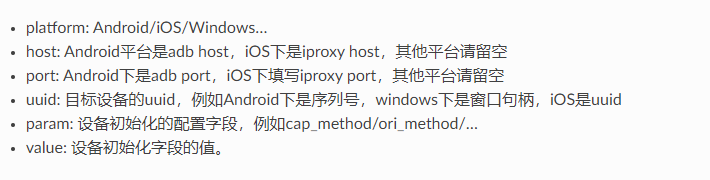
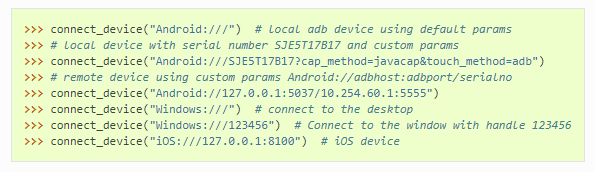
connect_device("Android://127.0.0.1:5037/10.254.60.1:5555")
adb host: adb server的地址(the IP of the host where adb Server is located) - By default, this is localhostor 127.0.0.1
adb port defaults to 5037
devicehost:port: 移动设备的地址和端口号 (端口号:5555-5585)
Simulate Input
touch swipe text keyevent snapshot wait
Make Assertion
assert_exists assert_not_exists assert_equal assert_not_equal
Running .air from CLI
run automated case
airtest run "path to your .air dir" --device Android:/// airtest run "path to your .air dir" --device Android://adbhost:adbport/serialno airtest run "path to your .air dir" --device Windows:///?title_re=Unity.* airtest run "path to your .air dir" --device iOS:///
string s = String.Empty;
generate html report
airtest report "path to your .air dir"
string s = String.Empty;
get case info
python -m airtest info "path to your .air dir"
string s = String.Empty;
设备连接问题
可以在调用airtest时连接设备,也可以在airtest脚本中进行设备的连接。
These two methods only need to choose one of them, basically can meet our needs to connect devices.
调用时通过参数初始化连接:
- 在运行时的命令行中如果传入了类似
--device Android:///XXXX这样的设备参数,那么脚本在 初始化时会自动连上对应的设备 ,不需要再另外写代码连接了。连接哪个设备,就会在哪个设备上执行脚本 - 如果不主动输入连接的设备,则会默认选择(随机性)一个设备来执行脚本。
airtest脚本内通过API连接:
- 如果没有在初始化时连上设备,可以在脚本代码中使用
connect_device接口来连接设备。 - Airtest支持在一个脚本里同时连接多个设备,使用
set_current接口可以在多个设备中进行切换,device()接口可以获取到当前使用中的设备。
虽然支持多线程多设备运行,但是一个airtest进程在同一时间只支持在一个设备上执行命令。可以调用时就设置连接的设备,也可以在脚本内进行连接或者断开,但device() 接口获取的当前设备只有一个。
Some special parameters
Some special devices may appear black screen when connected, such as some emulators, we can add an extra parameter cap_method=JAVACAP to force the screen capture mode to be JAVACAP :
string s = String.Empty;
In addition, we have two other parameters, ori_method=ADBORI, which specifies the rotation mode of the device screen, and touch_method=ADBTOUCH, which specifies the click mode of the screen as ADB instruction.
命令行传参数需要对一些字符进行转义。
if any of the characters ^<>|& appear on the command line, they may need to be escaped to take effect.
string s = String.Empty;
相关网站
源码地址:https://github.com/AirtestProject/Airtest
Android连接常见问题: https://airtest.doc.io.netease.com/IDEdocs/device_connection/2_android_faq/
各个平台支持情况:https://airtest.readthedocs.io/zh_CN/latest/wiki/device/platforms.html
Android平台的一些技巧: https://airtest.readthedocs.io/zh_CN/latest/wiki/device/android.html
模拟器连接:https://airtest.doc.io.netease.com/en/IDEdocs/device_connection/3_emulator_connection/#2
Airtest Project文档:https://airtest.doc.io.netease.com/
设备支持问题
https://airtest.doc.io.netease.com/IDEdocs/device_connection/6_android_support/
Poco
SDK集成
场景中任意 GameObject 上 Add Component Unity3D/PocoManager.cs
术语
UI proxy: proxy objects within Poco framework, they represent zero (none), one or multiple in-game UI elements Node/UI element: UI element instances or nodes in app/game 选择表达式 :除非你需要扩展或自定义更底层的Poco的行为,一般无需关心此。选择表达式是一种框架和sdk交互的底层数据结构,用在 Selector 类中。
多设备连接与初始化
https://poco.readthedocs.io/zh_CN/latest/source/doc/drivers/unity3d.html
坐标系
归一化坐标系(Normalized Coordinate System) UI在poco中的宽和高其实就是相对于屏幕的百分比大小,好处就是不同分辨率设备之间,同一个UI的归一化坐标系下的位置和尺寸是一样的,有助于编写跨设备测试用例。屏幕正中央一定是(0.5, 0.5)
局部坐标系(Local Coordinate System (local positioning)) 局部坐标系以UI包围盒左上角为原点,向右为x轴,向下为y轴,包围盒宽和高均为单位一。
常用API
string s = String.Empty;
UI选择:
- 相对选择器(Relative Selector)
- 空间顺序选择器(Sequence Selector)
操作UI对象(Object Proxy Related Operation)
点击(click) 滑动(swipe) 拖拽(drag) - darg 是从一个UI拖到另一个UI,而 swipe 是将一个UI朝某个方向拖动。
局部定位(focus (local positioning)) - 所有UI相关的操作都默认以UI的 anchorPoint 为操作点,如果想自定义一个点那么可以使用 focus 方法。调用此方法将返回 新的 设置了默认 焦点 的UI
string s = String.Empty;
等待出现(wait) wait(5).exists() wait_for_appearance(timeout=120) wait_for_disappearance(timeout=120)
全局操作(Global Operation)
poco.click([0.5, 0.5]) poco.long_click([0.5, 0.5], duration=3) poco.swipe(point_a, center)
截屏(snapshot)
string s = String.Empty;
异常处理(Exceptions)
PocoTargetTimeout PocoNoSuchNodeException
实践技巧(需求及处理方案汇总)
Android设备上的一些操作技巧可查看: https://airtest.readthedocs.io/zh_CN/latest/wiki/device/android.html
涉及到的例子有:连续滑动、两个手指操作、录屏等
代码功能示例:https://airtest.readthedocs.io/zh_CN/latest/wiki/code/code.html
遇到的坑
[Python]ModuleNotFoundError and ImportError
set PYTHONPATH="path to your .air dir"