---
title: "【Python】Python3基础"
author: "Perrin Yong"
author_profile: https://www.pystone.net/profile/
published_by: "Perrin Yong"
canonical: https://www.pystone.net/notes/python3-fundamentals/
type: note
content_role: unspecified
visibility: public
id_stability: rename-stable
source_path: "10-计算机、信息技术与工程/03-软件工程与质量保障/CI-CD与质量保障/CI-CD工具链/【Python】Python3基础.md"
content_hash: 17241b22eed8db70a8a3b46df02d01c109e1c245581488eafeba8cd676147f81
knowledge_version: 224c990773de.5fa8af6e39fa
site_commit: 224c990773de166d23a886306577dd90379529ce
notes_commit: 5fa8af6e39fa3891d1b9b4832bfa6c4e0ecaaf0a
---
# 【Python】Python3基础
> 创建时间:2021/5/11 15:02
* 【Python】Python3基础
* 知识结构与资料
* 基础语法特征
* string
* list
* 增删改查
* 排序,反转,计算长度
* 遍历,创建,计算
* for…in
* range
* 计算
* 简单的遍历并处理
* 截取一部分
* 元组
* 字典
* 遍历
* 逻辑运算
* 输入:
* if-else
* while
* 函数
* class
* 导入
* 函数导入
* 类导入
* 文件
* 读取整个文件
* 逐行读取
* 写入文件
* json
* 异常
* python3与python2的区别
* 除法
* 进阶
* arbitrary number of arguments
* **kwargs
* os.system & os.popen & subprocess
* os.system
* os.popen
* subprocess.Popen
* 对比
* Lambda
* Map
* filter
* Iterator & Generator
* Iterator
* Generator
* Building Generators With Generator Expressions
* 深入理解
* Profiling Generator Performance
* 工具与应用
* Sublime Build Python
* Ref
## 知识结构与资料
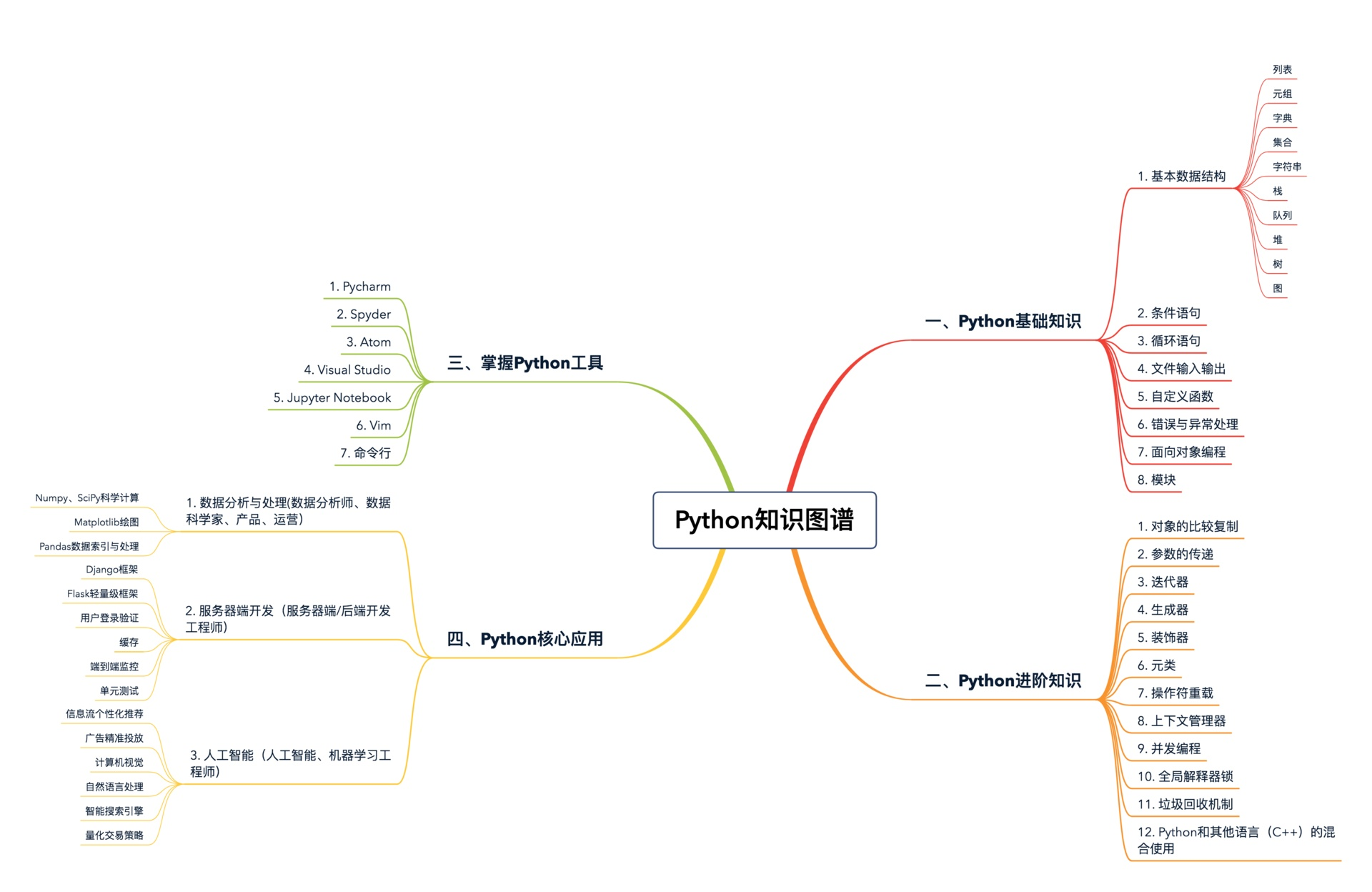
快速教程:
## 基础语法特征
### string
用引号括起的都是字符串
```csharp
string str1 = String.Empty;
string str2 = String.Empty;
str2 = String.Intern(sb.ToString());
if((object)str1==(object)str2)
Console.WriteLine("The strings are equal.");
else
Console.WriteLine("The strings are not equal.");
```
加号(+)来合并字符串
```csharp
string str1 = String.Empty;
string str2 = String.Empty;
str2 = String.Intern(sb.ToString());
if((object)str1==(object)str2)
Console.WriteLine("The strings are equal.");
else
Console.WriteLine("The strings are not equal.");
```
title() - 将每个单词的首字母都改为大写。
upper()、lower()
rstrip() 删除右侧空白
lstrip() 删除左侧空白
strip() 删除两端空白
strip() 不改变原来的字符串
str() - 将数字转换为字符串再进行拼接
```csharp
string str1 = String.Empty;
string str2 = String.Empty;
str2 = String.Intern(sb.ToString());
if((object)str1==(object)str2)
Console.WriteLine("The strings are equal.");
else
Console.WriteLine("The strings are not equal.");
```
### list
方括号([])来表示列表,并用逗号来分隔其中的元素
```csharp
string str1 = String.Empty;
string str2 = String.Empty;
str2 = String.Intern(sb.ToString());
if((object)str1==(object)str2)
Console.WriteLine("The strings are equal.");
else
Console.WriteLine("The strings are not equal.");
```
#### 增删改查
修改元素直接用索引修改
在末尾添加:append
插入:insert
```csharp
string str1 = String.Empty;
string str2 = String.Empty;
str2 = String.Intern(sb.ToString());
if((object)str1==(object)str2)
Console.WriteLine("The strings are equal.");
else
Console.WriteLine("The strings are not equal.");
```
del:按索引删除
pop():删除列表最后一个元素并返回最后一个元素的值。
pop(index) - 传索引删除任意位置的值并返回
remove():按值删除第一个元素
```csharp
string str1 = String.Empty;
string str2 = String.Empty;
str2 = String.Intern(sb.ToString());
if((object)str1==(object)str2)
Console.WriteLine("The strings are equal.");
else
Console.WriteLine("The strings are not equal.");
```
> list[-2] 是获取倒数第二个元素
#### 排序,反转,计算长度
改变原列表:
list.sort()
list.sort(reverse=True) - 反转
不影响原始排列顺序:
sorted(list)
sorted(list, reverse=True)
list.reverse()
len(list)
#### 遍历,创建,计算
##### for…in
```csharp
string str1 = String.Empty;
string str2 = String.Empty;
str2 = String.Intern(sb.ToString());
if((object)str1==(object)str2)
Console.WriteLine("The strings are equal.");
else
Console.WriteLine("The strings are not equal.");
```
##### range
range(1,6) - 前闭后开
range(0,11,2) - 指定步长为2
##### 计算
min():计算最小值
max():计算最大值
sum():计算总和
##### 简单的遍历并处理
```csharp
string str1 = String.Empty;
string str2 = String.Empty;
str2 = String.Intern(sb.ToString());
if((object)str1==(object)str2)
Console.WriteLine("The strings are equal.");
else
Console.WriteLine("The strings are not equal.");
```
##### 截取一部分
前闭后开
```csharp
string str1 = String.Empty;
string str2 = String.Empty;
str2 = String.Intern(sb.ToString());
if((object)str1==(object)str2)
Console.WriteLine("The strings are equal.");
else
Console.WriteLine("The strings are not equal.");
```
如果使用 names3=names,则只是把引用(地址)赋值过去,指向的是用一份数据。
### 元组
不可变的列表被称为元组
圆括号标识
访问和遍历方式与列表一致
### 字典
可将任何Python对象用作字典中的值
```csharp
string str1 = String.Empty;
string str2 = String.Empty;
str2 = String.Intern(sb.ToString());
if((object)str1==(object)str2)
Console.WriteLine("The strings are equal.");
else
Console.WriteLine("The strings are not equal.");
```
#### 遍历
遍历所有键值对
items()
```csharp
string str1 = String.Empty;
string str2 = String.Empty;
str2 = String.Intern(sb.ToString());
if((object)str1==(object)str2)
Console.WriteLine("The strings are equal.");
else
Console.WriteLine("The strings are not equal.");
```
遍历所有键
for k in cats.keys()
for k in cats
```csharp
string str1 = String.Empty;
string str2 = String.Empty;
str2 = String.Intern(sb.ToString());
if((object)str1==(object)str2)
Console.WriteLine("The strings are equal.");
else
Console.WriteLine("The strings are not equal.");
```
没有顺序
遍历所有值 values()
```csharp
string str1 = String.Empty;
string str2 = String.Empty;
str2 = String.Intern(sb.ToString());
if((object)str1==(object)str2)
Console.WriteLine("The strings are equal.");
else
Console.WriteLine("The strings are not equal.");
```
遍历并去除重复项 set()
for value in set(cat.values())
> 可以在列表中嵌套字典、在字典中嵌套列表以及在字典中嵌套字典。
### 逻辑运算
* and
* or
* in - 判断列表是否包含某元素
* not in - 判断不包含
```csharp
string str1 = String.Empty;
string str2 = String.Empty;
str2 = String.Intern(sb.ToString());
if((object)str1==(object)str2)
Console.WriteLine("The strings are equal.");
else
Console.WriteLine("The strings are not equal.");
```
### 输入:
```csharp
string str1 = String.Empty;
string str2 = String.Empty;
str2 = String.Intern(sb.ToString());
if((object)str1==(object)str2)
Console.WriteLine("The strings are equal.");
else
Console.WriteLine("The strings are not equal.");
```
### if-else
```csharp
string str1 = String.Empty;
string str2 = String.Empty;
str2 = String.Intern(sb.ToString());
if((object)str1==(object)str2)
Console.WriteLine("The strings are equal.");
else
Console.WriteLine("The strings are not equal.");
```
### while
```csharp
string str1 = String.Empty;
string str2 = String.Empty;
str2 = String.Intern(sb.ToString());
if((object)str1==(object)str2)
Console.WriteLine("The strings are equal.");
else
Console.WriteLine("The strings are not equal.");
```
```csharp
string str1 = String.Empty;
string str2 = String.Empty;
str2 = String.Intern(sb.ToString());
if((object)str1==(object)str2)
Console.WriteLine("The strings are equal.");
else
Console.WriteLine("The strings are not equal.");
```
for…in
else
```csharp
string str1 = String.Empty;
string str2 = String.Empty;
str2 = String.Intern(sb.ToString());
if((object)str1==(object)str2)
Console.WriteLine("The strings are equal.");
else
Console.WriteLine("The strings are not equal.");
```
pass 不做任何事情,一般用做占位语句
```csharp
string str1 = String.Empty;
string str2 = String.Empty;
str2 = String.Intern(sb.ToString());
if((object)str1==(object)str2)
Console.WriteLine("The strings are equal.");
else
Console.WriteLine("The strings are not equal.");
```
### 函数
```csharp
string str1 = String.Empty;
string str2 = String.Empty;
str2 = String.Intern(sb.ToString());
if((object)str1==(object)str2)
Console.WriteLine("The strings are equal.");
else
Console.WriteLine("The strings are not equal.");
```
传递任意数量的实参
```csharp
string str1 = String.Empty;
string str2 = String.Empty;
str2 = String.Intern(sb.ToString());
if((object)str1==(object)str2)
Console.WriteLine("The strings are equal.");
else
Console.WriteLine("The strings are not equal.");
```
* 函数名应只包含小写字母和下划线
* 给形参指定默认值时,等号两边不要有空格
### class
```csharp
string str1 = String.Empty;
string str2 = String.Empty;
str2 = String.Intern(sb.ToString());
if((object)str1==(object)str2)
Console.WriteLine("The strings are equal.");
else
Console.WriteLine("The strings are not equal.");
```
### 导入
#### 函数导入
> cat.py
```csharp
string str1 = String.Empty;
string str2 = String.Empty;
str2 = String.Intern(sb.ToString());
if((object)str1==(object)str2)
Console.WriteLine("The strings are equal.");
else
Console.WriteLine("The strings are not equal.");
```
import cat
import cat as c
from cat import eat, run
from cat import eat as cat_eat
from cat import * #不推荐。避免同名函数覆盖
要么只导入你需要使用的函数,要么导入整个模块并使用句点表示法。
#### 类导入
假如 car.py 包含了三个类 Car , Battery 和 ElectricCar 。
import car
from car import Car, ElectricCar
from module_name import * #不推荐
### 文件
with - 在不再需要访问文件后将其关闭。有了 with 你只管打开文件,并在需要时使用它,Python自会 在合适的时候自动将其关闭。
open() - 用于打开一个文件,参数为文件的路径。文件路径可以是相对路径,也可以是绝对路径。
#### 读取整个文件
```csharp
string str1 = String.Empty;
string str2 = String.Empty;
str2 = String.Intern(sb.ToString());
if((object)str1==(object)str2)
Console.WriteLine("The strings are equal.");
else
Console.WriteLine("The strings are not equal.");
```
> 相比于原始文件,该输出唯一不同的地方是末尾多了一个空行。为何会多出这个空行呢?因为 read() 到达文件末尾时返回一个空字符串,而将这个空字符串显示出来时就是一个空行。要删除多出来的空行,可在print语句中使用 rstrip()。
#### 逐行读取
要以每次一行的方式检查文件,可对文件对象使用for循环。
```csharp
string str1 = String.Empty;
string str2 = String.Empty;
str2 = String.Intern(sb.ToString());
if((object)str1==(object)str2)
Console.WriteLine("The strings are equal.");
else
Console.WriteLine("The strings are not equal.");
```
#### 写入文件
```csharp
string str1 = String.Empty;
string str2 = String.Empty;
str2 = String.Intern(sb.ToString());
if((object)str1==(object)str2)
Console.WriteLine("The strings are equal.");
else
Console.WriteLine("The strings are not equal.");
```
* r :只读。
* w : 只写。如果文件不存在则创建,如果文件存在则先清空,再写入。
* a :附加模式,写入的内容追加到原始文件后面。如果文件不存在则创建。
* r+ :可读可写。
#### json
```csharp
string str1 = String.Empty;
string str2 = String.Empty;
str2 = String.Intern(sb.ToString());
if((object)str1==(object)str2)
Console.WriteLine("The strings are equal.");
else
Console.WriteLine("The strings are not equal.");
```
### 异常
```csharp
string str1 = String.Empty;
string str2 = String.Empty;
str2 = String.Intern(sb.ToString());
if((object)str1==(object)str2)
Console.WriteLine("The strings are equal.");
else
Console.WriteLine("The strings are not equal.");
```
## python3与python2的区别
### 除法
```csharp
string str1 = String.Empty;
string str2 = String.Empty;
str2 = String.Intern(sb.ToString());
if((object)str1==(object)str2)
Console.WriteLine("The strings are equal.");
else
Console.WriteLine("The strings are not equal.");
```
## 进阶
### arbitrary number of arguments
The **non keyword arguments** are passed as a tuple and these passed arguments make tuple inside the function with same name as the parameter excluding asterisk `*`.
```csharp
string str1 = String.Empty;
string str2 = String.Empty;
str2 = String.Intern(sb.ToString());
if((object)str1==(object)str2)
Console.WriteLine("The strings are equal.");
else
Console.WriteLine("The strings are not equal.");
```
#### **kwargs
The arguments are passed as a dictionary
```csharp
string str1 = String.Empty;
string str2 = String.Empty;
str2 = String.Intern(sb.ToString());
if((object)str1==(object)str2)
Console.WriteLine("The strings are equal.");
else
Console.WriteLine("The strings are not equal.");
```
```csharp
string str1 = String.Empty;
string str2 = String.Empty;
str2 = String.Intern(sb.ToString());
if((object)str1==(object)str2)
Console.WriteLine("The strings are equal.");
else
Console.WriteLine("The strings are not equal.");
```
### os.system & os.popen & subprocess
#### os.system
**同步调用(阻塞)**
* os.system方法是os模块最基础的方法,其它的方法一般在该方法基础上封装完成。
* 创建一个子进程在系统上执行命令行,子进程的执行结果无法影响主进程。
* 返回值是脚本的退出状态码,0表示成功,其他均为失败
坑点:
1. 连续几个system命令执行,是启动了多个子进程来运行,上一条 cd 的效果不会在下一个子进程中生效。

2. os.system(command) 在调用完shell脚本后,返回一个16位的二进制数,低位为杀死所调用脚本的信号号码,高位为脚本的退出状态码,即脚本中“exit 1”的代码执行后,os.system函数返回值的高位数则是1,如果低位数是0的情况下,则函数的返回值是0x0100,换算为十进制得到256。
#### os.popen
**非阻塞**
```csharp
string str1 = String.Empty;
string str2 = String.Empty;
str2 = String.Intern(sb.ToString());
if((object)str1==(object)str2)
Console.WriteLine("The strings are equal.");
else
Console.WriteLine("The strings are not equal.");
```
command – 使用的命令。
mode – 模式权限可以是 ‘r’(默认) 或 ‘w’。
bufsize – 指明了文件需要的缓冲大小:0意味着无缓冲;1意味着行缓冲;
返回一个文件描述符号为fd的打开的文件对象。
**read()、eadlines()、close()** 会产生阻塞效果。
**文件用完就应该关闭** 。使用如下方法会自动关闭
```csharp
string str1 = String.Empty;
string str2 = String.Empty;
str2 = String.Intern(sb.ToString());
if((object)str1==(object)str2)
Console.WriteLine("The strings are equal.");
else
Console.WriteLine("The strings are not equal.");
```
像调用”ls”这样的shell命令,应该使用popen的方法来获得内容,对比如下:
```csharp
string str1 = String.Empty;
string str2 = String.Empty;
str2 = String.Intern(sb.ToString());
if((object)str1==(object)str2)
Console.WriteLine("The strings are equal.");
else
Console.WriteLine("The strings are not equal.");
```
#### subprocess.Popen
可以用 **wait** 来等待命令执行完成
```csharp
string str1 = String.Empty;
string str2 = String.Empty;
str2 = String.Intern(sb.ToString());
if((object)str1==(object)str2)
Console.WriteLine("The strings are equal.");
else
Console.WriteLine("The strings are not equal.");
```
当test.txt大于64k时,会阻塞住。原因是,子进程产生一些数据,他们会被buffer起来,当buffer满了,会写到子进程的标准输出和标准错误输出,这些东西通过管道发送给父进程。当管道满了之后,子进程就停止写入,于是就卡住了。
解决方法:
1. 在wait前,读取管道,这样管道就不会满
```csharp
string str1 = String.Empty;
string str2 = String.Empty;
str2 = String.Intern(sb.ToString());
if((object)str1==(object)str2)
Console.WriteLine("The strings are equal.");
else
Console.WriteLine("The strings are not equal.");
```
2. 使用communicate
```csharp
string str1 = String.Empty;
string str2 = String.Empty;
str2 = String.Intern(sb.ToString());
if((object)str1==(object)str2)
Console.WriteLine("The strings are equal.");
else
Console.WriteLine("The strings are not equal.");
```
#### 对比
```csharp
string str1 = String.Empty;
string str2 = String.Empty;
str2 = String.Intern(sb.ToString());
if((object)str1==(object)str2)
Console.WriteLine("The strings are equal.");
else
Console.WriteLine("The strings are not equal.");
```
### Lambda
```csharp
string str1 = String.Empty;
string str2 = String.Empty;
str2 = String.Intern(sb.ToString());
if((object)str1==(object)str2)
Console.WriteLine("The strings are equal.");
else
Console.WriteLine("The strings are not equal.");
```
### Map
将函数应用于各种数据结构中的元素
```csharp
string str1 = String.Empty;
string str2 = String.Empty;
str2 = String.Intern(sb.ToString());
if((object)str1==(object)str2)
Console.WriteLine("The strings are equal.");
else
Console.WriteLine("The strings are not equal.");
```
### filter
```csharp
string str1 = String.Empty;
string str2 = String.Empty;
str2 = String.Intern(sb.ToString());
if((object)str1==(object)str2)
Console.WriteLine("The strings are equal.");
else
Console.WriteLine("The strings are not equal.");
```
### Iterator & Generator
#### Iterator
An iterator is an object that can be iterated upon, meaning that you can traverse through all the values.
**Iterator vs Iterable:** Lists, tuples, dictionaries, and sets are all iterable objects. They are iterable containers which you can get an iterator from.
```csharp
string str1 = String.Empty;
string str2 = String.Empty;
str2 = String.Intern(sb.ToString());
if((object)str1==(object)str2)
Console.WriteLine("The strings are equal.");
else
Console.WriteLine("The strings are not equal.");
```
Looping Through an Iterator: We can also use a for loop to iterate through an iterable object.
```csharp
string str1 = String.Empty;
string str2 = String.Empty;
str2 = String.Intern(sb.ToString());
if((object)str1==(object)str2)
Console.WriteLine("The strings are equal.");
else
Console.WriteLine("The strings are not equal.");
```
Create an Iterator
```csharp
string str1 = String.Empty;
string str2 = String.Empty;
str2 = String.Intern(sb.ToString());
if((object)str1==(object)str2)
Console.WriteLine("The strings are equal.");
else
Console.WriteLine("The strings are not equal.");
```
#### Generator
在 Python 中,使用了 yield 的函数被称为生成器函数(generator functions)。
Introduced with PEP 255, generator functions are a special kind of function that return **a lazy iterator**. These are objects that you can loop over like a list. However, unlike lists, lazy iterators **do not store their contents in memory**.
在调用生成器运行的过程中,每次遇到 yield 时函数会暂停并保存当前所有的运行信息,返回 yield 的值, 并在下一次执行 next() 方法时从当前位置继续运行。
Example: Generating an Infinite Sequence
```csharp
string str1 = String.Empty;
string str2 = String.Empty;
str2 = String.Intern(sb.ToString());
if((object)str1==(object)str2)
Console.WriteLine("The strings are equal.");
else
Console.WriteLine("The strings are not equal.");
```
##### Building Generators With Generator Expressions
```csharp
string str1 = String.Empty;
string str2 = String.Empty;
str2 = String.Intern(sb.ToString());
if((object)str1==(object)str2)
Console.WriteLine("The strings are equal.");
else
Console.WriteLine("The strings are not equal.");
```
#### 深入理解
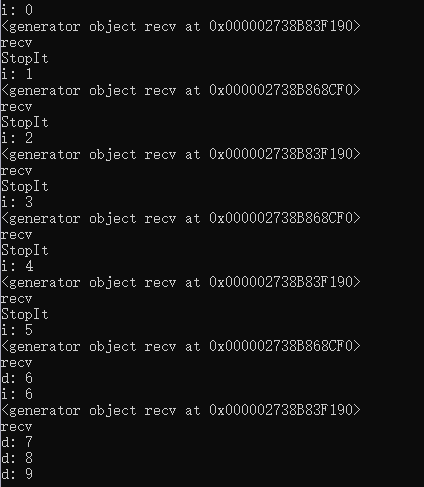
python的yield关键字与C#类似。函数中有yield语句时,调用该函数,会返回一个迭代器,并不会真正执行该函数。首次,对该函数调用next时,函数开始执行,会尝试执行到第一次yield语句,获取返回值。如果在调用到yield语句之前,函数返回,则会抛出异常 StopIteration 。如果成功执行到yield语句并返回,再次调用next函数时,会从这个yield语句的下一个语句开始执行。
示例如下,调用recv,会返回一个generator对象,调用next时,函数开始执行。而起初在调用时,会执行到break并返回,无法执行到yield,next函数会抛出异常,无法继续遍历。直到满足条件,可以执行到yield时,调用next才会获取到返回值 cnt ,下次调用next时,本次yield语句后的一个语句开始执行。
```csharp
string str1 = String.Empty;
string str2 = String.Empty;
str2 = String.Intern(sb.ToString());
if((object)str1==(object)str2)
Console.WriteLine("The strings are equal.");
else
Console.WriteLine("The strings are not equal.");
```
输出如下:
#### Profiling Generator Performance
```csharp
string str1 = String.Empty;
string str2 = String.Empty;
str2 = String.Intern(sb.ToString());
if((object)str1==(object)str2)
Console.WriteLine("The strings are equal.");
else
Console.WriteLine("The strings are not equal.");
```
## 工具与应用
### Sublime Build Python
## Ref